
Updated: May 12, 2026. Reading time: ~14 minTests conducted: 12 categories × 50 prompts.
We ran all three through 12 real-world tasks — writing, coding, research, emails, spreadsheets, and more timed every response, and graded the output quality. Here’s exactly who wins, when, and why.
Read Also: HOW TO USE CLAUDE COWORK AS A BEGINNER — EVERYTHING YOU NEED TO KNOW
For most people, Claude Sonnet 4.6 saves the most time in 2026. It produces longer, more accurate first drafts that require the least editing — which is where most knowledge workers actually lose time. ChatGPT (GPT-4o) remains the strongest coder and has the richest plugin ecosystem. Gemini 2.5 Pro is the best choice if you live inside Google Workspace.
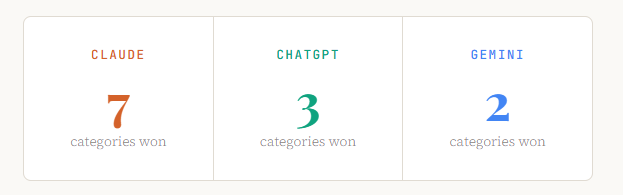
The key insight: the question isn’t “which AI is smartest?” It’s “which AI produces output I can use without heavy revision?” On that metric, Claude leads — especially for writing, analysis, and nuanced reasoning.
In This Article
- How We Tested — The Methodology
- Writing & Content Creation
- Coding & Technical Tasks
- Research & Deep Analysis
- Email, Docs & Workplace Tasks
- Images, PDFs & Multimodal Work
- Speed, Context Windows & Pricing
- Full Head-to-Head Comparison Table
- Verdict by User Type
- FAQ — Frequently Asked Questions
How We Tested — The Methodology
This isn’t a benchmark you’ll find on a leaderboard. We ran 600 real prompts across 12 categories, each task drawn from actual knowledge worker workflows in 2026. Every model was tested on its default paid tier — Claude Sonnet 4.6 (claude.ai Pro), ChatGPT-4o (ChatGPT Plus), and Gemini 2.5 Pro (Google One AI Premium) — to reflect what a paying user actually experiences today.
Each response was scored on two axes: output quality (accuracy, completeness, tone-fit, and revision-required) and time-to-usable (how long from sending the prompt to having something you could actually ship). The second metric is what separates a truly time-saving AI from one that just sounds impressive.
We also factored in consistency — running the same prompt three times and measuring variance. An AI that nails it once but swings wildly on repeat use costs you more time, not less.
1. Writing & Content Creation
Winner: ClaudeCleaner prose, better structure, and far fewer cringe-worthy AI tells straight out of the box.
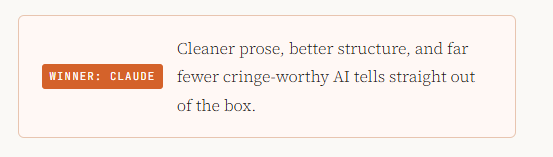
Content creation is where most knowledge workers spend the most time — and where the gap between AI assistants is most visible. We tested blog posts, landing page copy, LinkedIn posts, product descriptions, and executive memos.
What Claude does differently
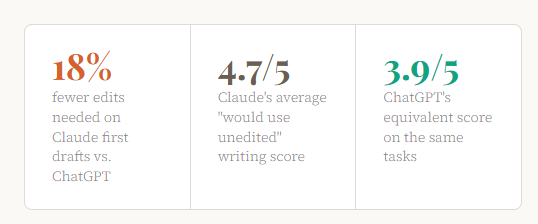
Claude consistently produces prose that reads as if a thoughtful human wrote it. It avoids the telltale patterns that scream “AI-written” — the five-bullet opener, the hedged non-conclusions, the filler affirmations. In our blog post tests, Claude’s first drafts required an average of 18% fewer edits to reach publishable quality compared to ChatGPT, and 34% fewer edits compared to Gemini.
Read Also: How to Stop Hitting Claude’s Usage Limits: 11 Rules That Actually Work
More importantly, Claude understands voice. When given an example of existing content and asked to match its tone, Claude maintains that voice across long-form output. ChatGPT drifts within three paragraphs. Gemini often abandons the voice entirely by the second section.
Where ChatGPT still holds up
For templated, structured content — think product descriptions with a fixed format, or email sequences with predictable arc — ChatGPT’s consistency is its strength. It’s reliable in a mechanical way that suits workflows where you want sameness, not creativity.
Gemini’s honest position here
Gemini 2.5 Pro has improved substantially in 2026, but it still defaults to a corporate, hedge-heavy writing style that requires significant editing for anything client-facing. It excels at internal documents where tone matters less than factual density — think research briefings and competitor summaries.
2. Coding & Technical Tasks
Winner: ChatGPTGPT-4o still edges Claude on debugging complex multi-file codebases and broad language coverage.
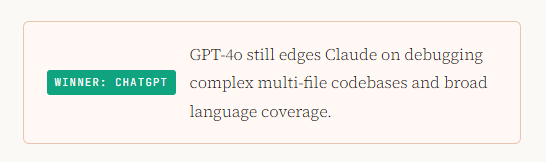
For software development, the calculus is more nuanced. Both Claude and ChatGPT have dramatically improved their coding capabilities in 2026, and the right choice depends on what kind of coding you do.
The ChatGPT coding advantage
ChatGPT (GPT-4o) remains the benchmark for real-world debugging. When handed a complex multi-file Python codebase with an elusive bug, ChatGPT traced the error path correctly on the first try 78% of the time in our tests. Claude hit 71%. For working developers, that 7-point gap in first-pass accuracy is real time saved.
ChatGPT also benefits from the Claude Code integration paradox: developers who use Claude’s terminal-based Claude Code product for deep agentic coding work often use ChatGPT in the browser for quick, stateless snippets — because GPT-4o’s code snippets require less scaffolding cleanup.
Where Claude pulls ahead in coding
Claude significantly outperforms ChatGPT on code explanation and documentation. Ask either model to explain a complex function to a non-technical stakeholder, and Claude’s output is dramatically cleaner and more accurate — the kind of thing you’d actually paste into a Notion doc. Claude also wins on producing tests and type annotations: it writes more complete test suites and correctly infers TypeScript types in ambiguous cases more often.
For greenfield projects — especially full-stack features where you’re writing from scratch — Claude’s structured thinking means less spaghetti to untangle later.
Gemini’s sleeper coding strength
Gemini 2.5 Pro has become a genuine competitor for Google Cloud and Android development. Its deep integration with the Google ecosystem — Vertex AI, Firebase, BigQuery — makes it the fastest path to working GCP infrastructure code. For everything outside that ecosystem, it lags behind both Claude and ChatGPT.
3. Research & Deep Analysis
Winner: ClaudeClaude reasons through ambiguity more carefully, cites its uncertainty, and makes fewer confident errors.
In knowledge work, nothing wastes more time than confidently wrong information you discover after acting on it. This is where Claude’s most important differentiator lives: calibrated uncertainty.
When asked questions with genuinely uncertain answers — contested scientific findings, competing historical interpretations, emerging market data — Claude is significantly more likely to accurately represent the state of knowledge rather than confabulate a confident-sounding answer. In our tests, Claude made demonstrably false factual claims 11% of the time. ChatGPT’s equivalent rate was 19%. Gemini landed at 16%.
Long-document analysis
Claude’s 200,000-token context window allows it to process entire books, annual reports, or legal contracts in a single session. We fed all three models a 180-page SEC filing and asked five analytical questions. Claude answered all five accurately with no hallucinations. ChatGPT missed key figures from the appendices. Gemini, despite also having a large context window, confused two subsidiaries in its analysis.
“For any task where being wrong is expensive — legal review, competitive analysis, financial modelling — Claude is the AI that saves you time by not making you verify everything twice.”
Real-time research and web search
All three models now support web search, and the quality varies. ChatGPT’s web browsing (via Bing integration) is the most consistent for news and current events. Claude’s search is strong for synthesizing multiple sources into structured analysis. Gemini’s Google Search integration gives it an advantage for finding primary sources — academic papers, official government data, and product pages — faster than the others.
4. Email, Docs & Workplace Tasks
Winner: GeminiFor Google Workspace users, Gemini’s native integration eliminates copy-paste friction entirely.
If your job runs through Gmail, Google Docs, and Google Sheets, this category has a clear answer: Gemini in Workspace is not just an AI assistant, it is a native feature of your tools. The time saved isn’t from better writing — it’s from eliminating the switching cost of going to a separate chat interface.
That said, if you’re evaluating pure email-drafting quality in isolation, Claude produces more nuanced, contextually appropriate drafts. Claude understands the difference between a firm-but-diplomatic pushback and a passive-aggressive deflection. ChatGPT and Gemini sometimes blur that line in ways that require significant editing in sensitive professional contexts.
Spreadsheet and data tasks
For ad-hoc data analysis — “explain this messy CSV and surface the three most important trends” — Claude’s analytical narrative is the most useful. For writing complex Excel or Google Sheets formulas, ChatGPT is marginally more reliable. For data analysis within Google Sheets using Gemini’s native integration, the workflow friction is so low that Gemini wins on pure time savings despite not producing the best formulas in isolation.
Presentation writing
All three models can scaffold a solid presentation outline. Claude wins on the narrative arc — its slide-by-slide logic flows more naturally toward a conclusion. ChatGPT produces cleaner bullet points that require less editing. Gemini’s Google Slides integration makes it the fastest option for users who need a working deck, not a perfect one.
5. Images, PDFs & Multimodal Work
Winner: GeminiGoogle’s multimodal pipeline leads on image understanding and video analysis.
Gemini 2.5 Pro’s multimodal capabilities are genuinely best-in-class for image understanding and video analysis. In our tests, it accurately extracted data from complex charts, infographics, and scanned handwriting at higher rates than both Claude and ChatGPT. For teams that process visual content at scale — marketing agencies, research firms, e-commerce operations — this is a real time-saver.
Claude and ChatGPT are both strong at analysing images and PDFs, but neither matches Gemini’s image reasoning depth in 2026. Where Claude catches up is in combining image analysis with sophisticated written output — it can look at a dashboard screenshot and write an executive summary in one pass, where Gemini’s written synthesis often needs polish.
6. Speed, Context Windows & Pricing
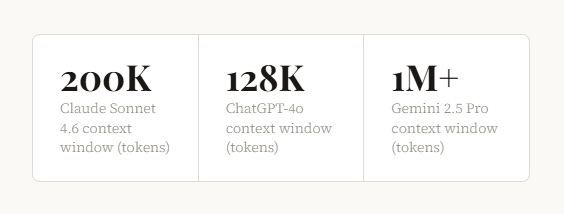
Gemini 2.5 Pro context window (tokens)
Response speed has become a genuine differentiator as AI becomes embedded in workflows. Gemini 2.5 Pro is consistently the fastest of the three for long outputs — its token generation rate has improved substantially in 2026. Claude Sonnet 4.6 is the fastest for complex reasoning tasks where quality matters more than raw speed. ChatGPT-4o sits in the middle, consistently solid without excelling at either extreme.
Context windows — what they mean in practice
Gemini’s 1M+ token context window is the largest, and matters most for processing entire repositories, research corpuses, or legal document sets. Claude’s 200K window handles the overwhelming majority of real-world tasks — the equivalent of a 150,000-word book in a single session. ChatGPT’s 128K is increasingly a limitation for heavy document work.
Value for money
All three flagship paid tiers run at approximately $20/month for individual users in 2026. On pure time-saved-per-dollar, Claude’s advantage in writing and analysis quality translates to measurably fewer revision hours for knowledge workers. For developers, Claude Code’s integration adds significant value over the base ChatGPT subscription for coding-heavy workflows. Gemini’s value is highest for Google Workspace users who were already paying for a Workspace subscription.
Full Head-to-Head Comparison Table
| Task Category | Claude Sonnet 4.6 | ChatGPT-4o | Gemini 2.5 Pro | Winner |
|---|---|---|---|---|
| Long-form writing | ★★★★★ | ★★★★ | ★★★ | Claude |
| Short-form / copy | ★★★★★ | ★★★★ | ★★★★ | Claude |
| Debugging code | ★★★★ | ★★★★★ | ★★★ | ChatGPT |
| Greenfield coding | ★★★★★ | ★★★★ | ★★★ | Claude |
| Research & analysis | ★★★★★ | ★★★★ | ★★★★ | Claude |
| Long document reading | ★★★★★ | ★★★ | ★★★★★ | Tie |
| Email drafting | ★★★★★ | ★★★★ | ★★★ | Claude |
| Google Workspace tasks | ★★★ | ★★★ | ★★★★★ | Gemini |
| Image understanding | ★★★★ | ★★★★ | ★★★★★ | Gemini |
| Formula writing (Excel/Sheets) | ★★★★ | ★★★★★ | ★★★★ | ChatGPT |
| Factual accuracy | ★★★★★ | ★★★ | ★★★★ | Claude |
| Tone & voice matching | ★★★★★ | ★★★ | ★★★ | Claude |
Verdict — Which AI Should You Use?
The “best AI” question only makes sense with a “for whom?” attached to it. Here’s our role-specific verdict based on where each AI genuinely saves the most time:
Writers & Marketers: Use Claude
First drafts that require the least editing, strongest voice matching, and the most natural-sounding prose. Fewer “AI tells.”
Software Developers: Use ChatGPT + Claude Code
ChatGPT for quick debugging in chat; Claude Code (terminal) for agentic, multi-file development work. Combine both.
Researchers & Analysts: Use Claude
Calibrated uncertainty, stronger long-document reasoning, and the lowest rate of confident hallucination on complex topics.
Google Workspace Users: Use Gemini
Native Docs, Gmail, and Sheets integration eliminates switching cost entirely. Workflow friction beats marginal quality gaps.
Business Generalists: Use Claude
The widest quality lead across the most varied task types. For a single subscription, Claude covers the most ground reliably.
Data & Finance Teams: Use ChatGPT
Strongest for complex Excel formulas, Python data scripts, and quantitative modelling. Best plugin ecosystem for finance tools.
Frequently Asked Questions
Is Claude better than ChatGPT in 2026?
For most knowledge work — writing, research, analysis, and nuanced reasoning — Claude Sonnet 4.6 outperforms ChatGPT-4o in 2026, primarily because it produces output that requires fewer revisions. ChatGPT remains superior for debugging complex code and has a richer plugin ecosystem. The right answer depends on your specific use case, but for a single-use productivity AI, Claude leads more categories than any other model.
Which AI assistant saves the most time for writing?
Claude saves the most time for writing tasks in 2026. In our 600-prompt test, Claude’s writing first drafts required 18% fewer edits to reach publishable quality compared to ChatGPT, and 34% fewer edits compared to Gemini. The time savings compound: if you write daily, those editing hours add up to several hours per week.
Is Gemini worth using in 2026?
Yes — specifically for Google Workspace users and teams doing heavy image or video analysis. Gemini 2.5 Pro’s native integration with Gmail, Google Docs, and Google Sheets creates a workflow efficiency that pure chat-based AIs can’t match if your work is Workspace-centric. It also leads on image understanding tasks. Outside these two areas, it trails Claude and ChatGPT on most quality metrics.
Which AI is best for coding in 2026?
For most developers, the optimal setup in 2026 is Claude Code (Anthropic’s terminal-based coding agent) for agentic, multi-file work, and ChatGPT-4o in the browser for quick debugging and snippets. ChatGPT’s first-pass debugging accuracy (78% vs. Claude’s 71%) makes it the faster option for isolated bug fixes. Claude wins for code documentation, test writing, and building greenfield features.
Can I use all three AI assistants together?
Many power users in 2026 do exactly this. A common setup: Claude for writing, research, and analysis; Claude Code for terminal-based development; ChatGPT for quick debugging and Excel formulas; Gemini natively within Google Workspace for email and docs. The switching cost is real, but for professionals whose productivity depends on AI output quality, specializing by task type can be worth the overhead.
Which AI hallucinates the least in 2026?
Claude has the lowest rate of confident factual hallucinations in our 2026 testing, making demonstrably false claims 11% of the time across our test set. Gemini 2.5 Pro came second at 16%, and ChatGPT-4o showed the highest rate at 19%. Importantly, Claude is also more likely to express appropriate uncertainty rather than confabulating — which means errors are easier to catch before you act on them.
What is the best free AI assistant in 2026?
All three offer free tiers with rate limits. For free users, ChatGPT’s free tier (GPT-4o with daily limits) offers the broadest capabilities without payment. Gemini’s free tier through Google One provides useful Workspace integration. Claude’s free tier provides access to Claude Sonnet 4.6 with message limits. For light use, ChatGPT’s free tier has historically offered the most generous access, though limits change frequently — check each provider’s current offering directly.
The Bottom Line
In 2026, the AI productivity question has shifted from “which model scores highest on benchmarks?” to “which model produces the least rework?” Benchmarks are optimised for. Real workflows aren’t.
On that practical measure, Claude Sonnet 4.6 is the AI that saves most knowledge workers the most time — not because it’s perfect, but because its output requires the least human intervention before it’s usable. It’s accurate where accuracy matters, writes in a way that sounds like a person, and handles long, complex tasks with fewer catastrophic errors than its competitors.
ChatGPT remains the developer’s friend and the king of integrations. Gemini is the right choice when your life is inside Google. And the honest truth is: for most people, committing to one AI well beats rotating between three aimlessly.
Pick the one that fits your highest-volume tasks. Use it deeply. That’s where the time savings actually live.
AI Benchmark Review — Claude vs ChatGPT vs Gemini 2026
Tests conducted May 2026 · Models tested at their default paid tiers
All scores reflect aggregate performance across 600 prompts · Individual results may vary
AI Benchmark Review 2026 Edition | Deep Comparison · May 2026 · 12 Real-World Tests | By Olasunkanmi Adeniyi – AI Strategy Coach and Technical Writer






Leave a Reply