Last Updated: May 2026 | Reading Time: 12 minutes | Skill Level: Intermediate
Table of Contents
- What Is an AI Lead Generation System?
- Why 3 Agents Beat One Monolithic Prompt
- Agent 1: The Trigger Researcher
- Agent 2: The Lead Generation Specialist
- Agent 3: The Copywriter in Your Voice
- The Onboarding Layer: What Separates a Tool from a Team
- Full System Architecture Diagram
- Step-by-Step Build Guide
- Prompts You Can Copy Right Now
- Tools Stack & Integrations
- Common Mistakes to Avoid
- FAQs

What Is an AI Lead Generation System?
An AI lead generation system is a multi-agent pipeline that automates the research, qualification, and outreach writing tasks that sales reps typically spend 2–4 hours doing manually each day.
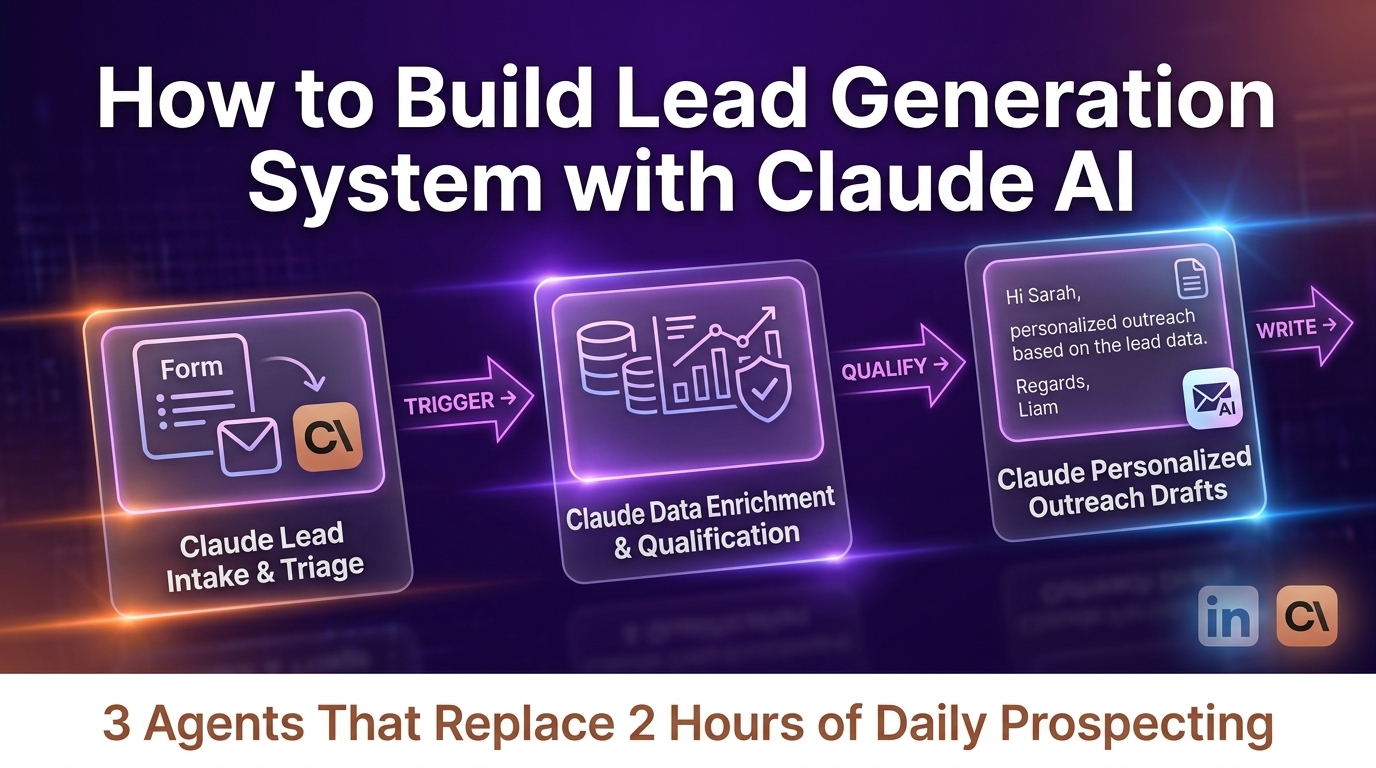
Instead of one AI prompt doing everything poorly, you build three specialized agents — each with a single, clear job — and chain them together so output from one feeds input to the next.
Read Also: How to Turn Your Idea Into a Money-Making Product With Lovable (Step-by-Step Guide for Non-Coders)
The system described in this guide was built using Claude by Anthropic and covers:
- Detecting buying signals before your competition does
- Scoring and qualifying leads automatically
- Writing personalized outreach in your voice, not a template
Key distinction: This is not a chatbot. It is a background pipeline that researches, qualifies, and drafts outreach 24/7 without human intervention until the message is ready to send.
Why 3 Agents Beat One Monolithic Prompt
Most people try to write one mega-prompt like: “Find me leads, research them, and write an email.” This fails for three reasons:
| Problem | Single Prompt | 3-Agent System |
|---|---|---|
| Context window | Overloaded, misses detail | Each agent uses full context for one job |
| Quality | Generic across all tasks | Expert-level at each step |
| Debuggability | Hard to trace errors | Isolate which agent failed |
| Scalability | Slow, expensive per run | Agents can run in parallel |
Breaking the workflow into Trigger → Qualify → Write is the single most important architectural decision in this guide.
Agent 1: The Trigger Researcher
What It Does
The Trigger Researcher monitors buying signals across data sources and fires an alert when a prospect enters a high-intent window. It does not pitch. It listens.
Signals It Watches For
- Job changes — new VP of Sales hired at a target account
- Funding rounds — Series A/B closed in last 30 days
- Expansion announcements — new office, new market, new product line
- Hiring sprees — 10+ SDR/AE roles posted simultaneously
- Competitor pain — G2/Trustpilot reviews mentioning a competing product failing
- LinkedIn activity — decision-maker posting about a problem you solve
Why This Agent Exists
Without a trigger, you are cold outreach. With a trigger, you are a well-timed, contextually relevant message. Response rates on trigger-based outreach are 3–5x higher than cold volume plays.
Data Sources to Connect
- LinkedIn Sales Navigator — job changes, company updates
- Crunchbase / Dealroom — funding data
- Builtwith / Similartech — tech stack changes
- G2 / Trustpilot — competitor review signals
- Apollo / Clay — intent data enrichment
- Google Alerts / RSS — press releases and news mentions
Trigger Researcher Prompt Template
SYSTEM:
You are a B2B buying-signal analyst. Your job is to review the following
data about a company and identify any events in the past 30 days that
signal the company may be in-market to buy [YOUR PRODUCT CATEGORY].

SCORING RULES:
- Job change at C-suite or VP level = HIGH signal (score 8–10)
- Funding round announced = HIGH signal (score 7–9)
- Competitor mentioned negatively in reviews = MEDIUM signal (score 5–7)
- Hiring surge in relevant departments = MEDIUM signal (score 4–6)
- No clear signals = LOW (score 1–3)

OUTPUT FORMAT (JSON):
{
  "company": "",
  "signal_type": "",
  "signal_summary": "",
  "signal_date": "",
  "score": 0,
  "recommended_action": "outreach_now | monitor | disqualify"
}

USER:
Company: [COMPANY NAME]
Data: [PASTE RAW DATA FROM SOURCES]
Agent 2: The Lead Generation Specialist
What It Does
Once Agent 1 fires a trigger, the Lead Generation Specialist runs the full SDR play:
- Builds the target list of decision-makers at the account
- Finds the right person — title, seniority, department
- Pulls company context — size, revenue, tech stack, recent news
- Scores the lead against your Ideal Client Profile (ICP)
The Four Outputs of Agent 2
| Output | What It Contains |
|---|---|
| Decision-maker profile | Name, title, LinkedIn URL, email (if found) |
| Company snapshot | Headcount, industry, tech stack, recent news |
| ICP match score | 1–10 score against your defined criteria |
| Recommended angle | The one reason this prospect should care today |
Lead Generation Specialist Prompt Template
SYSTEM:
You are a senior SDR analyst. Given a company and a trigger event,
your job is to identify the single best decision-maker to contact
and build a complete lead profile.

IDEAL CLIENT PROFILE:
- Industry: [YOUR ICP INDUSTRY]
- Company size: [EMPLOYEE RANGE]
- Title to target: [JOB TITLES]
- Pain points you solve: [LIST 3 PAIN POINTS]
- Disqualifiers: [LIST REASONS TO SKIP]

TASK:
1. Identify the highest-priority decision-maker at this company
2. Write a 3-sentence company snapshot
3. Score this lead 1–10 against ICP
4. Identify the ONE outreach angle with highest relevance to the trigger

OUTPUT FORMAT (JSON):
{
  "contact_name": "",
  "contact_title": "",
  "contact_linkedin": "",
  "company_snapshot": "",
  "icp_score": 0,
  "icp_score_reasoning": "",
  "outreach_angle": "",
  "pass_to_copywriter": true/false
}

USER:
Company: [COMPANY NAME]
Trigger: [OUTPUT FROM AGENT 1]
Additional context: [ANY ENRICHMENT DATA]
Scoring Your ICP Automatically
Define a rubric once and the agent scores every lead against it. Example ICP criteria with weights:
ICP Scoring Rubric (total = 10 points):
- Industry match: 0–3 pts
- Company size match: 0–2 pts
- Tech stack signals: 0–2 pts
- Budget indicators: 0–2 pts
- Decision-maker seniority: 0–1 pt

Threshold: Pass to Agent 3 if score >= 6
Agent 3: The Copywriter in Your Voice
What It Does
Agent 3 writes every outreach message — email, LinkedIn DM, or follow-up — in your specific tone, not a generic template tone.
This is the agent people get most wrong. They give it no voice context and wonder why the output sounds robotic. The fix is in the onboarding step covered below.
Read Also: Get Paid $15,000 Per Month to Join the Anthropic Fellows Program (2026 Guide)
What Makes Voice-Matched Outreach Different
- Uses your sentence length and rhythm patterns
- Mirrors your word choices and phrases you naturally reach for
- Avoids words you would never say (“synergy”, “leverage”, “circle back”)
- Matches your warmth-to-directness ratio
- References the trigger naturally, not awkwardly
Copywriter Prompt Template
SYSTEM:
You are a ghostwriter who has studied [YOUR NAME]'s writing style deeply.
You write all outreach as if you are [YOUR NAME]. Never sound like a template.

VOICE PROFILE:
[PASTE YOUR VOICE PROFILE FROM ONBOARDING — see Section 6]

WRITING RULES:
- Maximum 5 sentences for first outreach
- First sentence references the trigger specifically
- Second sentence shows you understand their situation
- Third sentence delivers the value proposition in one line
- Fourth sentence is a low-friction call to action
- Never use: "I hope this finds you well", "reaching out", "touch base",
  "synergy", "leverage", "per my last email"

TASK:
Write 3 variations of a LinkedIn DM or email to [CONTACT NAME] at
[COMPANY NAME] referencing the trigger.

USER:
Contact: [OUTPUT FROM AGENT 2]
Trigger: [OUTPUT FROM AGENT 1]
Preferred channel: [email / LinkedIn DM]
The 3-Variation System
Always generate 3 versions with different angles:
| Version | Angle | Best For |
|---|---|---|
| A | Lead with the trigger event | Recent, obvious signal |
| B | Lead with the outcome/result | Problem-aware prospects |
| C | Lead with a provocative question | Unconventional, pattern-interrupt |
You (or a human in the loop) pick the best one and send it with one click.
The Onboarding Layer: What Separates a Tool from a Team
This is the step 95% of people skip and why their AI outreach sounds like AI outreach.
The System Interviews You Before It Works for You
When you first deploy this system, it does not start generating leads on day one. It runs an onboarding interview to learn:
- Your Ideal Client Profile in granular detail
- Your tone of voice — examples of messages you’ve sent that got replies
- Your buying triggers — the exact situations that make someone ready to buy from you
- Your value propositions ranked by which resonate most with which buyer types
- Your hard disqualifiers — who to never contact regardless of score
How to Build Your Voice Profile
Step 1: Collect 10–20 messages you’ve sent that got positive replies. Paste them all into Claude and ask:
Analyze these outreach messages I wrote. Identify:
1. My average sentence length
2. Tone: formal/casual/warm/direct (rate each 1–5)
3. Opening patterns I use
4. Phrases I reach for repeatedly
5. What I never say
6. Overall voice description in 3 sentences

Output as a Voice Profile I can paste into future prompts.
Step 2: Use the Voice Profile as a system prompt constant. Every time Agent 3 runs, it receives your Voice Profile as part of its system prompt. This is what makes messages sound like you, not like ChatGPT.
Step 3: Refine after each batch. After 20 sends, note which messages got replies and which didn’t. Update the Voice Profile to reinforce what works.
Sample Onboarding Interview Questions
Run this as a prompt with Claude:
I'm building an AI lead generation system for my business.
Interview me with these questions one at a time and compile
my answers into a structured ICP + Voice Profile document
I can use as a system prompt.

Questions:
1. Describe your perfect customer in 3 sentences
2. What is the #1 problem you solve?
3. What does a company look like right before they're ready to buy?
4. What titles do you typically sell to?
5. What makes you disqualify a lead immediately?
6. Paste 3 outreach messages you sent that got replies
7. What words or phrases do you hate seeing in sales emails?
8. What's your typical CTA — call, demo, reply, download?
Full System Architecture
DATA SOURCES                   AGENT PIPELINE                OUTPUT
─────────────                  ──────────────                ──────
LinkedIn Sales Nav ──┐
Crunchbase         ──┤──► [AGENT 1: Trigger Researcher]
G2 Reviews         ──┤         │ Signal detected
Hiring APIs        ──┘         │ Score ≥ threshold?
                               │
                               ▼
                    [AGENT 2: Lead Gen Specialist]
                         │ Decision-maker ID'd
                         │ ICP score calculated
                         │ Score ≥ 6?
                               │
                               ▼
                    [AGENT 3: Copywriter]
                         │ Voice-matched draft
                         │ 3 variations ready
                               │
                               ▼
                    [HUMAN REVIEW — 30 seconds]
                               │
                               ▼
                    Send via LinkedIn / Email / CRM
Step-by-Step Build Guide
Phase 1: Define Your Foundation (Day 1)
Step 1: Run the Onboarding Interview Open Claude and run the onboarding interview questions from Section 6. Save the output as a document called system_context.md. This feeds every agent.
Step 2: Define Your Trigger List Write down the 5 events that historically precede a purchase decision for your product. Rank them by reliability. These become your Agent 1 detection criteria.
Step 3: Set Your ICP Rubric Assign point values (out of 10) to your core qualifying criteria. Decide your pass/fail threshold. 6/10 is a common starting point.
Phase 2: Build Agent 1 (Day 2)
Step 4: Choose Your Signal Sources Start with 2–3 sources. LinkedIn + one intent platform (Apollo, Clay, or Bombora) is a solid starting point. Don’t try to monitor everything at once.
Step 5: Create the Trigger Researcher System Prompt Use the template from Section 3. Add your specific product category and the signal types relevant to your industry.
Step 6: Test on 10 Known Accounts Take 10 accounts you closed in the last 12 months. Run Agent 1 backwards against their pre-purchase activity. Did it detect the right signals? Tune the prompt until it would have flagged 7 of 10.
Phase 3: Build Agent 2 (Day 3)
Step 7: Create the ICP Scoring Rubric in Your Prompt Paste your criteria from Step 3 directly into the Agent 2 system prompt.
Step 8: Set Up Enrichment Connect Agent 2 to a data enrichment source. Options: Clay (best for automation), Apollo (best value), Clearbit, or manual LinkedIn research if starting small.
Step 9: Test on 10 Leads Run 10 real prospects through Agent 2. Compare its scores to your own intuitive scores on the same leads. If they diverge significantly, refine the rubric.
Phase 4: Build Agent 3 (Day 4)
Step 10: Generate Your Voice Profile Run the voice analysis prompt from Section 6 on 10–20 of your best-performing messages.
Step 11: Create the Copywriter System Prompt Use the template from Section 4. Paste your Voice Profile in the designated section. Add your list of banned phrases.
Step 12: Generate 20 Test Drafts Feed Agent 3 with 20 leads from your CRM. Read every output. Mark each: “Would send as-is”, “Would edit slightly”, “Would rewrite entirely.” Aim for 70%+ in the first two categories.
Phase 5: Connect and Automate (Day 5)
Step 13: Choose Your Orchestration Layer Options by complexity level:
| Tool | Best For | Complexity |
|---|---|---|
| Make.com (Integromat) | Non-technical users | Low |
| n8n | Technical users, self-hosted | Medium |
| Claude API direct | Developers | High |
| Zapier + Claude | Quick MVP | Low |
Step 14: Build the Agent Chain Set the output of Agent 1 as the input trigger for Agent 2. Set the output of Agent 2 (when score ≥ threshold) as the input for Agent 3.
Step 15: Add a Human Checkpoint Do NOT fully automate sending. Create a review queue — a simple Notion database, Airtable, or even a Slack message — where Agent 3 outputs land before sending. A 30-second human review prevents hallucinated details from reaching a prospect.
Step 16: Set Run Frequency Start with daily runs. Once you trust the output quality, you can move to real-time triggers for high-score signals.
Read Also: Step-by-Step Guide: How to Build Your First Model Context Protocol (MCP) Server for Claude
Prompts You Can Copy Right Now
Master System Context Prompt
Add this at the top of every agent’s system prompt:
CONTEXT:
Company: [YOUR COMPANY NAME]
Product: [ONE-LINE DESCRIPTION OF WHAT YOU SELL]
ICP Summary: [3 SENTENCES FROM YOUR ONBOARDING]
Voice Profile: [PASTE GENERATED VOICE PROFILE]
Outreach Goal: [DEMO / CALL / REPLY / DOWNLOAD]
Banned phrases: [YOUR LIST]
CRM: [NAME OF YOUR CRM]
Quick-Start Daily Monitoring Prompt (Manual Version)
If you’re not ready to automate, run this manually each morning:
Here is a list of 10 companies I'm tracking.
For each, I'll paste in recent news, LinkedIn posts from their
leadership, and any job postings.

Your job:
1. Flag any buying signals
2. Score each 1–10
3. For anything scoring 6+, tell me exactly who to contact
   and what to say in 2–3 sentences referencing the signal

Companies and data: [PASTE DATA]
Tools Stack & Integrations
Recommended Stack by Budget
Bootstrap (Free / Near-Free)
- Signal source: Google Alerts + LinkedIn free
- Enrichment: Manual LinkedIn research
- Orchestration: Copy-paste between Claude conversations
- CRM: Notion or Airtable free tier
- Expected time saved: 45–60 min/day
Growth ($100–300/month)
- Signal source: Apollo.io ($50/mo) + LinkedIn Sales Nav ($80/mo)
- Enrichment: Apollo (included)
- Orchestration: Make.com ($10/mo) + Claude API ($20–50/mo usage)
- CRM: HubSpot Starter or your current CRM
- Expected time saved: 90–120 min/day
Scale ($500+/month)
- Signal source: Bombora intent data + Sales Nav + Clay
- Enrichment: Clay ($150+/mo with enrichment credits)
- Orchestration: n8n or custom API pipeline
- CRM: Salesforce / HubSpot Pro with API
- Expected time saved: Full SDR replacement for research tasks
Common Mistakes to Avoid
Mistake 1: Skipping Onboarding The #1 reason AI outreach sounds generic. You cannot skip the voice profile step. Spend 30 minutes on it before writing a single agent prompt.
Mistake 2: Fully Automating Sending Always keep a human in the loop before messages go out. One hallucinated statistic or wrong company name in a cold email destroys your credibility. A 30-second review queue is non-negotiable.
Mistake 3: Too Many Signal Sources at Once Start with two. More data sources = more noise, more false positives, more agent confusion. Add sources after you’ve tuned Agent 1 on the first two.
Mistake 4: Using Score Thresholds That Are Too Low If you set the pass threshold at 4/10, you flood yourself with weak leads. Start high (7/10) and lower only if volume is too thin.
Mistake 5: Never Updating the Voice Profile Your writing style evolves. Update the Voice Profile every quarter with your latest best-performing messages.
Mistake 6: Building Agents That Do Too Much If your Agent 1 prompt is also trying to write email subject lines, you’ve broken the architecture. Each agent has one job. Resist the urge to merge.
FAQs
Q: Do I need to know how to code to build this? No. The bootstrap and growth stacks described above require zero coding. Make.com and Zapier have point-and-click interfaces. Claude’s API is only needed for the scale tier.
Q: How long does it take to set up? Following this guide, the core system takes 3–5 days of focused work. Most of that time is prompt tuning and testing, not technical setup.
Q: Is this compliant with GDPR / CAN-SPAM? The system generates outreach; compliance depends on your sending practices and data sources, not the AI. You remain responsible for opt-out handling, data source legitimacy, and applicable regulations in your market.
Q: What’s the best Claude model to use for each agent? As of mid-2026, Claude Sonnet 4 balances speed, cost, and quality well for all three agents. Use Claude Opus 4 only for the Copywriter if voice fidelity is critical and cost is not a constraint.
Q: Can this work for inbound leads too? Yes. Agent 2 (Lead Gen Specialist) and Agent 3 (Copywriter) are directly applicable to inbound — use them to research inbound leads faster and draft personalized follow-ups.
Q: How do I measure if it’s working? Track three metrics: reply rate (target: >15% for triggered outreach), time saved per week, and ICP score of closed deals (should trend upward as you refine the rubric).
Summary
Here’s the full system in one paragraph:
Build three Claude agents: a Trigger Researcher that monitors LinkedIn, news, and intent platforms for buying signals; a Lead Generation Specialist that runs the SDR play — finding the decision-maker, pulling company context, and scoring the lead against your ICP; and a Copywriter that writes every message in your specific voice using a profile generated from your best-performing outreach. Before any of this goes live, run an onboarding interview so the system learns your ICP, your tone, and your triggers. Chain the three agents in Make.com or n8n, keep a human review checkpoint before sending, and you have a pipeline that replaces 2 hours of daily prospecting with a 30-second daily review queue.
About This Guide
This guide covers the technical build for the 3-agent AI lead generation system architecture. It is designed to be actionable — every section contains a prompt you can copy, a template you can adapt, or a step you can execute today.
Written by Olasunkanmi Adeniyi O : Olasunkanmi is a Product Manager, AI Prompt Engineer, and Technical Writer specializing in advanced automation and digital strategy. As the founder of AI Discoveries, he creates high-performance frameworks and digital operating systems designed to help professionals leverage artificial intelligence, optimize workflows, and build scalable global brands.


Leave a Reply