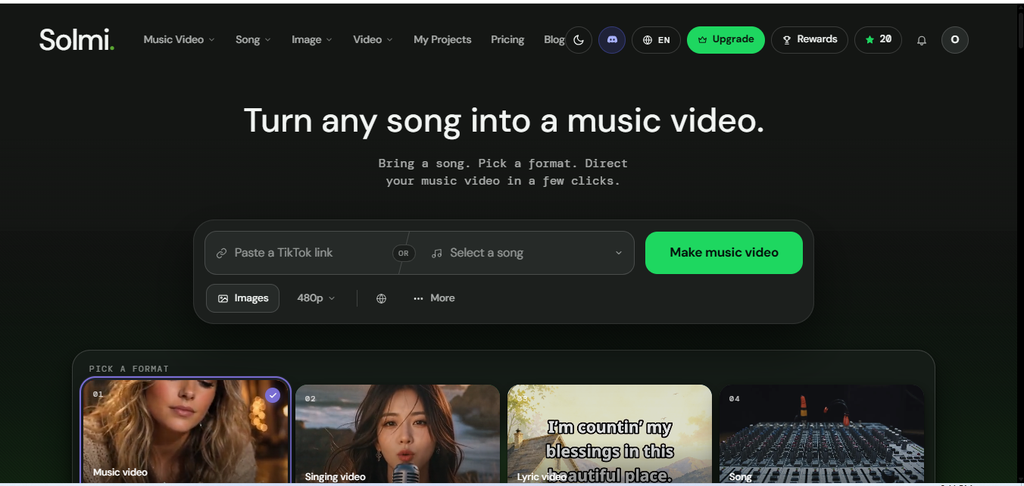
Creating a professional-looking music video used to require a camera, actors, video editors, expensive production equipment, and hours of post-production work. Making an original song also meant learning music production or hiring a musician.
AI is changing that process.
With an AI music generator, you can turn a written idea into a song with vocals, lyrics, and instrumentals. With an AI music video generator, you can transform that song into a visual experience for YouTube, TikTok, Instagram Reels, and other platforms.
Read Also: Claude Is Now Free for Startups: How to Apply Step by Step
One tool that brings these capabilities together is Solmi AI, an AI-powered music creation platform that lets users generate original songs, create music videos, animate singing performances, and work with existing audio tracks.
But is Solmi AI worth trying? What can you create with it, how does it work, and can you use it without paying?
In this guide, we explore Solmi AI’s features, benefits, limitations, pricing, and practical use cases to help you decide whether it belongs in your creative toolkit.
Quick answer: Solmi AI is an all-in-one AI music generator and music video maker. It can create songs from text prompts and turn existing audio into music videos with synchronized lyrics, lip-sync performances, and AI-generated visuals. You can start for free, although full-length exports and commercial-use features require a paid plan.
What Is Solmi AI?
Solmi AI is an AI-powered creative platform for generating music and producing music videos. Instead of requiring users to manage separate applications for song creation, visual generation, and synchronization, Solmi combines several music-production features in one workflow.
Official website: https://solmi.ai/
The platform serves two main purposes.
First, its AI music generator creates songs from a text description or lyrics supplied by the user. You can describe a genre, mood, theme, or vocal style and let the AI produce a track.
Second, its AI music video generator transforms a song into a video. Depending on the format you choose, you can create cinematic scenes, lyric videos, animated singing performances, dance videos, or audio visualizers.
5 Best Free & Unlimited AI Video Generators (Tested With the Same Prompt & Image)
Solmi also offers AI voice covers, vocal removal, and stem-splitting features.
This combination makes the platform useful for independent musicians, YouTube creators, social media managers, songwriters, and anyone experimenting with AI-generated music.
Key Features of Solmi AI
1. AI Music Generator
The Solmi AI music generator turns written ideas into complete songs.
You can describe the type of music you want, provide your own lyrics, or ask the AI to help write them. The platform then generates a musical arrangement with vocals.
For example, you could enter a prompt describing an inspirational Afrobeats song about overcoming financial struggles, with uplifting percussion, melodic vocals, and a memorable chorus.
You could also request a cinematic instrumental for a documentary, a relaxing lo-fi track for studying, or an energetic pop song for a short-form video.
Solmi supports a range of musical styles, including pop, hip-hop, R&B, rock, jazz, electronic music, reggae, and cinematic compositions.
The key advantage is accessibility. You do not need to know how to play an instrument or operate a digital audio workstation to experiment with song ideas.
Learn more: https://solmi.ai/ai-music-generator
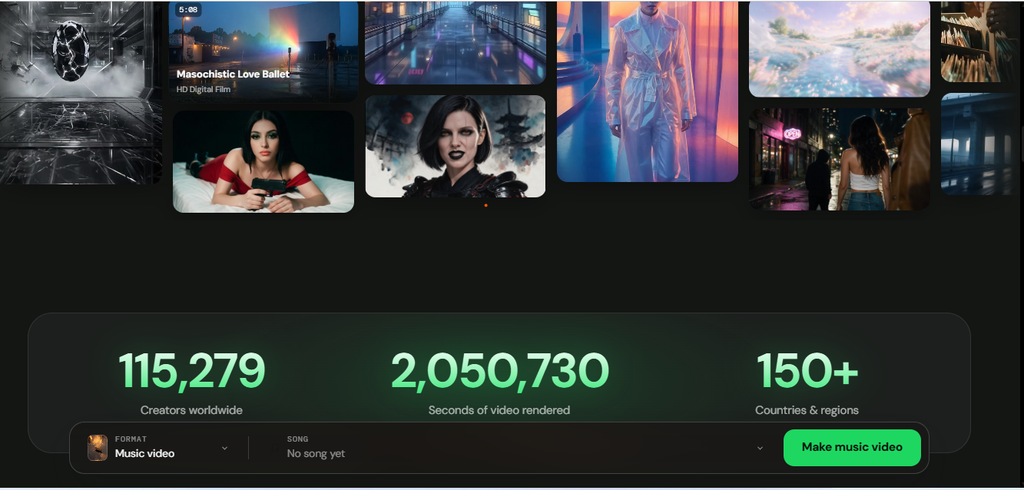
2. AI Music Video Generator
This is one of Solmi AI’s most useful features for content creators.
The AI music video generator takes an existing song and creates a corresponding video. You can upload an audio file, such as an MP3 or WAV, and use the platform to develop visuals around the music.
Solmi analyzes elements of the track, including its lyrics, structure, tempo, and mood, to help coordinate the visuals with the audio.
Depending on your creative direction, you can produce:
- Cinematic music videos with narrative scenes.
- Lyric videos with synchronized words on screen.
- Singing performance videos with AI lip-sync.
- Animated and anime-inspired music videos.
- Dance videos and music visualizers.
- Promotional videos for original songs.
For an independent artist, this can reduce the need to organize a traditional video shoot. For a YouTube creator, it offers a way to develop visual content around original music.
You can also choose landscape or vertical formats for different publishing platforms.
Learn more: https://solmi.ai/
3. AI Song Generator With Custom Lyrics
You do not have to let AI write every part of your song.
Solmi allows you to provide your own lyrics and use AI to turn them into a musical composition. This is particularly useful for songwriters who have a story, message, or chorus in mind but lack the technical skills to produce a complete track.
Imagine writing a song about Lagos, childhood memories, personal growth, or a special occasion. You can provide the lyrics and describe the sound you want.
The AI can then help turn your written concept into a song with a melody, arrangement, and vocals.
You can also experiment with different genres and vocal approaches to explore alternative versions of the same idea.
This makes Solmi useful for brainstorming, songwriting experiments, personalized songs, and early-stage music demos.
4. AI Lip-Sync and Singing Video Generator
Solmi also offers a singing video generator that animates a portrait to match a supplied vocal track.
You upload a suitable photo, add your song, and generate a video in which the person appears to sing along with the audio.
The system animates facial movements, including the mouth and jaw, to create a synchronized performance.
This feature can be useful for:
- Creating a virtual singer for an original song.
- Producing short music performance clips.
- Making promotional content without filming a live performance.
- Experimenting with virtual artists and AI characters.
- Turning a portrait into a singing video for social media.
The result depends on the source image, audio, and selected output settings. A clear, front-facing portrait generally provides a useful starting point.
If you use someone else’s photograph or likeness, make sure you have permission to animate and publish it.
Explore the feature: https://solmi.ai/ai-singing-video-generator
5. AI Voice Covers
Solmi includes AI voice-cover functionality, allowing users to experiment with different vocal interpretations of music.
This can help creators explore how a track might sound with an alternative voice or vocal style.
Voice covers can also be useful for creative experimentation and demo production. However, generating a cover does not automatically give you permission to distribute the underlying song or imitate a real person’s voice commercially.
Check the applicable licensing requirements before publishing or monetizing a cover.
6. AI Vocal Remover and Stem Splitter
Solmi also offers audio-processing tools that help separate vocals from instrumental music.
A vocal remover can be useful when you need an instrumental version of a track for editing or practice. Stem separation can help you isolate parts of an audio recording for remixing and other production tasks.
These features complement the platform’s song and video generators by giving creators more ways to work with existing audio.
As with any automated audio-processing tool, the quality of the separation can vary depending on the source recording.
7. Video Formats for YouTube and Social Media
Different platforms require different video formats.
A standard YouTube music video usually uses a horizontal 16:9 aspect ratio. TikTok, Instagram Reels, and YouTube Shorts generally use a vertical 9:16 format.
Solmi supports these formats, allowing creators to prepare videos for different publishing destinations.
You can create a full-length music video for YouTube and develop shorter vertical clips to promote the same song on social media.
That gives independent artists more options for distributing their music without creating every visual asset from scratch.
Solmi AI Pricing
What are you creating Next on Solmi AI: Dancing Music Video or AI Generated Music?
Solmi AI Analysis: Is It Actually Worth Using?
Most reviews of AI music tools focus on features. A more useful question is whether a tool helps you create better content, save production time, or publish more consistently without increasing your costs.
Solmi AI deserves to be evaluated on those three outcomes.
1. Its Biggest Advantage Is the Complete Workflow
Solmi’s strongest selling point is the connection between music generation and music video production.
A creator using separate tools might generate a song in one application, develop visuals in another, synchronize the footage with the music, and export the final video using an editing tool.
Solmi brings several of these steps together. Its workflow includes audio analysis, visual style selection, character and reference options, storyboard generation, and video rendering. It also supports music-video formats for YouTube and vertical social platforms. Source: Solmi’s official website.
The practical advantage is reduced workflow complexity.
However, fewer tools do not automatically mean a better result. If the generated scenes look inconsistent or the video does not communicate the song’s message, you may still need to regenerate scenes or edit the final output elsewhere.
My assessment: Solmi is most compelling when convenience and speed matter more than detailed, frame-by-frame creative control.
2. Solmi May Be More Useful for AI Musicians Than Traditional Artists
Consider two creators.
The first is an established musician who already works with a producer, cinematographer, and video editor. This person may prefer traditional production tools because they provide precise control over performances, camera movements, lighting, and editing.
The second is an independent creator who generates songs with AI and wants to publish them on YouTube or social media. This person may not have the budget or technical skills to produce a conventional music video.
Solmi is particularly relevant to the second creator.
The platform is designed to turn existing audio, including eligible AI-generated songs, into videos with synchronized lyrics and performances. That solves a specific problem for creators who can generate music more easily than they can produce accompanying visuals.
The distinction matters. Solmi’s value is not necessarily replacing a professional music production studio. It is lowering the barrier to producing a visual presentation for a song.
3. The Real Cost Is More Than the Subscription Price
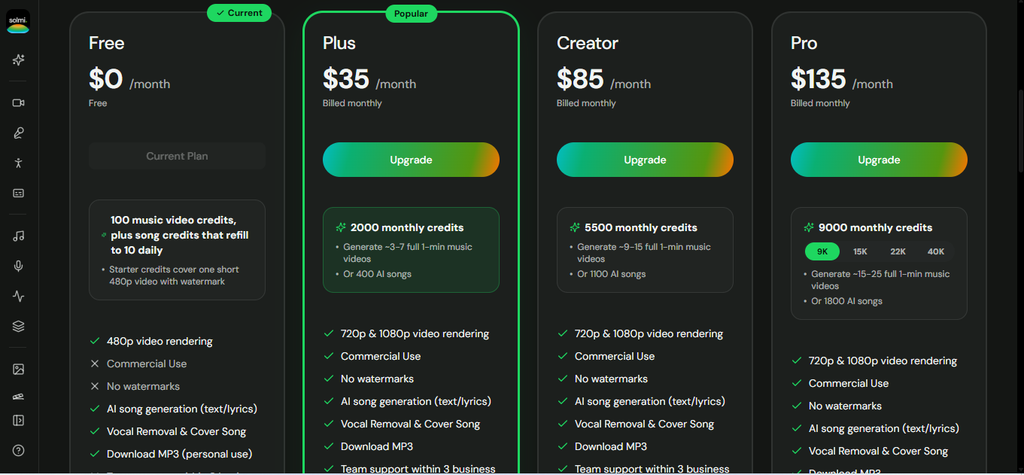
Solmi lists its Plus plan at $35 per month, with higher-priced Creator and Pro plans. Its free music-video preview is limited to 20 seconds at 480p and includes a watermark. Full-length, watermark-free exports require a paid plan under its published offering. Check Solmi’s official website for current prices and credit allowances.
A subscription only makes financial sense if the output is worth the money you spend.
Consider this example. Suppose you pay $35 per month and successfully produce five usable music videos. Your subscription cost per finished video is $7.
If you produce only one usable video, the cost is $35 per video.
These are illustrative calculations, not a guarantee of how many videos a subscription will produce. Your actual cost depends on the plan’s credits, video duration, resolution, and the number of times you regenerate scenes.
Use this formula to evaluate the economics:
Cost per usable video = Total monthly tool costs ÷ Number of finished videos you can actually publish
Count usable videos, not merely generated videos. An output that requires several regenerations or extensive manual editing may cost more in time and credits than it initially appears.
For creators in Nigeria and other markets where subscriptions are paid in foreign currencies, also consider exchange rates, applicable taxes, and payment fees.
4. The Main Quality Test Is Consistency, Not Visual Impressiveness
An AI-generated music video can look impressive in a few screenshots and still fail as a complete video.
For example, a song about a relationship might feature a character whose appearance changes between scenes. A gospel song might contain visuals that do not match the lyrics. A performance video might have noticeable lip-sync errors.
These problems can reduce the quality of the final product even when individual frames look attractive.
Solmi’s storyboard workflow gives creators an opportunity to review and regenerate shots before completing the video. That is a useful control point, but it does not guarantee consistency.
Before paying for a full export, evaluate five things:
- Character consistency across scenes.
- Lip-sync accuracy during vocal passages.
- Whether the visuals reflect the lyrics and mood.
- Whether transitions follow the song’s structure.
- Whether the final video needs extensive editing.
A strong result should work as a complete viewing experience, not simply as a collection of attractive AI images.
5. Can You Build a YouTube Channel Around Solmi AI?
Solmi can help you produce music videos more efficiently, but the tool itself is not a YouTube growth strategy.
A channel that repeatedly uploads similar AI-generated songs with interchangeable visuals may struggle to build a distinctive identity or provide enough original value to its audience.
A stronger approach is to give each release a clear creative purpose.
For example, an independent creator could build a channel around original Afrobeats stories, inspirational gospel compositions, cinematic instrumentals, or fictional musical characters. Each release could have its own concept, lyrics, visual identity, and audience.
Solmi would support the production process. The creator would still be responsible for the originality, storytelling, audience research, and distribution strategy.
You should also review YouTube’s current monetization policies, particularly its rules concerning repetitive, mass-produced, and reused content. AI-assisted production does not guarantee monetization eligibility.
6. Is Solmi AI Worth Paying For?
My recommendation depends on your intended use.
If you are curious about AI music, start with the free features and see whether the output meets your expectations.
If you already produce original songs and need accompanying music videos regularly, Solmi is more relevant. Its combined workflow could reduce the effort required to turn an audio track into a finished visual asset.
If you need precise cinematic direction, complex storytelling, or extensive control over every shot, compare Solmi with a workflow that uses a general-purpose AI video generator and a dedicated editor.
The most sensible decision is to test one complete project before committing to recurring payments. Measure the quality of the finished video, the time required, the credits consumed, and the amount of manual correction needed.
Final assessment: Solmi AI is worth considering as a music-video production tool for independent creators, especially those already generating songs with AI. Its strongest potential advantage is the ability to connect audio, storyboarding, and video creation in one workflow. Its actual value depends on the quality of the output and the cost of producing videos you are happy to publish.
Frequently Asked Questions About Solmi AI
1. What is Solmi AI?
Solmi AI is an AI-powered music creation platform that helps users generate songs, create music videos, produce AI singing performances, and work with audio. It combines music generation and video creation tools in one workflow.
2. Is Solmi AI the best AI music video generator?
Solmi AI is worth considering if you want to generate music and create accompanying videos on one platform. Its suitability depends on your budget, video quality requirements, creative control, and preferred workflow. Compare its results with other AI video tools before choosing a paid plan.
3. Is Solmi AI free to use?
Solmi AI offers free access to selected features, including song generation and limited music-video previews. Its published free video allowance includes a 20-second, 480p preview with a watermark. Check the official website for current credit limits and subscription terms.
4. Can Solmi AI generate complete songs from text prompts?
Yes. Solmi AI can turn text descriptions and custom lyrics into musical compositions. You can describe your preferred genre, mood, lyrical theme, and vocal style to guide the generation process.
5. Can Solmi AI turn a song into a music video?
Yes. You can upload an eligible audio track and use Solmi’s music-video generation workflow to create visuals that accompany the song. Depending on the selected features, the result can include cinematic scenes, synchronized lyrics, and singing performances.
6. Can I use Solmi AI to create music videos for YouTube?
Yes. Solmi supports horizontal 16:9 videos suitable for standard YouTube uploads. You can also create vertical videos for YouTube Shorts and other short-form platforms. Review the exported video for quality, synchronization, and visual consistency before publishing.
7. Can I turn Suno AI songs into music videos with Solmi AI?
Yes. You can download an eligible song from Suno as an audio file and upload it to Solmi to create a music video. Make sure your use of the song complies with the applicable licensing terms of both platforms.
8. Does Solmi AI support custom lyrics?
Yes. Solmi supports workflows that use custom lyrics, allowing songwriters to turn their written ideas into musical compositions. You can guide the result with details about the genre, mood, and desired vocal style.
9. Can Solmi AI create singing videos from photos?
Solmi offers an AI singing video feature that animates a portrait to match an audio track. The quality depends on the source image and audio, and the generated lip movements may require review. Obtain permission before using another person’s photograph or likeness.
10. Can I use Solmi AI-generated music commercially?
Solmi states that paid plans include commercial-use permissions, while free-plan songs are intended for personal use. Check the current terms for your subscription and confirm that you have the necessary rights to any lyrics, recordings, voices, and other material used in your project.
11. How much does Solmi AI cost?
Solmi’s published pricing has listed a free plan, Plus at $35 per month, Creator at $85 per month, and Pro at $135 per month. Prices, credit allowances, and plan features can change. Visit the official website to confirm current pricing before subscribing.
12. Is Solmi AI suitable for beginners?
Yes. Its prompt-based workflow makes it accessible to people without formal music production or video editing experience. Beginners can describe their musical ideas, generate songs, and create accompanying visuals. Reviewing and refining the results remains important.
13. Can Solmi AI create music videos in 9:16 format?
Solmi supports vertical video formats suitable for TikTok, Instagram Reels, and YouTube Shorts. Confirm the available resolution and export options in your selected plan before generating a large batch of videos.
14. Is Solmi AI better than Suno or Udio?
It depends on your needs. Solmi combines music generation with music-video creation, while Suno and Udio focus primarily on AI music generation. Solmi may suit creators who want an integrated song-to-video workflow. Compare audio quality, visual capabilities, pricing, and licensing before deciding.
15. Can I monetize AI-generated music videos on YouTube?
Potentially, yes, provided you meet YouTube’s monetization requirements and have the necessary rights to your content. AI-generated videos are not automatically eligible for monetization. Repetitive, mass-produced, or insufficiently original content can create monetization problems, so focus on distinctive music, meaningful creative input, and audience value.
16. How long does Solmi AI take to generate a music video?
Generation time depends on video length, settings, and processing demand. Solmi has described short previews rendering in about two minutes and full-length videos typically taking under ten minutes after storyboard approval. Actual processing times may vary.
17. What are the main limitations of Solmi AI?
The main considerations include free-plan restrictions, subscription costs, potential inconsistencies in generated visuals, imperfect lip synchronization, and the need to verify commercial-use rights. Some projects may also require additional editing to achieve the desired result.
18. Who should use Solmi AI?
Solmi AI may be useful for independent musicians, YouTube creators, songwriters, social media managers, digital marketers, and beginners who want to experiment with AI-generated music and videos. It is especially relevant to creators who want to turn songs into visual content without managing a traditional production workflow.
19. Where can I try Solmi AI?
You can explore the platform and its available features at the official website: https://solmi.ai/. Review the current free-plan limits, paid subscriptions, and licensing terms before using it for commercial projects.
✍️ About the Author
Olasunkanmi Adeniyi is a product manager, AI prompt engineer, and the founder of AI Discoveries (aidiscoveries.io). With hands-on expertise in leading AI models, no-code automation, and digital strategy, he helps businesses and creators adopt practical artificial intelligence. He is the author of several business and tech guides, including ChatGPT Mastery Guide for Business Owners, AI-POWERED LINKEDIN GROWTH AUDIT
and SELL YOURSELF. All content is rooted in real-world testing, modern workflows, and a commitment to smart, actionable technology adoption.
Learn more and explore his latest work at www.aidiscoveries.io.





Leave a Reply