
If you spend hours maintaining your website or creating content, Foenix can significantly reduce the manual work for you.
The platform acts more like an AI teammate than a traditional writing assistant because it understands your website’s structure and can perform actions instead of only producing text.
Read Also: How to Use Gemini Step by Step (2026 Beginner’s Guide for Beginners)
Everything You Need to Know Before You Buy
Quick Verdict
Rating: 4.8/5
Best For:
• Bloggers
• Small business owners
• Marketing agencies
• Freelancers
• SEO professionals
• WordPress developers
• Content creators
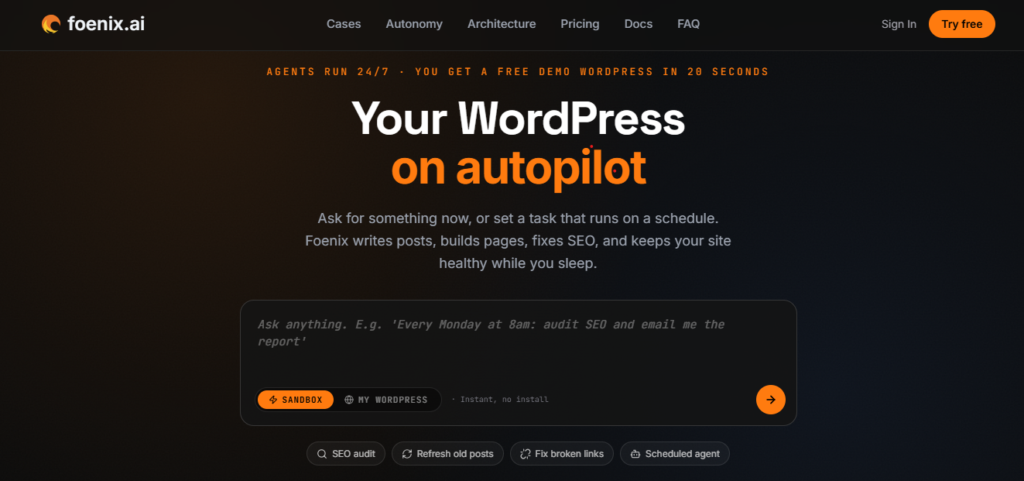
Foenix AI is one of the most ambitious AI tools built specifically for WordPress. Unlike general AI chatbots that only generate text, Foenix can understand your website, create and edit pages, optimize SEO, publish content, and automate recurring tasks from within WordPress.
Pros
• Built specifically for WordPress
• AI understands your entire website
• Generates pages and blog posts
• Automates SEO tasks
• Supports scheduled AI agents
• Works with popular WordPress plugins
• Beginner friendly interface
• Free plan available
Cons
• Requires a WordPress website
• Advanced automation takes time to learn
• Some features depend on your WordPress setup
Overall Rating
★★★★★ 4.8/5
Table of Contents
- What Is Foenix AI?
- How Foenix AI Works
- Key Features
- Real World Use Cases
- Pricing
- Pros and Cons
- Performance
- Ease of Use
- Foenix AI vs ChatGPT
- Foenix AI vs Elementor AI
- Foenix AI vs Claude
- Foenix AI vs Other WordPress AI Tools
- Who Should Use Foenix AI?
- Who Should Avoid It?
- Frequently Asked Questions
- Final Verdict
What Is Foenix AI?
Foenix AI is an AI powered WordPress assistant designed to help website owners build, edit, optimize, and manage their websites with natural language prompts.
Instead of switching between multiple plugins, copying content from AI chatbots, and manually updating pages, you can ask Foenix to perform many of these tasks directly inside WordPress.
For example, you can ask it to:
• Create a landing page
• Rewrite an existing article
• Optimize SEO
• Update product descriptions
• Publish a new blog post
• Create FAQs
• Fix formatting issues
• Generate images
• Improve page structure
• Schedule recurring AI tasks
Why Foenix AI Is Different
Many AI tools stop after generating content. You still have to copy the output into WordPress, adjust formatting, optimize SEO, add images, publish the page, and update internal links.
Foenix aims to remove much of that manual work by operating inside your WordPress environment.
This means it can help with:
• Website maintenance
• Content creation
• SEO improvements
• Publishing workflows
• Site updates
• Routine administrative tasks
For businesses managing multiple websites, agencies handling client projects, or bloggers publishing frequently, this can save meaningful time and reduce repetitive work.
Key Features at a Glance
| Feature | Available |
| AI Content Generation | Yes |
| WordPress Editing | Yes |
| SEO Optimization | Yes |
| Landing Page Creation | Yes |
| Website Knowledge | Yes |
| Scheduled AI Agents | Yes |
| Natural Language Commands | Yes |
| Multi Site Support | Yes |
| Plugin Compatibility | Yes |
| Free Plan | Yes |
Who Is Foenix AI Best For?
Foenix AI is a strong fit for:
• Bloggers who want to publish more consistently.
• Small businesses managing their own websites.
• Marketing teams creating landing pages and campaigns.
• Agencies handling multiple WordPress sites.
• Freelancers building client websites.
• Ecommerce stores that need help with product descriptions and content updates.
• SEO professionals looking to streamline repetitive optimization tasks.
If your workflow already revolves around WordPress, Foenix has the potential to centralize many tasks that would otherwise require several separate tools.
Read Also: 10 Claude AI Skills for Social Media Growth (2026 Guide)
What You’ll Learn in This Review
By the end of this guide, you’ll understand:
• How Foenix AI works.
• Which features provide the most value.
• What its limitations are.
• How its pricing compares with alternatives.
• Whether it fits your workflow.
• Which users are most likely to benefit.
• Whether it offers good value for money.
How Does Foenix AI Work?
Unlike traditional AI writing tools that only generate text, Foenix AI is designed to work from inside your WordPress website. It combines large language models with direct access to your site’s content and structure, allowing it to understand context and carry out tasks that normally require multiple plugins or manual work.
Instead of copying content from ChatGPT into WordPress, you can simply tell Foenix what you want in plain English.
For example, you can ask it to:
• Create a new landing page for your latest product.
• Rewrite a blog post to improve readability.
• Add an FAQ section to an existing page.
• Optimize headings and meta descriptions for SEO.
• Update product descriptions across your WooCommerce store.
• Schedule recurring content updates.
• Generate featured images.
• Fix formatting problems.
Because Foenix works within your WordPress environment, it has awareness of your website that standalone AI chatbots do not.
Four Levels of AI Assistance
One of Foenix AI’s standout ideas is that it offers different levels of autonomy. This lets you choose how much control the AI has over your website.
Read Also: How to Build Free Brand Assets for Your Business With LoveArt: Complete Beginner’s Guide (2026)
Level 1. AI Chat Assistant
This works much like a traditional AI chatbot.
You ask questions, brainstorm ideas, draft content, or request code snippets. Nothing changes on your website unless you choose to apply the suggestions.
Best for:
• Brainstorming
• Content outlines
• Keyword ideas
• Website planning
Level 2. AI Editor
At this level, Foenix can edit existing pages and posts based on your instructions.
Examples include:
• Rewriting paragraphs
• Improving readability
• Correcting grammar
• Updating outdated information
• Adding new sections
• Optimizing headings
This removes the need to copy and paste between different applications.
Level 3. AI Website Assistant
This is where Foenix starts to stand apart from general AI tools.
Instead of only generating text, it can perform actions inside WordPress.
Examples include:
• Creating new pages
• Publishing blog posts
• Updating menus
• Editing layouts
• Managing website content
For busy website owners, this can significantly reduce repetitive administrative work.
Level 4. Autonomous AI Agent
The highest level allows AI agents to carry out scheduled tasks with minimal supervision.
Examples include:
• Weekly SEO checks
• Content updates
• Scheduled publishing
• Website maintenance tasks
• Routine optimization
For agencies managing multiple client websites, this feature can save many hours each month.
Detailed Feature Review
1. AI Content Generation
★★★★★ 5/5
Content creation is one of Foenix AI’s strongest capabilities.
It can generate:
• Blog posts
• Landing pages
• Product descriptions
• Service pages
• FAQs
• Email copy
• Calls to action
• Website copy
Unlike generic AI tools, the content can be created directly within your WordPress workflow, reducing the number of manual steps required before publishing.
Why This Matters
Many content creators lose time switching between multiple tools.
A typical workflow often looks like this:
ChatGPT
↓
Google Docs
↓
WordPress
↓
SEO Plugin
↓
Formatting
↓
Publishing
Foenix simplifies much of this process by keeping content creation inside WordPress.
2. Website Understanding
★★★★★ 5/5
One of the biggest limitations of standalone AI chatbots is that they know nothing about your website unless you manually provide context.
Foenix can analyze your site’s existing pages, structure, and content to generate more relevant suggestions.
For example, if your site focuses on digital marketing, the AI can maintain a more consistent tone and avoid introducing unrelated topics.
This helps produce content that feels connected to the rest of your website.
3. Landing Page Builder
★★★★★ 4.8/5
Creating landing pages is often time consuming.
Foenix allows you to describe what you want using natural language.
Example prompt:
“Create a landing page for an AI productivity course aimed at freelancers.”
The AI can draft sections such as:
• Hero headline
• Benefits
• Features
• Testimonials
• Pricing
• Frequently asked questions
• Call to action
You can then review, edit, and publish the page without starting from scratch.
4. SEO Optimization
★★★★★ 4.9/5
Search engine optimization involves many repetitive tasks.
Foenix can assist with:
• Title optimization
• Meta descriptions
• Heading structure
• Keyword placement
• Internal linking suggestions
• FAQ generation
• Content improvements
Rather than replacing your SEO strategy, it helps speed up routine optimization work while keeping you in control of the final decisions.
5. Scheduled AI Agents
★★★★★ 5/5
This is one of the platform’s most innovative features.
Instead of waiting for instructions every time, you can schedule recurring AI tasks.
Examples include:
Every Monday:
• Review older blog posts.
• Suggest content updates.
• Check SEO opportunities.
Every Friday:
• Generate a draft for next week’s article.
• Refresh selected product descriptions.
For teams with regular publishing schedules, this automation can reduce repetitive work and improve consistency.
6. WooCommerce Support
★★★★★ 4.8/5
If you run an online store, writing and updating product descriptions can become a major task.
Foenix can help by:
• Drafting product descriptions.
• Rewriting existing listings.
• Improving SEO copy.
• Creating promotional content.
• Updating product information.
For stores with hundreds of products, these features can save significant time.
7. Works with Popular WordPress Plugins
★★★★★ 4.7/5
Foenix is designed to fit into existing WordPress workflows rather than replacing them.
Compatibility with widely used plugins makes it easier to adopt without rebuilding your site from scratch.
This is especially valuable for agencies and businesses that rely on established WordPress tools.
Ease of Use
★★★★★ 4.9/5
Foenix is designed for users who may not have technical experience.
Most tasks begin with a simple instruction written in everyday language.
Examples include:
“Write a comparison article between ChatGPT and Claude.”
“Improve the SEO of this page.”
“Create a landing page for my consulting business.”
“Update all product descriptions to sound more persuasive.”
This conversational approach lowers the learning curve and makes advanced website management more accessible.
Performance
During typical content workflows, Foenix performs best when handling repetitive WordPress tasks that would otherwise require several separate tools.
Its biggest strength is not that it writes better than every AI model on the market. Instead, it reduces the friction between creating content and publishing it.
For website owners, agencies, and marketers, eliminating repetitive steps can translate into meaningful productivity gains over weeks and months.
Our Feature Ratings
| Category | Rating |
| AI Content Generation | ⭐⭐⭐⭐⭐ |
| Website Understanding | ⭐⭐⭐⭐⭐ |
| SEO Features | ⭐⭐⭐⭐⭐ |
| Landing Pages | ⭐⭐⭐⭐☆ |
| WooCommerce Support | ⭐⭐⭐⭐☆ |
| Ease of Use | ⭐⭐⭐⭐⭐ |
| Automation | ⭐⭐⭐⭐⭐ |
| Overall Feature Set | ⭐⭐⭐⭐⭐ |
Key Takeaways
Foenix AI stands out because it goes beyond text generation. It is built to help users manage WordPress websites more efficiently by combining AI assistance with direct access to website workflows.
Its strongest advantages include content creation, website awareness, automation, and the ability to carry out actions inside WordPress. For users who spend a significant amount of time maintaining websites, these capabilities have the potential to save hours each week.
Real World Use Cases: Who Should Use Foenix AI?
A feature list only tells part of the story. The real question is how Foenix AI fits into everyday workflows.
Below are practical examples of how different users can benefit from the platform.
Read Also: How to Use AI to Study Smarter and Learn 10x Faster. The Ultimate Student Guide (2026)
1. Bloggers and Content Creators
If you publish content regularly, you know that writing is only one part of the process.
A typical publishing workflow includes:
• Keyword research
• Content writing
• Editing
• SEO optimization
• Formatting
• Internal linking
• Featured images
• Publishing
• Updating older articles
Foenix AI helps streamline several of these tasks from within WordPress.
Example workflow:
Monday:
“Write a 2,500-word article targeting ‘Best AI Writing Tools for Small Businesses.’”
Tuesday:
“Optimize the article for SEO.”
Wednesday:
“Generate a featured image.”
Thursday:
“Publish the article at 9:00 AM.”
Friday:
“Suggest five related articles I should write next.”
Instead of moving between multiple tools, much of the workflow happens in one place.
Best For
✔ Affiliate marketers
✔ Niche bloggers
✔ News websites
✔ AI blogs
✔ Educational websites
2. Marketing Agencies
Marketing agencies often manage multiple client websites.
Common tasks include:
• Publishing blog posts
• Updating landing pages
• Improving SEO
• Creating service pages
• Maintaining website content
These repetitive activities can consume dozens of hours each month.
Foenix AI can reduce manual work by assisting with content creation and routine updates.
Agency Benefits
• Faster content production
• Consistent publishing
• Reduced repetitive work
• Easier website management
• Better team productivity
3. Small Business Owners
Many small business owners cannot justify hiring a full-time content writer or web developer.
Foenix AI can help them:
• Create landing pages
• Update service pages
• Publish blog posts
• Improve SEO
• Refresh outdated content
• Answer customer questions with FAQ sections
This makes it easier to keep a website current without relying on outside support for every change.
4. WooCommerce Store Owners
Running an online store involves constant updates.
Examples include:
• New products
• Product descriptions
• Promotional pages
• Seasonal campaigns
• SEO improvements
Foenix AI can speed up these tasks while helping maintain a consistent tone across product listings.
Potential use cases include:
• Rewriting hundreds of product descriptions
• Creating category pages
• Drafting promotional banners
• Writing holiday sales content
• Generating buying guides
5. Freelance Web Designers
Freelancers often spend time on tasks that clients rarely notice but still expect.
Examples include:
• Building service pages
• Writing placeholder copy
• Creating FAQ sections
• Optimizing headings
• Improving existing content
Foenix AI can help complete these tasks more quickly, allowing freelancers to focus on design and client strategy.
6. SEO Professionals
SEO is rarely a one-time task.
Successful websites require ongoing improvements such as:
• Updating old articles
• Improving internal linking
• Expanding thin content
• Refreshing metadata
• Adding FAQs
Foenix AI can support these workflows by suggesting improvements and generating draft content for review.
It should be viewed as a productivity tool rather than a replacement for human SEO expertise.
Foenix AI Pricing
One of the first questions buyers ask is whether the platform provides good value for its price.
Foenix AI offers multiple plans designed for different types of users, from individuals to agencies.
While pricing may change over time, the platform generally includes:

Free Plan
Best for:
• Beginners
• Students
• Hobby websites
• Testing the platform
The free plan lets users explore core features before committing to a paid subscription.
Starter Plan
Ideal for:
• Bloggers
• Freelancers
• Small businesses
This plan unlocks additional AI credits and advanced features for users who publish content regularly.
Pro Plan
Designed for:
• Agencies
• Growing businesses
• High-volume publishers
• Multiple WordPress websites
The Pro plan offers higher usage limits and more automation capabilities.
Is the Pricing Worth It?
If Foenix AI saves even two to three hours each week, many professionals may recover the subscription cost through improved productivity.
For agencies and freelancers managing client websites, the value often comes from completing projects faster and taking on additional work without increasing administrative overhead.
Pros and Cons
No software is perfect. Understanding both strengths and limitations helps buyers make informed decisions.
Pros
✔ Built specifically for WordPress
✔ Works inside your website
✔ Natural language commands
✔ AI understands website context
✔ Creates pages and blog posts
✔ Strong SEO assistance
✔ Scheduled AI agents
✔ Beginner friendly interface
✔ Free plan available
✔ Helpful for agencies and freelancers
Cons
✘ Requires a WordPress website
✘ Advanced automation features may require some experimentation
✘ Results still benefit from human review before publishing
✘ Some capabilities depend on your existing WordPress setup and plugin compatibility
Foenix AI vs ChatGPT
This is one of the most common comparisons buyers make.
| Feature | Foenix AI | ChatGPT |
| Generates Content | ✅ | ✅ |
| Works Inside WordPress | ✅ | ❌ |
| Website Awareness | ✅ | Limited |
| Creates Pages | ✅ | ❌ |
| Scheduled Website Tasks | ✅ | ❌ |
| WordPress Editing | ✅ | ❌ |
| SEO Assistance | ✅ | ✅ |
Which One Is Better?
Choose ChatGPT if your main goal is brainstorming, research, coding assistance, or general writing across many topics.
Choose Foenix AI if your daily work happens inside WordPress and you want an AI assistant that can help create, edit, and manage website content without constantly switching tools.
Many users may find value in using both together, with ChatGPT for ideation and Foenix AI for executing WordPress tasks.
Foenix AI vs Claude
Claude is widely recognized for producing thoughtful long-form writing.
Foenix AI focuses on integrating AI directly into WordPress workflows.
| Feature | Foenix AI | Claude |
| Long-form Writing | ✅ | ✅ |
| WordPress Integration | ✅ | ❌ |
| Website Management | ✅ | ❌ |
| Content Publishing | ✅ | ❌ |
| Automation | ✅ | Limited |
If your priority is writing quality alone, Claude remains a strong option.
If your priority is reducing the number of manual steps involved in managing a WordPress site, Foenix AI offers capabilities that extend beyond text generation.
Foenix AI vs Elementor AI
Elementor AI is designed to assist users within the Elementor page builder.
Foenix AI aims to provide broader website assistance across WordPress.
| Feature | Foenix AI | Elementor AI |
| AI Content Writing | ✅ | ✅ |
| Website Awareness | ✅ | Limited |
| Scheduled AI Tasks | ✅ | ❌ |
| General WordPress Assistance | ✅ | Limited |
| Landing Pages | ✅ | ✅ |
Users already committed to Elementor may appreciate its built-in AI features, while those seeking wider WordPress automation may find Foenix AI a more comprehensive solution.
Our Recommendation
Foenix AI is best suited for people who spend significant time working in WordPress.
The platform delivers the greatest value when used as a productivity assistant rather than expecting it to replace human creativity or strategic decision making.
For bloggers, agencies, freelancers, and businesses that publish content regularly, the combination of AI writing, website awareness, and workflow automation makes it a compelling option worth evaluating.
Frequently Asked Questions About Foenix AI
The following questions address common concerns from potential buyers. They are written in a concise format that is easy for readers to scan and suitable for FAQ structured data.
Is Foenix AI worth it?
Foenix AI is worth considering if you manage one or more WordPress websites and want to reduce the time spent creating content, updating pages, and handling routine website tasks. Its value comes from combining AI writing with WordPress automation, allowing users to complete more work without constantly switching between different tools.
If you only need an AI chatbot for brainstorming or occasional writing, a general purpose AI assistant may be enough. If WordPress is central to your workflow, Foenix AI offers capabilities that go beyond text generation.
Is Foenix AI free?
Yes. Foenix AI offers a free plan that allows new users to explore the platform before upgrading. The free tier is useful for testing the interface, learning how AI agents work, and evaluating whether the platform fits your workflow.
Paid plans provide higher usage limits, additional AI credits, and access to more advanced automation features.
Can Foenix AI build an entire WordPress website?
Foenix AI can assist with creating pages, generating website copy, drafting blog posts, building landing pages, and updating existing content.
However, it should be viewed as a productivity tool rather than a complete replacement for web designers or developers. Human oversight is still important for branding, user experience, accessibility, and business strategy.
Can Foenix AI improve SEO?
Foenix AI can support many on page SEO tasks, including:
• Improving headings
• Suggesting keywords
• Writing meta descriptions
• Creating FAQ sections
• Recommending internal links
• Refreshing outdated content
Strong SEO still depends on quality content, search intent, backlinks, site performance, and technical optimization. Foenix AI helps speed up repetitive SEO work but does not guarantee higher rankings.
Does Foenix AI replace ChatGPT?
Not entirely.
The two tools serve different purposes.
ChatGPT is a general purpose AI assistant that can help with research, coding, brainstorming, writing, and many other tasks across different industries.
Foenix AI focuses on helping users complete WordPress related work directly inside their websites.
Many professionals may benefit from using both together.
Can beginners use Foenix AI?
Yes.
Most actions begin with simple natural language prompts, making the platform approachable for users without programming experience.
Beginners should still take time to understand WordPress basics so they can review AI generated changes before publishing.
Is Foenix AI suitable for agencies?
Yes.
Agencies managing multiple WordPress websites may benefit from:
• Faster content creation
• Consistent publishing
• Website maintenance assistance
• Repetitive task automation
• Improved team productivity
The platform can help reduce administrative work while allowing teams to focus on strategy and client relationships.
Does Foenix AI work with WooCommerce?
Foenix AI supports common WooCommerce content tasks such as creating and improving product descriptions, writing category copy, and generating promotional content.
Before relying on advanced workflows, confirm that your specific plugins and theme are supported by your current setup.
Does Foenix AI replace human writers?
No.
AI can accelerate drafting, editing, and optimization, but human expertise remains essential for original insights, fact checking, brand voice, and strategic messaging.
The strongest results usually come from combining AI efficiency with human review.
Security and Privacy Considerations
Whenever you give an AI tool access to your website, security should be part of your evaluation process.
Before connecting any AI platform to a production website, consider the following:
• Review the platform’s privacy policy.
• Understand how your data is processed.
• Check user roles and permissions.
• Use strong administrator credentials.
• Enable two factor authentication where available.
• Keep WordPress core, themes, and plugins updated.
• Maintain regular website backups.
These practices help reduce risk regardless of which WordPress tools you use.
Customer Support and Documentation
A powerful platform is only as useful as the support behind it.
When evaluating Foenix AI, look for:
• Documentation and setup guides
• Video tutorials
• Knowledge base articles
• Community forums
• Email or live chat support
Responsive customer support can significantly shorten the learning curve, especially for agencies and businesses deploying the platform across multiple websites.
Alternatives to Foenix AI
Foenix AI is not the only AI solution available for WordPress users. Depending on your needs, you may also want to evaluate these alternatives.
ChatGPT
Best for:
• Research
• Brainstorming
• Coding assistance
• General writing
Claude
Best for:
• Long form writing
• Editing
• Thoughtful explanations
Elementor AI
Best for:
• Elementor users
• Landing page creation
• Design assistance
Divi AI
Best for:
• Divi website builders
• Visual page design
Rank Math Content AI
Best for:
• SEO focused content optimization
• Keyword guidance
• On page improvements
Each platform has different strengths. Your choice should depend on your workflow, budget, and the level of WordPress automation you need.
Final Verdict
Foenix AI represents a growing category of AI tools that move beyond content generation and into website operations.
Its biggest advantage is not that it can write articles. Many AI platforms can do that.
Its real value lies in helping users complete WordPress tasks more efficiently by combining AI writing with website awareness and automation.
For bloggers, freelancers, agencies, and businesses that publish content regularly, this can translate into meaningful time savings and a more streamlined workflow.
No AI tool should replace human judgment. Every piece of content should be reviewed for accuracy, clarity, and alignment with your brand before publication.
If your goal is to spend less time on repetitive WordPress work and more time creating value for your audience, Foenix AI is a platform worth exploring.
Overall Rating
| Category | Score |
| Features | ⭐⭐⭐⭐⭐ |
| Ease of Use | ⭐⭐⭐⭐⭐ |
| Automation | ⭐⭐⭐⭐⭐ |
| SEO Assistance | ⭐⭐⭐⭐⭐ |
| Value for Money | ⭐⭐⭐⭐☆ |
| Customer Experience | ⭐⭐⭐⭐☆ |
| Overall | ⭐⭐⭐⭐⭐ (4.8/5) |
Should You Buy Foenix AI?
Buy Foenix AI if you:
✔ Manage one or more WordPress websites.
✔ Publish content consistently.
✔ Want to automate repetitive website tasks.
✔ Prefer working directly inside WordPress.
✔ Value productivity gains over manual workflows.
You may want to consider other options if your work rarely involves WordPress or if you only need a general purpose AI chatbot for occasional writing.
If Foenix AI aligns with your workflow, you can learn more about its plans, features, and latest updates through its official website before deciding whether it meets your needs.
Olasunkanmi Adeniyi is the founder of AI Discoveries, where he helps professionals, entrepreneurs, and businesses understand Artificial Intelligence through practical tutorials, in-depth guides, and real-world use cases. His mission is to make AI simple, accessible, and actionable for everyone, regardless of their technical background. .





Leave a Reply