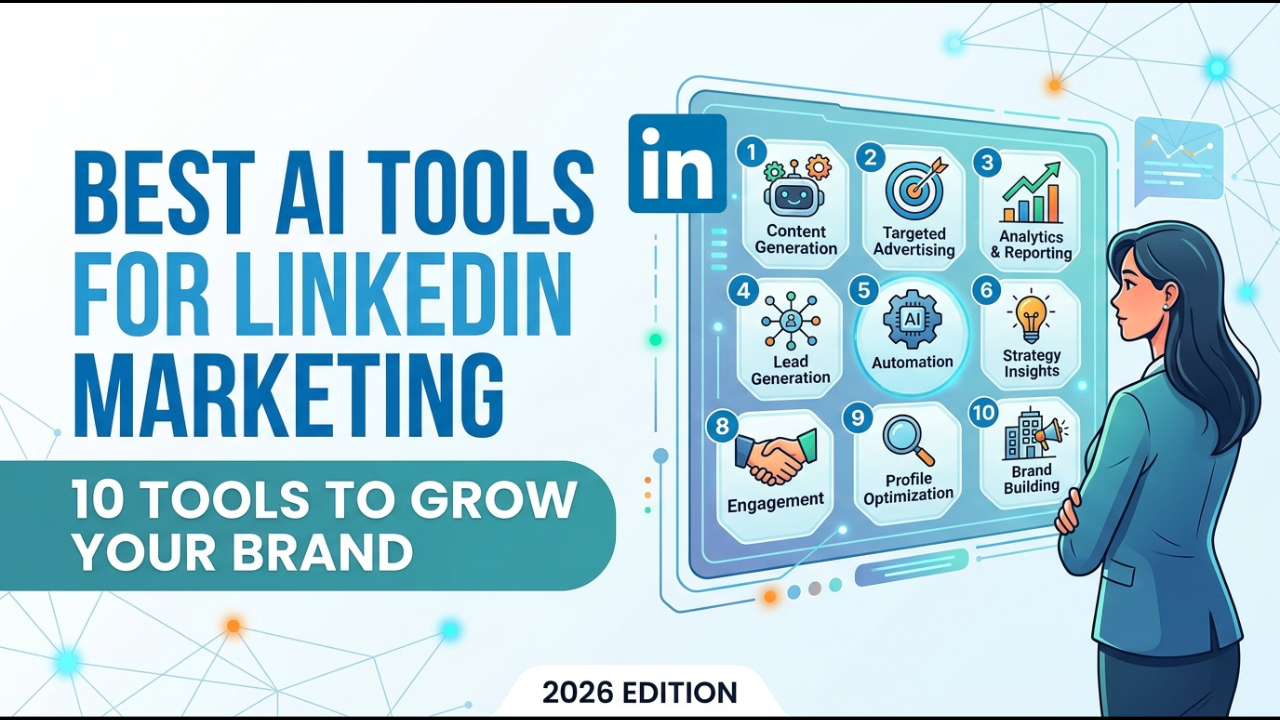
If you want to grow your personal brand, generate leads, promote your business, or build authority on LinkedIn, AI can dramatically reduce the time required to plan and create content.
But there is a problem.
There are now hundreds of AI marketing tools, and they are not equally useful for LinkedIn.
Some are excellent for writing posts. Others are better for scheduling, analytics, graphic design, content repurposing, or managing a company page.
This guide reviews the best AI tools for LinkedIn marketing in 2026 and explains what each tool is best for, who should use it, and how to build a practical LinkedIn marketing workflow around AI.
Quick answer: What are the best AI tools for LinkedIn marketing?
The best AI tools for LinkedIn marketing in 2026 include:
- ChatGPT, best overall AI assistant for LinkedIn content and strategy
- Claude, best for long-form content and maintaining a natural writing style
- Buffer, best for AI-assisted LinkedIn scheduling and analytics
- Hootsuite, best for businesses and marketing teams
- Canva, best for LinkedIn graphics, carousels, and visual content
- AuthoredUp, best for LinkedIn-specific content creation and analytics
- Jasper, best for marketing teams that need brand consistency
- Taplio, best for LinkedIn-focused personal branding
- Google Gemini, best for research, brainstorming, and working with Google Workspace
- Notion AI, best for organizing a LinkedIn content system
The best choice depends on your goal. A solo creator may only need ChatGPT, Canva, and Buffer. A larger marketing team may benefit from Hootsuite, Jasper, and a dedicated analytics platform.
Read Also: How to Build a SaaS Business With AI in 2026: Complete Step-by-Step Guide
What is AI LinkedIn marketing?
AI LinkedIn marketing means using artificial intelligence to support activities such as content research, post writing, content repurposing, visual creation, scheduling, audience analysis, and performance optimization on LinkedIn.
AI does not have to replace your judgment.
The most effective approach is to use AI for repetitive tasks while keeping your experience, opinions, examples, and final editorial decisions human.
That distinction matters because LinkedIn is increasingly focused on content quality and authenticity. Recent reporting indicates that LinkedIn has been taking steps to reduce the visibility of low-quality AI-generated content.
So the goal should not be to publish more AI-generated posts.
The goal should be to use AI to produce better content faster.
1. ChatGPT: Best Overall AI Tool for LinkedIn Marketing
ChatGPT is one of the most flexible AI tools for LinkedIn marketing because it can support almost every stage of your content workflow.
You can use it to:
- Research content ideas
- Create LinkedIn post outlines
- Turn experiences into posts
- Rewrite weak hooks
- Generate content calendars
- Repurpose blog posts into LinkedIn content
- Summarize research
- Analyze your existing posts
- Brainstorm lead-generation campaigns
- Create LinkedIn newsletter ideas
- Develop content pillars
- Turn videos into written posts
Its biggest advantage is flexibility.
Instead of using it only as a post generator, you can treat it as a marketing thinking partner.
For example, instead of asking:
“Write a LinkedIn post about AI.”
Give it useful context:
“Act as a LinkedIn content strategist. My audience is small-business owners who want to use AI to save time. Create five post ideas based on common productivity problems. Make each idea practical and include a specific example.”
The quality of the output improves when you provide better context.
Best for: Personal brands, consultants, founders, marketers, creators, and professionals.
2. Claude: Best for Natural-Sounding LinkedIn Content
Claude is particularly useful when you want help producing longer, structured content while maintaining a conversational writing style.
You can use it for:
- LinkedIn articles
- Long-form posts
- Content research
- Content repurposing
- Editing
- Brand voice development
- Thought-leadership content
- Content strategy
A useful workflow is to provide Claude with several examples of your previous LinkedIn posts and ask it to identify your writing patterns.
You can then use those insights to develop future content without asking AI to simply imitate generic LinkedIn writing.
Best for: Thought leaders, consultants, executives, writers, and professionals who publish detailed content.
3. Buffer: Best for AI-Assisted LinkedIn Scheduling
Buffer combines AI-assisted content creation with social media scheduling and analytics.
Its LinkedIn tools can schedule text, image, carousel, PDF, video, and link-preview posts. Buffer also provides LinkedIn analytics covering metrics such as impressions, clicks, engagement, and follower performance.
Buffer’s AI Assistant can help generate ideas, create posts, repurpose existing content, and adjust the tone of your copy.
This makes Buffer useful if your biggest problem is consistency.
Instead of creating a post every morning, you can develop several pieces of content in one session and schedule them.
Best for: Solo creators, consultants, small businesses, and marketers managing multiple social channels.
4. Hootsuite: Best for LinkedIn Marketing Teams
Hootsuite is designed for organizations that need more comprehensive social media management.
Its AI capabilities can help generate social posts, identify emerging topics, summarize social insights, and develop content calendars.
Its LinkedIn offering also combines scheduling, analytics, social listening, engagement management, and paid campaign management.
This makes it more suitable for businesses with multiple accounts, teams, approval processes, and broader social media campaigns.
Best for: Marketing teams, agencies, larger businesses, and organizations managing multiple social accounts.
5. Canva: Best AI Tool for LinkedIn Visual Content
LinkedIn is no longer only a text platform.
Visual content such as carousels, documents, infographics, presentations, and branded graphics can play an important role in communicating complex ideas.
Canva’s AI social media tools can generate platform-specific social posts based on your idea, goal, tone, and preferred style.
You can use Canva to create:
- LinkedIn carousels
- Infographics
- Quote graphics
- Presentation-style posts
- Personal brand graphics
- Company announcements
- Event graphics
- Lead magnets
A good strategy is to use an AI writing tool for the idea and copy, then use Canva to turn the most valuable information into a visual asset.
Best for: Creators, personal brands, marketers, entrepreneurs, and businesses.
6. AuthoredUp: Best LinkedIn-Specific Content Tool
AuthoredUp is built specifically around LinkedIn content creation and analysis.
It provides an editor, content calendar, scheduling, analytics, historical post analysis, formatting tools, and content reuse features.
One particularly useful feature is its ability to analyze your existing LinkedIn posts.
This lets you identify patterns in your own content rather than blindly copying what works for another creator.
AuthoredUp also provides tools for hooks, endings, readability, post previews, headline writing, engagement-rate analysis, and content planning.
Best for: LinkedIn creators, personal-brand builders, consultants, and professionals who take LinkedIn content seriously.
7. Jasper: Best for Brand-Focused LinkedIn Marketing
Jasper is designed specifically for marketing teams that need to create content consistently across different channels.
Its current platform supports content ideation, creation, optimization, repurposing, and marketing workflows. It also includes a specific LinkedIn Post use case.
This makes Jasper particularly useful when several people need to create content while maintaining a consistent brand voice.
For example, a marketing team could use Jasper to develop LinkedIn posts from a common campaign brief while maintaining consistent messaging across multiple pieces of content.
Best for: Marketing teams, agencies, established businesses, and brands with structured content operations.
8. Taplio: Best for LinkedIn Personal Branding
Taplio is designed around LinkedIn growth and personal branding.
Tools in this category can be useful for creators who want a more LinkedIn-specific workflow rather than using a general-purpose AI chatbot.
The biggest advantage of a specialized LinkedIn platform is that the workflow is built around the platform instead of requiring you to assemble several separate tools.
Best for: Founders, consultants, creators, coaches, recruiters, and professionals building a personal brand.
9. Google Gemini: Best for Research and Brainstorming
Gemini can be useful for researching topics, brainstorming content, summarizing information, and working with content inside Google’s broader ecosystem.
For LinkedIn marketers, one practical use is turning research into content opportunities.
For example:
Research topic → identify audience problem → generate LinkedIn post angles → create a carousel → schedule the content → measure performance.
Gemini can also be useful when your workflow already relies heavily on Google Workspace.
Best for: Professionals, marketers, researchers, students, creators, and teams using Google Workspace.
10. Notion AI: Best for Organizing a LinkedIn Content System
Notion AI is less about creating one viral post and more about building a repeatable content operation.
You can create a LinkedIn content database containing:
- Content pillars
- Post ideas
- Drafts
- Publishing dates
- Target audiences
- Content formats
- Calls to action
- Performance metrics
- Repurposing opportunities
AI can then help turn notes and ideas into structured content.
This is especially useful when you have lots of ideas but struggle to organize them.
Best for: Content teams, creators, consultants, marketers, and professionals building a long-term publishing system.
Best AI tools for LinkedIn marketing compared
| AI tool | Best for | Content creation | Scheduling | Analytics | Visuals |
|---|---|---|---|---|---|
| ChatGPT | Overall LinkedIn marketing | Yes | No | With data | Limited |
| Claude | Long-form content | Yes | No | With data | Limited |
| Buffer | Scheduling and analytics | Yes | Yes | Yes | Basic |
| Hootsuite | Marketing teams | Yes | Yes | Yes | Basic |
| Canva | Visual content | Yes | Yes | Limited | Yes |
| AuthoredUp | LinkedIn content | Yes | Yes | Yes | Limited |
| Jasper | Brand content | Yes | No | Limited | Yes |
| Taplio | Personal branding | Yes | Yes | Yes | Limited |
| Gemini | Research and ideation | Yes | No | With data | Limited |
| Notion AI | Content organization | Yes | No | With data | Limited |
Which AI tool is best for LinkedIn marketing?
There is no single best AI tool for every LinkedIn marketer.
Your best choice depends on your objective.
For writing LinkedIn posts: ChatGPT or Claude.
For LinkedIn scheduling: Buffer or Hootsuite.
For LinkedIn analytics: Buffer, Hootsuite, or AuthoredUp.
For LinkedIn carousels: Canva.
For personal branding: Taplio or AuthoredUp.
For marketing teams: Jasper or Hootsuite.
For content organization: Notion AI.
For research and brainstorming: ChatGPT or Gemini.
For an all-around solo creator workflow: ChatGPT + Canva + Buffer is a strong starting combination.
How to use AI for LinkedIn marketing
The biggest mistake is asking AI to “create my LinkedIn content” and publishing whatever it generates.
Instead, build a five-step workflow.
Step 1: Define your audience
Tell the AI who you want to reach.
For example:
“My target audience is Nigerian professionals interested in AI, career development, productivity, and digital skills.”
This gives the AI a specific audience to write for.
Step 2: Create content pillars
Choose three to five topics you want to become known for.
For example:
- AI productivity
- Career development
- Product management
- Digital skills
- Personal branding
Then ask AI to generate content ideas around each pillar.
Step 3: Add your experience
This is where human expertise becomes important.
Give AI:
- Your personal experience
- Real examples
- Lessons learned
- Numbers
- Mistakes
- Customer questions
- Opinions
- Case studies
Generic information produces generic content.
Your experiences make the content distinctive.
Step 4: Create and schedule the content
Use an AI writing tool to develop the draft.
Then use Canva for visual assets and Buffer, Hootsuite, or AuthoredUp for scheduling and performance tracking.
Read Also: 10 Claude AI Skills for Social Media Growth (2026 Guide)
Step 5: Analyze what actually works
Do not judge your LinkedIn strategy by likes alone.
Track:
- Impressions
- Engagement rate
- Comments
- Saves
- Shares
- Profile visits
- Follower growth
- Link clicks
- Leads generated
Then identify the topics and formats producing the strongest results.
AuthoredUp, for example, provides historical post analysis and performance metrics that can help you compare your own content over time.
The best AI LinkedIn marketing workflow for beginners
You do not need 10 AI tools.
Start with this simple stack:
ChatGPT → Research, ideas, writing and repurposing
Canva → Carousels and visual content
Buffer → Scheduling and analytics
Your weekly workflow could look like this:
Monday: Research five audience problems.
Tuesday: Turn those problems into five post ideas.
Wednesday: Write and edit the posts.
Thursday: Create one or two visual assets.
Friday: Schedule the content for the following week.
End of week: Review performance and identify the best-performing topics.
This is more sustainable than trying to publish AI-generated content every day.
How AI can help you generate LinkedIn leads
AI can support lead generation without turning your LinkedIn account into a spam machine.
Use AI to identify:
- Customer pain points
- Frequently asked questions
- Content gaps
- Common objections
- Industry trends
- Educational topics
- Potential content offers
Then turn those insights into useful content.
For example:
Problem → LinkedIn post → useful checklist → profile visit → conversation → potential customer.
The content should create enough value that the right person wants to learn more.
How to avoid generic AI-generated LinkedIn posts
This is increasingly important.
LinkedIn has been taking steps against low-quality AI-generated content, while industry reporting has highlighted concerns around generic and repetitive AI posts.
To make AI-assisted content more authentic:
- Give AI your real experiences.
- Use specific examples.
- Add your opinion.
- Include original data where available.
- Remove generic introductions.
- Rewrite phrases that do not sound like you.
- Fact-check important claims.
- Do not publish every AI draft.
- Share lessons you have actually learned.
- Use AI as an assistant, not as your identity.
The strongest LinkedIn content should sound like a knowledgeable person using AI, not an AI pretending to be a knowledgeable person.
Can AI automate LinkedIn marketing?
AI can automate parts of LinkedIn marketing, including idea generation, drafting, repurposing, scheduling, analytics, and content organization.
However, full automation is usually a poor strategy for personal branding.
Your expertise, judgment, relationships, and conversations still matter.
A better model is:
AI handles repetitive work.
You handle strategy, expertise, relationships, and final approval.
Best AI tools for LinkedIn marketing by use case
If you want the shortest possible recommendation:
Best overall: ChatGPT
Best for long-form writing: Claude
Best for scheduling: Buffer
Best for marketing teams: Hootsuite
Best for graphics: Canva
Best LinkedIn-specific platform: AuthoredUp
Best for brand-focused marketing teams: Jasper
Best for personal branding: Taplio
Best for research: Gemini
Best for content organization: Notion AI
Frequently asked questions
What is the best AI tool for creating LinkedIn posts?
ChatGPT is one of the most versatile options because it can help with research, ideation, drafting, editing, repurposing, and content strategy. Specialized tools such as AuthoredUp can provide additional LinkedIn-specific formatting, publishing, and analytics features.
What is the best free AI tool for LinkedIn marketing?
ChatGPT, Gemini, and Canva all provide useful entry points for AI-assisted LinkedIn marketing. Your exact free features can change over time, so check each platform’s current plan before choosing a long-term workflow.
Can AI write LinkedIn posts?
Yes. AI can generate LinkedIn post drafts, hooks, outlines, variations, and content ideas. However, you should review and personalize the content before publishing.
Is AI-generated content good for LinkedIn?
AI-assisted content can be useful when it contains original insights, accurate information, relevant examples, and a recognizable human voice. Generic mass-produced content is less useful and can damage credibility.
What AI tool is best for LinkedIn personal branding?
For a personal brand, a combination of ChatGPT or Claude for thinking and writing, Canva for visual content, and AuthoredUp or Buffer for publishing and analytics can work well.
Can AI help me get LinkedIn leads?
Yes. AI can help identify audience problems, develop educational content, research prospects, create lead magnets, and improve your content strategy. It should support genuine relationship building rather than replace it.
How often should I post on LinkedIn?
There is no universal posting frequency that guarantees results. Focus on a sustainable schedule that lets you consistently publish useful content and engage with your audience.
Final verdict
AI has changed LinkedIn marketing, but the winning strategy is not to generate the largest number of posts.
It is to build a better content system.
For most individual professionals, I recommend starting with three tools:
ChatGPT for strategy and writing.
Canva for visual content.
Buffer for scheduling and analytics.
If LinkedIn is your primary growth channel, add AuthoredUp for deeper LinkedIn-specific content analysis and optimization.
For larger marketing teams, Hootsuite and Jasper become more attractive because they support broader marketing workflows and team-oriented content operations.
The key principle is simple:
Use AI to save time.
Use your experience to create value.
Use analytics to decide what to do next.
That combination is much more powerful than simply publishing more AI-generated content.
Sources and further reading
Buffer’s LinkedIn capabilities and AI-assisted content workflow provide useful documentation on scheduling, analytics, content creation, and repurposing.
Hootsuite documents its LinkedIn scheduling, analytics, social listening, AI writing, and campaign management capabilities.
Canva documents its AI-powered social media post generation capabilities for different platforms.
AuthoredUp provides LinkedIn-specific content creation, scheduling, analytics, post analysis, and optimization tools.
Jasper provides marketing-focused AI workflows, including LinkedIn post creation and multi-channel content production.
About the Author
Olasunkanmi Adeniyi is a solo founder, product builder, no-code and low-code developer, and SEO/content strategist. He builds websites, SaaS products, digital tools, and content systems using AI and modern development tools.
His work focuses on practical AI implementation rather than theory. He experiments with AI-powered workflows, product development, automation, SEO, and online business, documenting the lessons, tools, and processes that help founders and creators build and launch faster.
Through his blog, www.aidiscoveries.io Olasunkanmi Adeniyi shares practical guides on AI tools, SaaS development, no-code and low-code building, SEO, content strategy, and online business.




Leave a Reply