Published: August 10, 2026
Last updated: August 10, 2026
Building a SaaS business used to require a technical co-founder, a development team, months of development, and a significant budget.
AI has changed the economics of software development.
Today, a founder with limited coding experience can use AI-assisted development tools to research a problem, define an MVP, design an interface, generate code, connect a database, add authentication, integrate AI features, accept payments, deploy a web application, and start testing it with real users.
But there is an important distinction.
AI makes software development faster. It does not automatically make a SaaS business successful.
The difficult part is still identifying a valuable problem, validating demand, designing the right product, building a focused MVP, protecting user data, and getting customers.
This guide explains how to build a SaaS business with AI from idea to launch.
It covers:
- How to find a SaaS idea
- How to validate a SaaS idea before coding
- How to define your MVP
- How to create a SaaS product specification with AI
- How to design a SaaS application
- How to build a SaaS with AI coding tools
- How to choose a database and backend
- How to add authentication
- How to integrate AI into your SaaS
- How to secure AI API keys
- How to add SaaS subscriptions and payments
- How to test your application
- How to deploy your SaaS
- How to get your first users
- How to improve your SaaS using customer feedback
If you want to build your first AI SaaS product, this is the complete workflow.
What Is an AI SaaS?
An AI SaaS is a software-as-a-service product that uses artificial intelligence as part of its functionality.
Instead of selling software that users install on their computers, a SaaS application is typically accessed through the internet.
Examples can include:
- AI content generation platforms
- Customer support applications
- AI research tools
- Document analysis software
- Sales automation platforms
- Marketing tools
- Productivity applications
- Data analysis products
- Industry-specific AI assistants
The important distinction is that an AI SaaS should solve a specific customer problem.
Simply connecting an AI model to a textbox does not automatically create a valuable SaaS product.
A useful SaaS combines AI with a workflow, user experience, data, automation, integrations, or specialized functionality.
Can You Build a SaaS With AI Without Knowing How to Code?
Yes, AI can significantly reduce the amount of code you need to write.
However, “no-code” and “AI-assisted development” are not exactly the same thing.
AI can help you:
- Generate application code
- Explain unfamiliar code
- Debug errors
- Create database schemas
- Design interfaces
- Write API integrations
- Generate tests
- Refactor code
- Create documentation
- Build individual application features
You still need to understand what you are building.
You need to make product decisions, evaluate the AI’s output, test your application, understand basic architecture, and verify that security controls actually work.
The most effective approach is to treat AI as a development assistant rather than an autonomous software company.
How Much Does It Cost to Build a SaaS With AI?
The cost varies significantly depending on the product.
A simple MVP can require far less money than a complex SaaS involving large amounts of data, advanced AI models, multiple integrations, or high infrastructure requirements.
Typical cost categories include:
- Domain
- Hosting
- Database
- Authentication
- AI API usage
- Payment processing
- Analytics
- Third-party integrations
- Development tools
The important question is not “How cheaply can I build a SaaS?”
It is:
“How cheaply can I test whether customers want this product?”
That changes the entire development strategy.
Your first objective should be learning.
Do not spend months building features that nobody has validated.
Step 1: Find a SaaS Problem Worth Solving
Before writing code, identify a problem.
AI can generate hundreds of SaaS ideas in seconds. That does not mean those ideas are good businesses.
A strong SaaS opportunity usually starts with a specific customer and a painful problem.
For example, imagine a SaaS called ContentPilot.
Its target customer is a small business owner who wants to publish consistently on LinkedIn.
The problem is that creating ideas, writing posts, organizing content, and maintaining a publishing workflow takes time.
The initial product could allow users to:
- Enter their niche
- Generate content ideas
- Turn ideas into posts
- Save posts
- Organize content inside a dashboard
That is enough for an initial MVP.
You do not need to immediately build:
- A mobile application
- Ten AI agents
- Multiple social network integrations
- Advanced analytics
- Complex collaboration features
Start with one audience, one problem, and one core workflow.
A Simple Framework for Finding SaaS Ideas
Ask these questions:
Who has the problem?
Be specific.
Instead of “business owners,” consider:
“Small marketing agencies with fewer than 10 employees.”
What problem do they have?
The problem should be specific enough to understand.
For example:
“Creating weekly LinkedIn content takes several hours.”
How are they solving it today?
Look for existing alternatives.
They might use:
- Spreadsheets
- Documents
- Manual processes
- Freelancers
- Existing software
- Competitors
- Generic AI tools
Existing alternatives are not necessarily bad news.
If people are already spending money or time solving a problem, that can indicate existing demand.
Why would they pay for another solution?
Your product needs a reason to exist.
Maybe it is:
- Faster
- Easier
- More specialized
- Better integrated
- Designed for a particular industry
- More automated
- More affordable
- Better suited to a particular workflow
AI Prompt for SaaS Idea Research
Instead of asking AI:
“Give me SaaS ideas.”
Give it context.
Use a prompt like this:
“You are a SaaS product strategist.
I want to build a SaaS product for [TARGET CUSTOMER].
Their biggest problems are:
[PROBLEM 1]
[PROBLEM 2]
[PROBLEM 3]
Generate 10 SaaS opportunities.
For each opportunity, identify:
- The problem
- Existing alternatives
- Why customers might pay
- The simplest useful MVP
- The biggest business risk
- How the product could differentiate itself.”
This gives you a much better starting point because you are asking AI to evaluate opportunities rather than randomly generate business ideas.
Step 2: Validate the SaaS Idea Before Building
One of the biggest mistakes new founders make is confusing an interesting idea with validated demand.
Do not spend months building before talking to potential customers.
Before development, investigate:
- Who experiences the problem?
- How frequently does it happen?
- How expensive is the problem?
- What do people currently use?
- Are customers already paying for alternatives?
- What do users dislike about existing solutions?
- What would make them switch?
You can validate an idea through customer conversations, relevant online communities, competitor research, landing pages, waitlists, prototypes, and small experiments.
The goal is not to prove that everyone will buy your product.
The goal is to reduce uncertainty.
What Makes a SaaS Problem Valuable?
A problem becomes more interesting when it is:
- Frequent
- Expensive
- Time-consuming
- Frustrating
- Operationally important
- Currently solved poorly
A product that saves a company several hours every week may have a stronger business case than one that provides an occasional convenience.
Step 3: Define the SaaS MVP
MVP means minimum viable product.
But it should not mean minimum possible product.
Your MVP should be the smallest version that delivers the core customer outcome.
For ContentPilot, an initial MVP might include:
- Landing page
- Sign-up
- Login
- Dashboard
- AI content generator
- Saved posts
- Basic settings
You could add advanced analytics, team collaboration, social scheduling, and integrations later.
The question for every feature should be:
“Does this help the user achieve the primary outcome?”
If the answer is no, consider removing it from version one.
The One-Audience, One-Problem, One-Workflow Rule
A useful way to prevent feature creep is:
One audience.
One painful problem.
One core workflow.
One MVP.
Then improve based on evidence.
This makes your product easier to build and easier to explain.
Step 4: Create a SaaS Product Specification With AI
Do not jump directly from idea to code.
Create a product specification first.
A good specification gives you and your AI coding assistant a shared blueprint.
Ask AI to define:
- Target users
- Core problem
- Product promise
- User journey
- MVP features
- Application pages
- Database entities
- User permissions
- Error states
- Empty states
- Success states
- Acceptance criteria
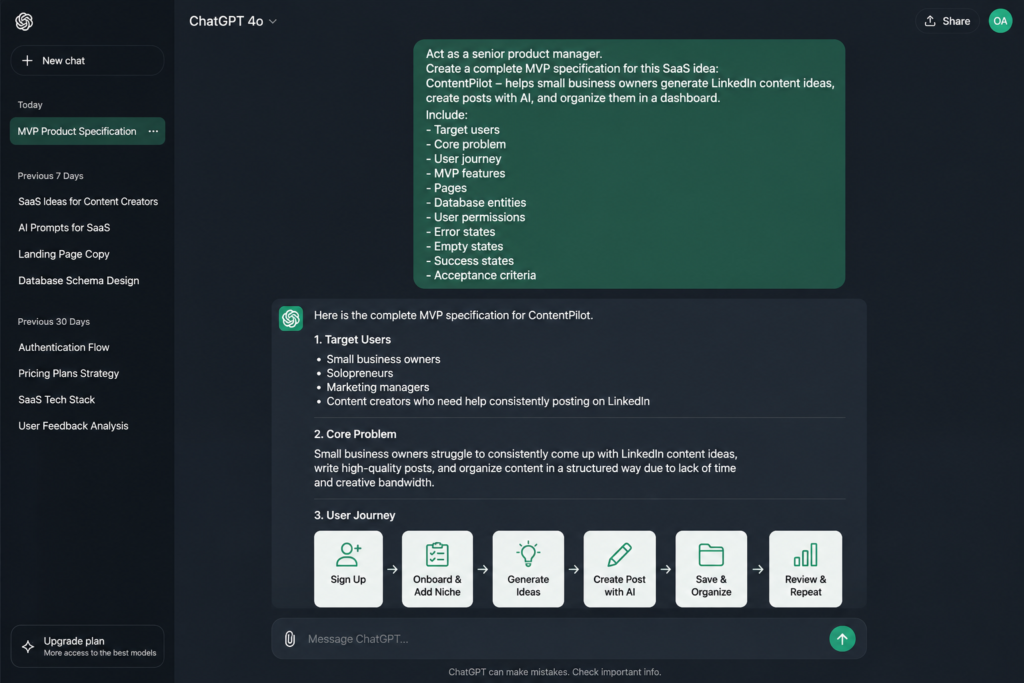
A simple prompt is:
“Act as a senior product manager.
Create a complete MVP specification for this SaaS product.
Include:
Target users
Core problem
Product goal
User journey
MVP features
Pages
Database entities
User permissions
Error states
Empty states
Success states
Acceptance criteria.
Keep the MVP focused and remove features that are not necessary for the core user outcome.”
This specification becomes the foundation for development.
Step 5: Design the SaaS Interface With AI
Before generating large amounts of code, define the interface.
AI coding environments can help create SaaS interfaces and reusable components.
The exact tool matters less than your instructions and development process.
Start with a simple design system.
Define:
- Typography
- Spacing
- Buttons
- Forms
- Cards
- Navigation
- Alerts
- Loading states
- Empty states
- Error states
- Responsive behavior
Avoid vague instructions such as:
“Make it look cool.”
Instead, describe exactly what the user should see.
For example:
“Create a SaaS dashboard with a left sidebar containing Dashboard, Generate, Saved Posts, and Settings.
The main content area should include a welcome message, a primary content generation button, recent posts, and basic usage statistics.
Use reusable components and make the interface responsive.”
Specific instructions give the AI more useful constraints.
Step 6: Build the SaaS One Feature at a Time
Do not ask an AI coding assistant to generate an entire SaaS application in one giant prompt.
Build incrementally.
A practical sequence is:
- Landing page
- Authentication
- Dashboard
- Database
- Core product workflow
- AI functionality
- Saved data
- Billing
- Analytics
- Testing
Why?
Because incremental development makes problems easier to isolate.
If you generate thousands of lines of code at once and something breaks, identifying the cause becomes much harder.
A better approach is:
Build.
Test.
Review.
Then continue.
A Useful AI Coding Prompt
Tell your coding assistant:
“You are a senior full-stack engineer.
Before changing the code:
- Inspect the existing project.
- Explain what you plan to change.
- Identify the files affected.
- Preserve existing functionality.
- Make the smallest necessary change.
- Test the result.
- Explain what changed and any remaining issues.”
This encourages the AI to work with your existing architecture instead of repeatedly rebuilding the application.
Step 7: Add a Database
A real SaaS needs persistent data.
If a user creates a post, account, project, document, subscription, or other resource, that information needs to be stored.
For a product like ContentPilot, your database could contain:
- Users
- Content ideas
- Generated posts
- Subscriptions
- Usage records
The exact database technology depends on your application.
A backend platform such as Supabase can provide database and related backend functionality for many modern web applications.
The important part is understanding your data model.
For example:
One user can have many posts.
One user can have many content ideas.
One user can have one current subscription.
Define these relationships before asking AI to generate the schema.
Step 8: Protect User Data
A SaaS can appear to work correctly while still having serious security problems.
Imagine a user changes an ID in a URL and suddenly sees another customer’s saved content.
That is unacceptable.
Your application needs access controls that verify whether a user has permission to access a particular record.
Do not rely exclusively on frontend restrictions.
Authorization should be enforced where the data is actually protected.
For every request, your application should effectively ask:
“Is this user allowed to access this resource?”
Security should be part of the architecture, not an afterthought.
Step 9: Add AI to Your SaaS
Now you can add the AI functionality.
For ContentPilot, a basic workflow might look like:
User enters a topic.
The frontend sends the request to your server.
Your server sends the request to the AI provider.
The AI provider returns the generated result.
Your server returns the result to the frontend.
The user sees the output.
The important architecture is:
User
↓
Frontend
↓
Your Server
↓
AI API
↓
Your Server
↓
Frontend
Never Expose Private AI API Keys in Frontend Code
Your private API credentials should not be embedded directly in browser code.
If the browser can access a secret key, an attacker may potentially obtain it.
Instead, keep sensitive credentials on the server.
The frontend should communicate with your backend, and your backend should communicate with the AI provider.
This is especially important when the AI API charges based on usage.
Step 10: Build Better AI Prompts
Connecting an AI model to your application is only part of the product.
The quality of the workflow matters.
A weak prompt might be:
“Write a LinkedIn post.”
A more useful prompt defines:
- Goal
- Audience
- Context
- Topic
- Tone
- Format
- Constraints
- Desired output
For example:
“Create a LinkedIn post for a busy operations manager.
Topic: [TOPIC]
Audience: professionals interested in AI and productivity.
Goal: educate the audience and encourage discussion.
Use simple language.
Start with a strong hook.
Include three practical insights.
End with a question.
Avoid generic motivational language.”
The more useful context your system provides, the more useful the output can become.
AI Wrapper vs AI SaaS Product
One of the most important strategic questions is whether your application is simply an AI wrapper or a complete product.
A basic AI wrapper might provide:
Text box → AI model → response.
That can be useful, but it is easy to replicate.
A stronger SaaS can add:
- Templates
- User context
- Saved data
- Workflow automation
- Integrations
- Analytics
- Collaboration
- Specialized industry knowledge
- Custom business rules
- Better user experience
The AI model may be one component.
The product is the complete workflow around it.
Step 11: Add Authentication
A SaaS normally needs user accounts if it stores personal data, usage information, projects, subscriptions, or other private resources.
Users should be able to:
- Create an account
- Log in
- Log out
- Maintain a session
- Reset credentials where supported
- Access their own data
The basic flow is:
Sign up
↓
Authentication
↓
User session
↓
Dashboard
The application should verify the user’s session before providing access to protected resources.
For many projects, using a mature authentication service is preferable to implementing password security from scratch.
Step 12: Add SaaS Payments and Subscriptions
At some point, you need to turn your application into a business.
A simple SaaS pricing structure could contain:
- Free
- Pro
- Team
The free plan might provide limited usage.
The Pro plan could increase usage and unlock premium functionality.
The Team plan could introduce collaboration features.
Do not create complicated pricing before you understand customer demand.
Your first pricing experiment should help answer a simple question:
“Will customers pay for this solution?”
Read Also: How to Use Gemini Step by Step (2026 Beginner’s Guide for Beginners)
How SaaS Subscription Payments Work
A typical flow is:
User selects a plan.
↓
Checkout opens.
↓
Payment succeeds.
↓
Payment provider sends an event to your backend.
↓
Subscription status updates.
↓
The user’s account receives the appropriate access.
Do not rely on the frontend alone to decide whether a user has paid.
Your backend should verify subscription status.
Step 13: Test the SaaS Before Launch
A successful demo is not the same as a reliable product.
Try to break your application.
Test:
- Incorrect login credentials
- Empty forms
- Invalid inputs
- Large prompts
- Network interruptions
- Expired sessions
- Failed AI requests
- Failed payments
- Cancelled payments
- Refreshing during operations
- Unauthorized resource access
Ask:
“What happens when this fails?”
Good software needs useful behavior when things go wrong.
Step 14: Test With Five Real Users
Before trying to acquire hundreds of customers, give the product to a small group.
Five users can reveal problems you may never notice yourself.
Do not explain every feature.
Watch how they use the product.
Look for:
- Where they hesitate
- Where they get confused
- What they click
- What they ignore
- What they expect to happen
- Where they abandon the workflow
Then ask:
“Would you be disappointed if this product disappeared tomorrow?”
The answer is more useful than a simple “Do you like it?”
You are looking for evidence that the product solves a meaningful problem.
Step 15: Deploy Your SaaS
Once the application works, deploy it to a production environment.
A SaaS deployment may involve:
- Frontend hosting
- Backend
- Database
- Environment variables
- AI API credentials
- Payment credentials
- Domain
- Analytics
- Monitoring
Services such as Vercel can simplify deployment for many modern web applications.
A basic workflow is:
Connect your code repository.
Configure environment variables.
Deploy.
Test the production application.
Connect your domain.
Monitor the application.
Once your production URL works, you have a live SaaS application.
But you do not necessarily have a business yet.
Step 16: Get Your First SaaS Customers
Building the product is only half the challenge.
Distribution matters.
Your first customers are unlikely to appear simply because you launched a website.
Start where your potential customers already spend time.
You can:
- Publish educational content
- Document the building process
- Create tutorials
- Talk directly to potential users
- Participate in relevant communities
- Offer a free trial
- Demonstrate before-and-after results
- Create useful resources around the problem
- Ask early users for referrals
For example, instead of constantly posting:
“Buy my AI writing SaaS.”
Create useful content such as:
“How to turn one idea into 30 LinkedIn content ideas using AI.”
The content attracts people who already care about the problem.
Then give them an opportunity to try the product.
How to Market an AI SaaS
Your marketing should connect the customer’s problem to your solution.
A simple content funnel is:
Problem awareness
↓
Educational content
↓
Demonstration
↓
Product
↓
Free trial or offer
↓
Customer
For example:
Problem:
“I don’t know what to post on LinkedIn.”
Educational content:
“10 ways to generate LinkedIn content ideas.”
Demonstration:
“Watch how we turn one topic into a month’s worth of ideas.”
Product:
“Generate your own content inside the platform.”
This is more useful than repeatedly advertising features without explaining the problem they solve.
The Complete AI SaaS Development Workflow
Here is the entire process in order:
- Find a painful problem.
- Identify a specific target customer.
- Research existing alternatives.
- Validate demand.
- Define the customer outcome.
- Create a narrow MVP.
- Write the product specification.
- Design the user experience.
- Set up the development environment.
- Build the frontend.
- Create the database.
- Add authentication.
- Build the core workflow.
- Integrate AI.
- Secure API keys and user data.
- Add billing.
- Test failure scenarios.
- Test with real users.
- Deploy the product.
- Acquire the first customers.
- Collect feedback.
- Improve the product.
Common Mistakes When Building a SaaS With AI
1. Starting With Technology Instead of a Problem
Asking “What can AI build?” is often the wrong starting point.
Start with:
“What problem can I solve?”
Then determine whether AI is useful for solving it.
2. Building Too Many Features
More features do not automatically create more value.
A focused product can be easier to understand, build, test, and sell.
3. Trusting AI-Generated Code Without Testing
AI can generate incorrect code.
It can misunderstand requirements.
It can introduce bugs.
It can create insecure implementations.
Review and test everything important.
4. Exposing API Keys
Private credentials should remain private.
Keep secrets on the server.
5. Ignoring Authorization
Authentication answers:
“Who are you?”
Authorization answers:
“What are you allowed to access?”
You need both.
6. Building Before Validating
A technically impressive product can still have zero customers.
Validate the problem early.
7. Waiting Until Launch to Think About Marketing
Distribution should begin before the final launch.
Talk to potential users while you build.
8. Treating AI as the Entire Product
The model is not necessarily your competitive advantage.
Your workflow, data, user experience, specialization, integrations, and distribution can create more durable value.
What Should You Build With AI?
Good AI SaaS opportunities often exist where users repeatedly perform tasks involving:
- Writing
- Research
- Classification
- Summarization
- Customer support
- Data extraction
- Document processing
- Content creation
- Workflow automation
- Repetitive analysis
But the presence of AI does not automatically make a business opportunity.
The better question is:
“Where can AI produce a meaningful improvement in an existing workflow?”
Should You Build an AI SaaS or a Traditional SaaS?
You do not always need AI.
A traditional SaaS may be better when the core problem is primarily:
- Scheduling
- Project management
- Inventory
- Billing
- Workflow tracking
- Data storage
- Reporting
AI becomes useful when it can meaningfully improve the workflow.
The best product may combine conventional software with AI rather than making AI the entire product.
How Long Does It Take to Build a SaaS With AI?
There is no universal timeline.
A simple MVP can be developed much faster with AI-assisted development than traditional software development, but complexity varies significantly.
Factors include:
- Number of features
- Database complexity
- Authentication requirements
- AI integrations
- Payment systems
- Third-party integrations
- Security requirements
- Testing
- User roles
- Compliance requirements
Do not choose a development timeline simply because an AI tool claims it can generate an application quickly.
The real milestone is not:
“AI generated the code.”
It is:
“A real user can successfully solve a real problem with the product.”
Can AI Build a SaaS Completely by Itself?
AI can generate significant portions of an application, but a reliable SaaS still requires human decisions and oversight.
You need to decide:
- What problem to solve
- Who the customer is
- What the MVP includes
- How the product should work
- What data needs protection
- What users should be allowed to do
- How pricing works
- What should happen when systems fail
- Whether customers actually want the product
AI can accelerate execution.
It does not eliminate product thinking.
What Makes an AI SaaS Successful?
A successful AI SaaS is not necessarily the product with the most advanced AI model.
It can be the product that solves a specific problem better than the alternatives.
Focus on:
Customer problem.
Clear outcome.
Simple workflow.
Useful AI functionality.
Reliable software.
Good user experience.
Security.
Pricing.
Distribution.
Customer feedback.
The technology supports the business.
It is not the business by itself.
Frequently Asked Questions About Building a SaaS With AI
Can I build a SaaS without being a professional programmer?
Yes. AI-assisted development can reduce the amount of code you need to write. You still need enough technical understanding to review outputs, test the application, troubleshoot problems, and make sound product decisions.
Can ChatGPT build a SaaS application?
AI assistants can help generate code, explain technical concepts, design components, create database schemas, debug errors, and plan development. Building a production SaaS still requires product decisions, testing, security, deployment, and ongoing maintenance.
What is the easiest SaaS to build with AI?
The easiest SaaS is usually one with a narrow audience, a simple workflow, limited integrations, and a clear customer outcome. Avoid starting with complex marketplaces, large social platforms, or products requiring many interconnected systems.
How do I start an AI SaaS business?
Start by identifying a specific customer problem. Validate that the problem exists. Define a narrow MVP. Create the product specification. Build the core workflow with AI-assisted development. Test with real users. Add payments when appropriate. Deploy and start acquiring customers.
How much coding do I need to know to build an AI SaaS?
You can build more with less coding experience than before because AI can generate and explain code. However, learning fundamentals such as HTML, CSS, JavaScript, APIs, databases, authentication, HTTP, Git, and basic security will make you significantly more effective.
What database should I use for a SaaS?
The right database depends on your product architecture and requirements. A managed backend platform such as Supabase can be a practical option for many early-stage web applications. The important part is designing the data relationships and access controls correctly.
How do I add AI to my SaaS?
A common architecture sends a user’s request from the frontend to your backend, sends the request from your backend to an AI provider, receives the result, and returns the result to the frontend. Keep private API credentials on the server.
How do I monetize an AI SaaS?
Common models include:
- Monthly subscriptions
- Annual subscriptions
- Usage-based pricing
- Freemium plans
- Paid tiers
- Team plans
- Enterprise plans
The right model depends on how customers receive value and how your costs scale.
Should my AI SaaS have a free plan?
A free plan can help reduce the barrier to trying a product. However, it is not mandatory. You can also use a free trial, demo, limited feature set, or direct sales approach.
How do I get my first SaaS customers?
Start with direct customer conversations, useful educational content, demonstrations, communities where your target audience already participates, partnerships, referrals, and targeted outreach. Focus on proving the product’s value before spending heavily on advertising.
What is an AI wrapper?
An AI wrapper is generally an application built around an existing AI model or API. The application adds an interface or workflow on top of the model. An AI wrapper can become a valuable SaaS when it solves a specific customer problem and provides meaningful functionality beyond simply sending prompts to an AI model.
Is building an AI SaaS still worth it?
It can be, but the opportunity is not simply “build something with AI.” Strong opportunities exist where AI produces a meaningful improvement to a specific customer workflow. Validate demand before investing heavily in development.
Final Checklist: Build Your First AI SaaS
Before launch, make sure you can answer yes to these questions:
Problem:
Do I understand the customer’s problem?
Customer:
Do I know exactly who I am building for?
Validation:
Have I spoken to potential users?
MVP:
Does the product solve one clear problem?
UX:
Can a new user understand what to do?
Database:
Is user data stored correctly?
Authentication:
Can users securely access their accounts?
Authorization:
Can users access only the resources they are permitted to access?
AI:
Does the AI feature actually improve the workflow?
Security:
Are private credentials protected?
Payments:
Can the system correctly determine subscription status?
Testing:
Have I tested failure scenarios?
Users:
Have real people used the product?
Feedback:
Do I know what users want improved?
Distribution:
Do I have a plan for getting the first customers?
The Real Advantage of Building With AI
AI has reduced the amount of technical work required to create software.
But that does not mean software businesses have become easy.
The bottleneck is moving.
It is moving from writing every line of code to understanding customers, choosing the right problems, designing useful workflows, evaluating AI output, building reliable systems, and distributing the finished product.
That is why your first SaaS should not begin with:
“What can AI build for me?”
Start with:
“What problem can I solve?”
Then use AI to move faster.
Find one audience.
Solve one painful problem.
Build one useful workflow.
Launch one focused MVP.
Talk to real users.
Improve what they actually need.
That is the path from an AI-generated prototype to a real SaaS business.
Your AI SaaS Roadmap
IDEA
↓
VALIDATE
↓
DEFINE MVP
↓
DESIGN
↓
BUILD
↓
SECURE
↓
TEST
↓
LAUNCH
↓
ACQUIRE USERS
↓
ITERATE
The technology will continue to change.
The fundamentals will remain.
Find a problem.
Build a useful solution.
Get it in front of people.
Listen.
Improve.
Repeat.
Ready to Build Your First AI SaaS?
You do not need to build everything at once.
Start with one customer.
Solve one painful problem.
Build one focused MVP.
Use AI to accelerate the work.
Then put the product in front of real users.
The goal is not to prove that AI can generate code. The goal is to build something people find useful enough to use and eventually pay for.
Explore more AI, SaaS, no-code, and product-building guides on AI Discoveries’s blog.
About This Guide
This guide was developed from a practical SaaS-building workflow covering idea validation, product specification, AI-assisted development, databases, authentication, AI integration, payments, testing, deployment, and customer acquisition.
The goal is not to promise that AI can magically create a profitable business.
The goal is to show you how to use AI as leverage while keeping product thinking, validation, security, and customer feedback at the center of the process.
About the Author
Olasunkanmi Adeniyi is a solo founder, product builder, no-code and low-code developer, and SEO/content strategist. He builds websites, SaaS products, digital tools, and content systems using AI and modern development tools.
His work focuses on practical AI implementation rather than theory. He experiments with AI-powered workflows, product development, automation, SEO, and online business, documenting the lessons, tools, and processes that help founders and creators build and launch faster.
Through his blog, www.aidiscoveries.io Olasunkanmi Adeniyi shares practical guides on AI tools, SaaS development, no-code and low-code building, SEO, content strategy, and online business.





Leave a Reply