If words like GPT, Claude, Gemini, Grok, Llama, reasoning models, multimodal AI, and AI agents sound confusing, you are not alone. This guide explains the major types of AI models—and the most important models from the leading AI companies—in simple language anyone can understand.
You do not need to be a programmer.
You do not need to understand mathematics.
And you definitely do not need to memorize hundreds of model names.
By the end of this guide, you will understand what an AI model actually is, why there are so many of them, how they differ, which models are best for different jobs, and how to choose the right one.
The simplest way to think about AI models: An AI model is like a trained digital brain. Different brains are trained for different jobs.
Table of Contents
- What Is an AI Model?
- How Does an AI Model Work?
- Why Are There So Many AI Models?
- The 10 Major Types of AI Models
- Large Language Models Explained
- GPT Models Explained
- Claude Models Explained
- Gemini Models Explained
- Grok Models Explained
- Llama and Open Models Explained
- Reasoning Models Explained
- Multimodal Models Explained
- Small AI Models Explained
- AI Image Models Explained
- AI Video Models Explained
- AI Audio Models Explained
- Embedding Models Explained
- AI Models vs AI Tools vs AI Agents
- Which AI Model Should You Use?
- A Beginner’s AI Model Cheat Sheet
- Common AI Model Mistakes
- Frequently Asked Questions
What Is an AI Model?
Let’s start with the easiest possible explanation.
Imagine you have a child who has spent years reading:
- books
- websites
- conversations
- mathematics
- programming examples
- scientific papers
- stories
- images
- and other information.
After learning from all of that information, the child becomes very good at recognizing patterns and answering questions.
An AI model works in a somewhat similar way.
It is a computer system trained on enormous amounts of data so that it can recognize patterns and produce useful outputs.
For example:
You:
Write a birthday message for my mother.
AI model:
Happy birthday, Mum! Thank you for your love, wisdom, and endless support…
The model did not simply search Google for that exact sentence.
It generated a new response based on patterns it learned during training.
In one sentence:
An AI model is a trained mathematical system that learns patterns from data and uses those patterns to generate predictions or outputs.
That output could be:
- text
- an image
- a video
- speech
- music
- code
- a prediction
- a classification
- a recommendation
- or an action.
How Does an AI Model Work?
This sounds complicated.
It doesn’t have to be.
Think about your phone’s autocomplete.
You type:
“How are”
Your phone might suggest:
“you?”
Why?
Because it has learned patterns about language.
Generative AI does something vastly more sophisticated.
A language model receives your input and predicts what should come next, repeatedly, while using the context of the conversation.
For example:
“The capital of France is…”
The model predicts:
“Paris.”
Then you can give it a much more complicated request:
“Explain why Paris is the capital of France to an eight-year-old.”
Now the model has to understand:
- the subject,
- your instruction,
- your intended audience,
- the desired level of complexity,
- and the appropriate style.
Modern models can also reason through complex tasks, use tools, analyze files, interpret images, browse information, write code, and perform multi-step work.
For example, OpenAI’s current GPT-5.6 family includes models designed for complex professional work, balanced everyday work, and cost-sensitive high-volume workloads.
Google’s current Gemini lineup similarly includes models optimized for different combinations of intelligence, speed, multimodal work, coding, and agentic tasks.
Why Are There So Many AI Models?
This is one of the biggest sources of confusion for beginners.
Why doesn’t one company simply create one perfect AI model?
Because different jobs require different strengths.
Think about humans.
You might have:
- a fast typist,
- a mathematician,
- a programmer,
- a photographer,
- a translator,
- a doctor,
- and a researcher.
You wouldn’t expect the fastest typist to automatically be the best mathematician.
AI works similarly.
One model may be:
Very intelligent but expensive.
Another may be:
Extremely fast and cheap.
Another may be:
Excellent at coding.
Another may be:
Excellent at understanding images.
Another may be:
Designed to generate images.
Another may be:
Designed to generate speech.
Another may be:
Small enough to run locally on your computer.
That’s why AI companies create families of models.
The 10 Major Types of AI Models
Before learning individual model names, learn these categories.
| AI model type | Simple explanation | Example use |
|---|---|---|
| Language model | Works with words and language | Writing |
| Reasoning model | Spends more effort solving difficult problems | Mathematics |
| Multimodal model | Understands multiple types of information | Text + images |
| Image model | Creates or edits images | Thumbnails |
| Video model | Creates or edits video | Short films |
| Audio model | Understands or creates speech/audio | Voice assistants |
| Embedding model | Converts information into mathematical representations | Search |
| Small model | Compact model designed for speed/efficiency | Mobile apps |
| Vision model | Understands visual information | Image analysis |
| Agentic model | Can plan and perform multi-step tasks | AI agents |
Now let’s make each one extremely simple.
Large Language Models Explained
You have probably heard the term LLM.
It stands for:
Large Language Model.
That’s it.
An LLM is an AI model designed primarily to understand and generate human language.
Examples include model families from:
- OpenAI
- Anthropic
- xAI
- Meta
- Mistral
- DeepSeek
- Qwen
- and other AI companies.
An LLM can be used for:
- writing
- summarizing
- translation
- brainstorming
- research
- coding
- question answering
- tutoring
- analysis
- content creation.
Think of an LLM as a very powerful language engine.
You give it language.
It processes language.
It gives you language back.
GPT Models Explained
GPT stands for Generative Pre-trained Transformer.
OpenAI created the GPT family.
Over the years, GPT models have evolved from relatively simple text-generation systems into increasingly capable models that can reason, work with images, use tools, write code, and complete complex workflows.
As of August 2026, OpenAI’s current flagship API family is GPT-5.6, with:
- GPT-5.6 Sol — designed for complex professional work
- GPT-5.6 Terra — designed to balance intelligence and cost
- GPT-5.6 Luna — optimized for cost-sensitive, high-volume workloads.
OpenAI describes these latest models as supporting text and image input, text output, multilingual capabilities, and tools such as web search, file search, and computer use.
GPT explained like you’re 8
Imagine three bicycles:
Sol:
The powerful racing bicycle.
Terra:
The everyday bicycle that balances speed and comfort.
Luna:
The inexpensive bicycle you can use for lots of simple trips.
They are all bicycles.
But you wouldn’t necessarily use the racing bicycle to go around the neighborhood every day.
What are GPT models good for?
GPT models can be useful for:
- writing articles
- brainstorming
- coding
- research
- analyzing documents
- creating plans
- mathematics
- business tasks
- data analysis
- working with images
- complex problem solving.
Important lesson
The newest model isn’t automatically the best choice for every task.
Sometimes a smaller, faster model is all you need.
Claude Models Explained
Claude is the AI model family created by Anthropic.
Anthropic has historically organized Claude into model families such as:
- Haiku
- Sonnet
- Opus
The names help communicate different positions in the capability/speed/cost spectrum.
Anthropic’s current models have moved far beyond the original Claude 3 generation. In 2026, Anthropic released Claude Opus 4.8, while Claude Sonnet 5 was introduced as a highly agentic model designed for coding, tool use, reasoning, and knowledge work.
Claude explained like you’re 8
Imagine a school has three students:
Haiku:
Fast student who can finish simple assignments quickly.
Sonnet:
Very capable student who can handle difficult everyday assignments.
Opus:
The student you call when the problem is extremely difficult.
The exact models and naming change over time, but the basic idea is useful:
Different Claude models are designed for different combinations of intelligence, speed, cost, and task complexity.
What is Claude especially useful for?
Many users choose Claude for:
- writing
- editing
- coding
- analyzing long documents
- research
- brainstorming
- complex knowledge work
- agentic workflows.
Claude Sonnet 5, for example, is explicitly positioned around agentic work involving planning, browser and terminal tools, coding, and knowledge work.
Gemini Models Explained
Gemini is Google’s family of AI models.
One reason Gemini is important is that Google has built it around multimodal AI.
That means Gemini can work with different types of information—not just text.
Depending on the model and product, this can include:
- text
- images
- audio
- video
- documents
- code.
Google’s current Gemini model documentation lists Gemini 3-series models such as Gemini 3.7 Flash, Gemini 3.6 Flash, Gemini 3.5 Flash, Gemini 3.5 Flash-Lite, and Gemini 3.1 Flash-Lite, along with specialized models for image generation, computer use, deep research, embeddings, and robotics.
Gemini explained like you’re 8
Imagine giving a smart student:
- a book,
- a photograph,
- a video,
- a voice recording,
- and a spreadsheet.
Instead of saying:
“I only understand words.”
The student can work with all of them.
That’s the basic idea behind multimodal AI.
What is Gemini useful for?
Depending on the model:
- research
- coding
- document analysis
- image understanding
- video understanding
- content creation
- reasoning
- Google ecosystem workflows
- agentic tasks.
Google also offers specialized Gemini systems for computer use, deep research, embeddings, and robotics.
Grok Models Explained
Grok is the AI model family from xAI.
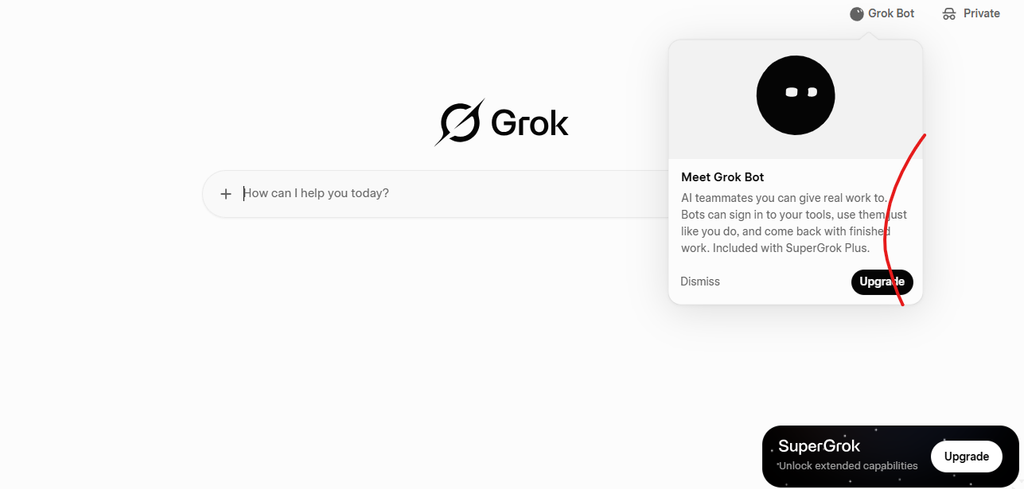
Grok has become particularly interesting because of its focus on:
- reasoning
- coding
- knowledge work
- agents
- visual interaction
- real-time information.
In August 2026, xAI introduced Grok 4.6, describing it as a model focused on long-running agents and ambitious interactive and visual work.
Grok 4.6 has also been made available through platforms such as Amazon Bedrock and Google’s Gemini Enterprise Agent Platform.
Grok explained like you’re 8
Imagine a smart assistant that doesn’t just answer:
“What is happening?”
It can also help investigate:
“Find out what is happening, compare the information, analyze it, and help me act on it.”
That’s moving toward agentic AI.
What is Grok useful for?
Depending on the version and product:
- research
- coding
- analysis
- reasoning
- current-information workflows
- agentic tasks
- building applications
- working with information from the web and X.
xAI has also expanded Grok into tools that can build applications, websites, games, and dashboards from natural-language instructions.
Llama and Open Models Explained
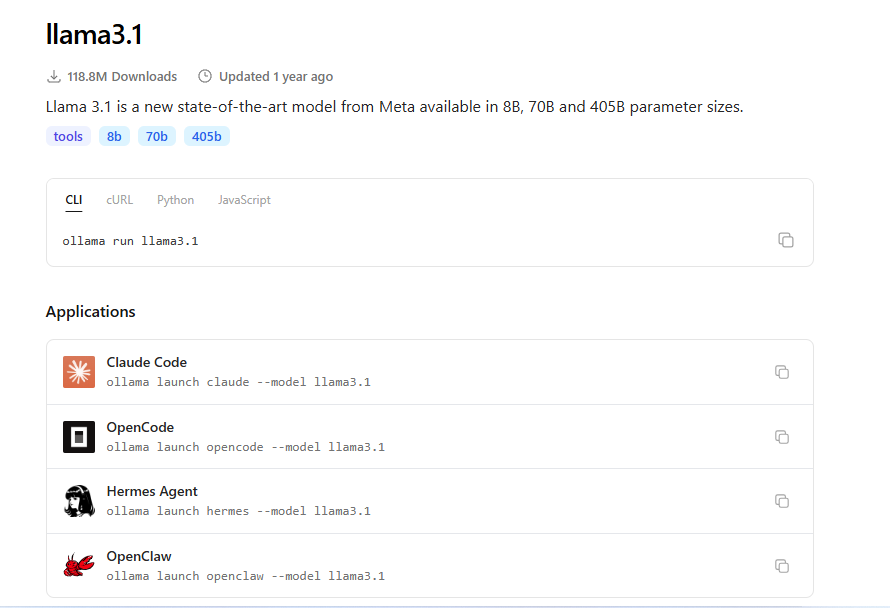
Llama is Meta’s family of AI models.
One important distinction is that people often use the phrase open model loosely.
“Open” can mean different things depending on what exactly has been released—such as model weights, code, documentation, or other components.
The big idea is that some AI models are made available in ways that give developers significantly more control over how they deploy and customize them.
Why does this matter?
Suppose you want to build an AI assistant for your company.
Instead of sending every request to someone else’s hosted AI service, you may want greater control over:
- where the model runs,
- how it is customized,
- how data is handled,
- and how the system is integrated.
That’s where open and openly available model ecosystems can become important.
Simple analogy
A hosted AI service is like:
Renting a finished house.
An open model can be more like:
Getting the building materials and having greater control over the house.
But “open” does not automatically mean “easy.”
Running powerful models yourself can require:
- GPUs
- memory
- storage
- engineering knowledge
- maintenance
- electricity
- monitoring.
Reasoning Models Explained
This is one of the most important AI concepts beginners should understand.
A reasoning model is designed to spend additional computation working through difficult problems before producing an answer.
Think about a simple question:
What is 2 + 2?
You don’t need much thinking.
But now consider:
A company has three departments, five revenue streams, four years of financial data, and several conflicting assumptions. Analyze the business and recommend the best strategy.
That requires much more work.
Normal model
Think:
“What answer is most likely useful?”
Reasoning model
Think more like:
“Let’s break this problem into pieces, examine the relationships, test possible approaches, and then produce an answer.”
You don’t necessarily see every internal reasoning step.
What matters is that the system is designed to allocate more computation to difficult problems.
Modern frontier models increasingly combine ordinary fast responses with configurable reasoning effort. For example, OpenAI’s current GPT-5.6 models expose multiple reasoning levels, while Grok 4.6 offers configurable reasoning effort.
Use reasoning models for:
- difficult mathematics
- complicated coding
- strategic analysis
- scientific problems
- multi-step planning
- difficult research
- complex data analysis.
Don’t use maximum reasoning for everything.
If you ask:
“What is the capital of Nigeria?”
You probably don’t need a heavyweight reasoning model.
That would be like using a bulldozer to move a pencil.
Multimodal Models Explained
Multimodal means an AI system can work with multiple types of information.
For example:
Text + image
You upload a photograph and ask:
“What’s wrong with this design?”
Or:
Text + audio
You upload a meeting recording and ask:
“Summarize the key decisions.”
Or:
Text + video
You provide a video and ask:
“Explain what happens in this video.”
Multimodal AI is important because the real world is multimodal.
Humans don’t experience the world only through text.
We see.
We hear.
We read.
We speak.
We watch.
We interact.
AI systems are increasingly being designed to work across these different information types.
Small AI Models Explained
Not every AI model needs to be enormous.
Sometimes you want something:
- fast,
- cheap,
- lightweight,
- private,
- and easy to deploy.
That’s where small language models come in.
Imagine two students.
Student A is incredibly intelligent but takes 30 minutes to solve a simple question.
Student B is slightly less capable but answers the question correctly in two seconds.
For simple tasks, Student B might be the better choice.
Small models can be excellent for:
- classification
- simple chatbots
- summarization
- text extraction
- customer support
- local applications
- mobile applications
- high-volume workloads.
OpenAI, for example, provides smaller GPT variants for cost-sensitive and high-volume use cases, while Google’s Gemini lineup includes Flash and Flash-Lite variants optimized for speed and efficiency.
AI Image Models Explained
A language model primarily works with language.
An image generation model creates images.
You might type:
“Create a cinematic photograph of a futuristic African city at sunset.”
An image model turns the description into an image.
Popular image-generation systems include models from companies such as:
- OpenAI
- xAI
- Adobe
- Midjourney
- Stability AI
- Black Forest Labs
- and others.
Modern image models can also:
- edit existing images,
- remove objects,
- change backgrounds,
- create product images,
- generate illustrations,
- create advertising creatives,
- produce thumbnails.
Google’s current Gemini API lineup, for example, includes Nano Banana 2 and Nano Banana 2 Lite for image generation and editing.
OpenAI’s current API model catalog also lists GPT-Image-2 for image generation and editing.
Simple example
Prompt:
Create a clean YouTube thumbnail showing a shocked entrepreneur looking at an AI robot, with a bright background and large readable text: “AI CHANGED EVERYTHING.”
The image model creates the visual.
AI Video Models Explained
Video models do something similar—but across time.
Instead of:
“Create one picture.”
You ask:
“Create a 10-second cinematic video of a futuristic city during a rainstorm.”
The model has to generate a sequence of frames that make sense together.
Modern video models can work from:
- text
- images
- video references
- sometimes audio or other controls.
Video generation is particularly useful for:
- advertising
- social media
- filmmaking
- education
- product demonstrations
- storytelling
- YouTube content.
The technology is improving rapidly, so model names and capabilities change frequently.
AI Audio Models Explained
Audio models work with sound.
They can perform tasks such as:
Speech-to-text
You speak.
AI writes down what you said.
Text-to-speech
You type:
“Welcome to today’s episode.”
AI generates a spoken voice.
Speech-to-speech
You speak.
AI processes your speech and responds with another voice.
Music generation
You describe:
“Create an energetic cinematic soundtrack.”
The system generates music.
Audio AI is increasingly important for:
- podcasts
- customer service
- voice assistants
- accessibility
- video production
- transcription
- translation.
OpenAI’s current model catalog, for example, includes dedicated realtime, speech-to-text, translation, and audio models alongside its general-purpose models.
Embedding Models Explained
This is where AI becomes slightly more technical—but the idea is surprisingly simple.
An embedding model converts information into numbers that represent its meaning.
Imagine putting words on a giant map.
Words with similar meanings appear closer together.
For example:
Dog
might be close to:
Puppy
and:
Pet
while being farther away from:
Airplane
The computer doesn’t literally see a map.
It represents information as mathematical vectors.
Why are embeddings useful?
They power systems such as:
- semantic search
- recommendation systems
- document search
- retrieval-augmented generation (RAG)
- similarity matching
- knowledge bases.
Google currently offers Gemini embedding models, including Gemini Embedding 2, which is designed to map multiple modalities into a shared embedding space for applications such as semantic search and RAG.
Simple analogy
Traditional search can behave like:
“Find pages containing these exact words.”
Semantic search is more like:
“Find pages that mean something similar to what I asked.”
That’s a huge difference.
AI Models vs AI Tools vs AI Agents
This distinction will save you a lot of confusion.
1. AI Model
The brain.
Examples:
- GPT
- Claude
- Gemini
- Grok
- Llama
2. AI Tool
The application you use to interact with the brain.
Examples include AI chat applications, coding environments, research tools, image generators, and productivity applications.
3. AI Agent
The worker that uses a model plus tools to accomplish a goal.
Imagine telling an assistant:
“Research five competitors, compare their pricing, create a spreadsheet, and prepare a report.”
A basic chatbot may give you instructions.
An agentic system may be able to:
- plan the task,
- browse websites,
- collect information,
- analyze it,
- use software,
- create files,
- check its work,
- and deliver the result.
That’s why the AI industry is moving from:
Chat → Tools → Agents
Some current models are explicitly designed for agentic workflows. Google’s Gemini documentation lists specialized computer-use and deep-research systems, while OpenAI and xAI increasingly emphasize tool use and long-running workflows.
So Which AI Model Should You Use?
This is the question that actually matters.
Don’t ask:
“What is the best AI model?”
Ask:
“What is the best AI model for this particular job?”
Here is a simple guide.
| What you want to do | What to look for |
|---|---|
| Write an email | Fast general-purpose model |
| Brainstorm ideas | Fast general-purpose model |
| Write an article | Strong language model |
| Analyze a complex business problem | Reasoning model |
| Solve difficult mathematics | Reasoning model |
| Write complicated software | Strong coding/reasoning model |
| Analyze images | Multimodal/vision model |
| Analyze video | Multimodal model with video support |
| Create images | Image-generation model |
| Create videos | Video-generation model |
| Generate speech | Audio/text-to-speech model |
| Transcribe audio | Speech-to-text model |
| Search a knowledge base | Embedding + retrieval system |
| Run a lightweight chatbot | Small efficient model |
| Automate many steps | Agentic model/system |
A Simple AI Model Decision Tree
Use this.
Question 1: What are you trying to create?
Text?
→ Use a language model.
Image?
→ Use an image model.
Video?
→ Use a video model.
Audio?
→ Use an audio model.
Code?
→ Use a strong coding/reasoning model.
Question 2: Is the problem easy or difficult?
Easy:
Use a fast model.
Difficult:
Use a reasoning model.
Question 3: Do you need multiple types of information?
If you need:
text + image + audio + video
Look for a multimodal model.
Question 4: Do you need AI to perform multiple actions?
If yes, look for:
Agentic AI + tool use
The Most Important AI Model Families to Know
If you’re a beginner, don’t try to memorize everything.
Start with these:
| Company | Model family | Remember it for |
|---|---|---|
| OpenAI | GPT | General-purpose AI, reasoning, coding, tools |
| Anthropic | Claude | Writing, coding, knowledge work, agents |
| Gemini | Multimodal AI, reasoning, Google ecosystem | |
| xAI | Grok | Reasoning, coding, current-information and agentic workflows |
| Meta | Llama | Open/openly available model ecosystem |
| Mistral | Mistral | Efficient and developer-focused models |
| DeepSeek | DeepSeek | Reasoning and efficient model development |
| Qwen | Qwen | Broad multilingual and developer ecosystem |
The important thing is not memorizing every model number.
The important thing is understanding what kind of job each model is designed to do.
Why Model Names Are So Confusing
Suppose you see:
GPT-5.6 Luna
Then:
Claude Sonnet 5
Then:
Gemini 3.7 Flash
Then:
Grok 4.6
Then:
SomeModel-32B-Instruct
It can feel like you’re reading car license plates.
Here’s the trick.
Most model names contain several pieces of information.
For example:
Brand + generation + size/type + specialization
A model name might tell you:
- who created it,
- which generation it belongs to,
- how large or efficient it is,
- whether it is optimized for reasoning,
- whether it is designed for speed,
- whether it is specialized for coding,
- or whether it is a particular deployment variant.
But don’t assume the name alone tells you which model is better.
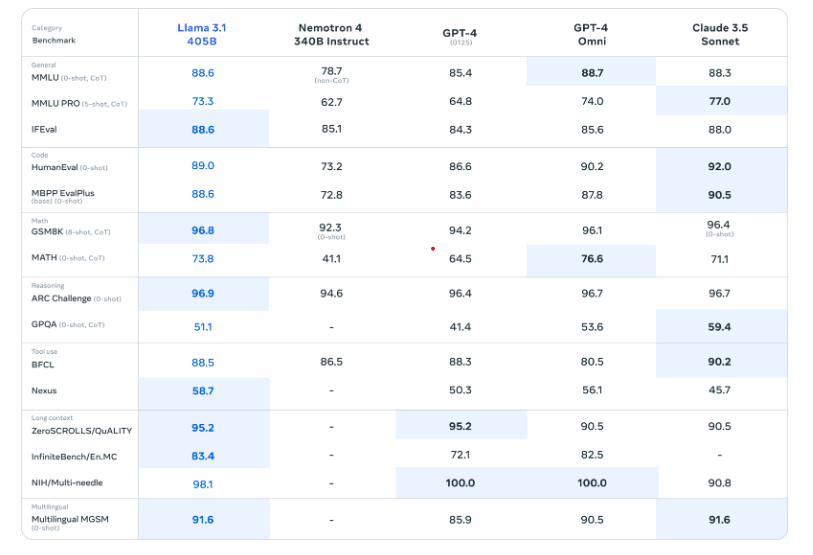
Benchmark results, real-world performance, price, latency, context length, tool support, and your specific task all matter.
What Is a Context Window?
You’ll hear this term constantly.
A context window is roughly the amount of information a model can consider within a particular interaction.
Think of it as the model’s temporary desk.
A tiny desk can hold:
one notebook.
A giant desk can hold:
50 books, a laptop, several spreadsheets, and documents.
A larger context window can be useful when working with:
- long books
- large codebases
- lengthy reports
- multiple documents
- long conversations.
For example, OpenAI’s GPT-5.6 API documentation currently lists a context window of about 1.05 million tokens for its flagship model.
But remember:
A larger context window does not automatically mean a better model.
It’s only one capability.
What Are Tokens?
A token is a small piece of text that an AI model processes.
Don’t think of tokens as exactly equal to words.
A token might be:
- part of a word,
- a whole short word,
- punctuation,
- or another chunk of text.
For example:
“Artificial intelligence”
might be broken into multiple tokens.
Why should you care?
Because many AI services calculate:
- context limits,
- API costs,
- and output limits
using tokens.
Beginner rule:
More tokens = more text the model can process, but not necessarily better answers.
What Does “Parameters” Mean?
You’ve probably seen things like:
7B
70B
405B
The B usually means billion parameters.
Parameters are internal numerical values the model learns during training.
Think of them as tiny adjustable settings inside the model.
A larger number of parameters can mean a model has more capacity, but:
More parameters does not automatically mean better AI.
Modern AI performance also depends heavily on:
- training data,
- training methods,
- architecture,
- inference techniques,
- reinforcement learning,
- reasoning methods,
- tool use,
- and engineering.
So don’t judge an AI model only by its parameter count.
What Is a Mixture-of-Experts Model?
You may also see:
MoE
It means:
Mixture of Experts.
Imagine a school with 100 teachers.
If you ask about mathematics, you don’t need all 100 teachers to answer.
You might send the question to the mathematics experts.
If you ask about literature, you send it to literature experts.
An MoE architecture can work somewhat like that.
Different parts—or “experts”—can specialize in different patterns, while the system activates only some of them for a particular input.
Why use MoE?
It can potentially provide:
- high capability,
- better computational efficiency,
- and lower inference costs than activating a huge dense model for every token.
You don’t need to understand the mathematics to use an AI model.
Just remember:
MoE means the model can route different inputs through different expert components.
What Is RAG?
RAG stands for:
Retrieval-Augmented Generation.
The name sounds terrifying.
The idea isn’t.
Imagine asking a student a question about your company’s 500-page employee handbook.
Instead of expecting the student to memorize the whole book, you give them the relevant page first.
Then they answer your question using that information.
That’s roughly what RAG does.
RAG has three basic steps:
1. Search
Find relevant information.
2. Retrieve
Bring the information into the model’s context.
3. Generate
Ask the model to produce an answer using that information.
RAG is useful for:
- company knowledge bases
- customer support
- legal documents
- manuals
- research
- internal documents
- websites.
What Is Fine-Tuning?
Fine-tuning means taking an already trained model and training it further on a more specific dataset.
Imagine a student who already knows English.
Now you give the student thousands of examples of:
legal writing.
After training, the student may become better suited to legal-language tasks.
That’s the basic idea.
Fine-tuning can be useful when you need a model to consistently:
- follow a particular format,
- classify information,
- use a particular style,
- behave according to specialized examples,
- or perform a narrow task.
But fine-tuning is not always necessary.
Sometimes good prompting + RAG + tools is enough.
What Is Prompting?
A prompt is simply the instruction you give an AI model.
Bad prompt:
Write something about AI.
Better prompt:
Explain AI models to a complete beginner using simple examples, short paragraphs, analogies, and practical examples. Avoid technical jargon unless you explain it first.
The second prompt gives the model more direction.
A powerful beginner prompt formula
Use:
ROLE + TASK + CONTEXT + AUDIENCE + FORMAT + CONSTRAINTS
For example:
You are an experienced technology teacher. Explain reasoning models to someone who has never used AI. Use simple language, a school analogy, three examples, and a short summary. Avoid unnecessary technical jargon.
This works because you’re telling the AI exactly what you want.
The Biggest Mistake Beginners Make
They keep asking:
“Which AI is the best?”
That’s the wrong question.
Read Also: I Tested 50 AI Money-Making Ideas. Here Are the 7 I’d Actually Start in 2026
“Which AI is best for my task, budget, speed requirement, and quality requirement?”
For example:
A content creator may prioritize:
- writing quality,
- research,
- image generation,
- video generation.
A software developer may prioritize:
- coding,
- debugging,
- context length,
- tool use.
A business may prioritize:
- reliability,
- security,
- cost,
- integration,
- data handling.
A student may prioritize:
- explanations,
- tutoring,
- research,
- affordability.
There is no universal winner for every situation.
The “One AI Is Enough” Strategy
If you’re a complete beginner, don’t subscribe to 15 AI tools.
Start with one strong general-purpose model.
Learn:
- how to prompt it,
- how to give it context,
- how to check its answers,
- how to use files,
- how to use images,
- how to break large tasks into smaller tasks.
Then add specialized tools only when you actually need them.
This will save you:
- money,
- time,
- confusion.
A Practical AI Workflow for Beginners
Let’s say you want to write a blog post.
Instead of asking AI:
Write my blog post.
Try this workflow.
Step 1: Research
Ask the AI to identify:
- important concepts,
- questions beginners ask,
- competing viewpoints,
- useful examples.
Step 2: Create an outline
Ask for:
- title,
- introduction,
- sections,
- examples,
- FAQs.
Step 3: Draft
Generate one section at a time.
Step 4: Fact-check
Check important claims against reliable sources.
Step 5: Improve
Ask the model to identify:
- confusing sentences,
- unsupported claims,
- repetitive sections,
- missing information.
Step 6: Optimize
Improve:
- headings,
- readability,
- search intent,
- internal links,
- FAQs,
- metadata.
Step 7: Add visuals
Use an image model to create:
- diagrams,
- illustrations,
- thumbnails,
- social media graphics.
This is much more powerful than simply saying:
“Write an article.”
AI Models Are Not Perfect
This is extremely important.
AI models can:
- make mistakes,
- misunderstand questions,
- invent facts,
- produce outdated information,
- misinterpret documents,
- confidently give incorrect answers.
This is often called a hallucination.
So never assume:
“The AI said it, therefore it must be true.”
For important information, verify the answer.
Especially when dealing with:
- medicine
- law
- finance
- current events
- scientific claims
- statistics
- business decisions.
AI is a powerful assistant.
It is not automatically an infallible authority.
The Future of AI Models
The AI industry is moving beyond simple chatbots.
We’re increasingly seeing systems that can:
Understand
→ text, images, audio, video and documents.
Reason
→ solve increasingly complex problems.
Use tools
→ browse, search, code and interact with software.
Remember context
→ work with larger amounts of information.
Act
→ perform multi-step tasks.
Create
→ generate text, images, audio and video.
Collaborate
→ coordinate multiple AI systems or agents.
That means the future question may become less:
“Which chatbot should I use?”
and more:
“Which AI system can complete this job for me?”
The Beginner’s AI Model Cheat Sheet
Save this section.
GPT
Think: General-purpose AI.
Good for:
- writing
- reasoning
- coding
- analysis
- tools.
Claude
Think: Strong language, coding, knowledge work and agents.
Good for:
- writing
- coding
- long-form work
- analysis
- agentic workflows.
Gemini
Think: Multimodal Google AI.
Good for:
- text
- images
- video
- coding
- research
- multimodal tasks.
Grok
Think: Reasoning + current-information + agentic workflows.
Good for:
- research
- reasoning
- coding
- interactive work
- agents.
Llama
Think: Open/openly available model ecosystem.
Good for:
- developers
- customization
- experimentation
- self-hosted applications.
Reasoning model
Think: “Take your time and solve the difficult problem.”
Small model
Think: “Do the job quickly and cheaply.”
Multimodal model
Think: “Understand more than just text.”
Image model
Think: “Create pictures.”
Video model
Think: “Create moving pictures.”
Audio model
Think: “Understand or create sound.”
Embedding model
Think: “Turn meaning into numbers so computers can search and compare information.”
AI agent
Think: “Don’t just tell me how—help me do it.”
A Simple Mental Model for Understanding AI
If you remember nothing else from this article, remember this:
AI Model = Brain
The model provides intelligence.
Prompt = Instruction
You tell the model what you want.
Context = Information
You give it the information it needs.
Tool = Hands
Tools allow the AI to do things outside the model itself.
Agent = Worker
An agent combines intelligence, context, tools, and planning to accomplish a goal.
App = Workplace
The application gives you an interface through which everything works.
That is the modern AI stack in very simple language.
Frequently Asked Questions
What is an AI model in simple terms?
An AI model is a computer system trained to recognize patterns in data and produce useful outputs such as text, images, audio, predictions, or actions.
Think of it as a trained digital brain.
What is the difference between GPT, Claude, Gemini and Grok?
They are different AI model families created by different companies.
GPT is developed by OpenAI, Claude by Anthropic, Gemini by Google, and Grok by xAI.
They overlap in many capabilities but differ in architecture, training, tools, performance, pricing, product integrations, and strengths.
Is ChatGPT an AI model?
Not exactly.
ChatGPT is an AI application/product that uses AI models.
The underlying model is what provides much of the intelligence.
Is GPT the same thing as ChatGPT?
No.
GPT refers to a family of AI models.
ChatGPT is an application that uses models from OpenAI.
What is an LLM?
LLM means Large Language Model.
It is an AI model designed primarily to understand and generate language.
What is the difference between an AI model and an AI tool?
The model is the underlying intelligence.
The tool is the application or interface that lets you use that intelligence.
What is a reasoning model?
A reasoning model is designed to spend additional computation working through difficult problems before producing an answer.
It is particularly useful for complex reasoning, coding, mathematics, research, and multi-step tasks.
What is a multimodal AI model?
A multimodal model can work with more than one type of information, such as text, images, audio, video, or documents.
What is the best AI model?
There is no single AI model that is best for every task.
The best model depends on what you’re trying to accomplish, how much quality you need, how quickly you need the result, and how much you’re willing to spend.
Are bigger AI models always better?
No.
A larger model may have greater capabilities, but a smaller model may be faster, cheaper, and perfectly adequate for a particular task.
What does “7B” or “70B” mean in AI?
The “B” usually means billion parameters.
For example, 70B generally means approximately 70 billion model parameters.
Parameter count is useful information, but it should not be treated as a simple ranking of model intelligence.
What is RAG in AI?
RAG means Retrieval-Augmented Generation.
It allows an AI system to retrieve relevant information from a knowledge source and use that information when generating an answer.
What is an AI agent?
An AI agent is a system that can use a model, tools, information, and planning to perform multi-step tasks rather than simply returning a single response.
Will AI models replace humans?
AI models are powerful tools, but the more useful question is how humans will work with them.
People who understand how to direct, verify, and apply AI can use these systems to dramatically increase their productivity.
Final Takeaway: You Don’t Need to Understand Everything About AI
The AI industry is moving incredibly fast.
New models appear.
Old models are renamed.
Companies release new versions.
Benchmarks change.
Prices change.
Capabilities improve.
Trying to memorize every model name is therefore a losing game.
Instead, understand the categories.
Remember:
Language model → words
Reasoning model → difficult problems
Multimodal model → many types of information
Image model → pictures
Video model → video
Audio model → sound
Embedding model → meaning/search
Small model → speed and efficiency
Agentic model → actions and workflows
And remember the major families:
GPT → OpenAI
Claude → Anthropic
Gemini → Google
Grok → xAI
Llama → Meta
Once you understand that, the AI world becomes much less confusing.
And here’s the most important lesson of all:
You don’t become good at AI by memorizing AI model names. You become good at AI by knowing what you want to accomplish, choosing the right model for the job, giving it good instructions, providing the right context, and checking its work.
That’s the real skill.
Sources and Further Reading
For readers who want to verify current model capabilities, the most useful starting points are the official model documentation from the major AI providers:
- OpenAI Platform Documentation — current OpenAI models, capabilities and model selection guidance.
- Google Gemini model documentation — current Gemini models and specialized AI systems.
- Anthropic Claude announcements — current Claude model releases and capabilities.
- xAI news and model releases — current Grok model releases and capabilities.
Last updated: August 25, 2026
Because AI models change rapidly, always check the provider’s current documentation before choosing a model for an important production workload.




Leave a Reply