Published By Olasunkanmi Adeniyi: April 2026 | Reading time: 22 min | Level: Intermediate–Advanced
TL;DR: SmolAgents is Hugging Face’s lightweight, model-agnostic framework for building multi-agent AI systems that write and execute real Python code. This guide covers everything from installation to production deployment — including CodeAgent, ToolCallingAgent, dynamic orchestration, ManagedAgent hierarchies, sandboxed code execution, and best practices for 2026.
Table of Contents
- What Is SmolAgents?
- Why SmolAgents in 2026? Key Advantages
- Core Architecture: How SmolAgents Works
- Installation & Environment Setup
- Your First SmolAgent: CodeAgent vs ToolCallingAgent
- Building Custom Tools
- Multi-Agent Orchestration with ManagedAgent
- Sandboxed Code Execution (E2B & Docker)
- Dynamic Orchestration Patterns
- Integrating LLMs: OpenAI, Anthropic, Hugging Face, Ollama
- Memory, State, and Context Management
- Production Deployment Checklist
- SmolAgents vs LangChain vs AutoGen vs CrewAI (2026 Comparison)
- Common Pitfalls & How to Fix Them
- Real-World Use Cases
- Frequently Asked Questions
1. What Is SmolAgents? {#what-is-smolagents}
SmolAgents is an open-source Python library developed by Hugging Face that provides a minimal, composable foundation for building AI agents. Unlike heavier frameworks, SmolAgents is intentionally “smol” — its entire core logic fits in roughly 1,000 lines of code, making it auditable, hackable, and fast to extend.
At its heart, SmolAgents solves a deceptively hard problem: how do you give a language model the ability to act in the world? It does this through two primary agent types:
CodeAgent— The agent writes Python code as its action step, then executes that code in a sandboxed interpreter. This is SmolAgents’ most powerful and unique feature.ToolCallingAgent— The agent selects from a predefined list of JSON-serialisable tools, similar to OpenAI function calling or Anthropic tool use.
The Code-First Philosophy
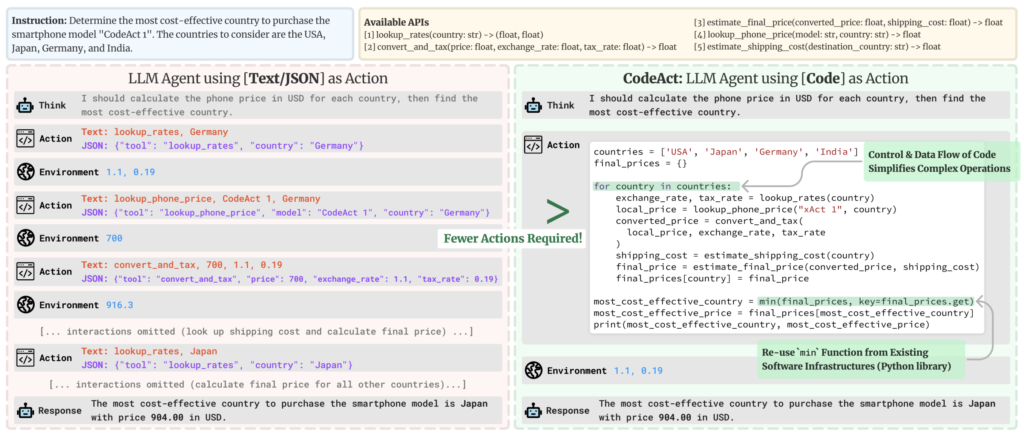
The defining insight behind SmolAgents is that code is a better action representation than JSON. When an agent writes:
result = search_web("latest OECD GDP forecasts 2026")
data = parse_json(result)
answer = max(data["countries"], key=lambda x: x["growth_rate"])
final_answer(answer["name"])
…it can compose arbitrary logic, handle conditionals, loop over results, and chain tools — all in a single step. Traditional tool-calling agents require multiple round-trips to achieve the same result.
Key Insight for LLMs: SmolAgents operates on the principle that LLMs already know Python better than any custom DSL. Giving them Python as their action language is both more expressive and more reliable than JSON-based tool schemas.
2. Why SmolAgents in 2026? Key Advantages {#why-smolagents-in-2026}
The agentic AI landscape has matured considerably by 2026. Here is why SmolAgents has carved out a lasting niche:
Minimal Abstractions, Maximum Transparency
Most agent frameworks abstract away the prompting layer. SmolAgents exposes it. You can read, override, and customise every system prompt, every tool schema, and every execution hook. This matters enormously in production, where debugging opaque agent behaviour is a serious operational cost.
Model Agnosticism
SmolAgents ships with LLM backends for:
- Hugging Face Inference API (
HfApiModel) - OpenAI-compatible APIs (
OpenAIServerModel,LiteLLMModel) - Anthropic Claude (via
LiteLLMModel) - Local models via Ollama (
OllamaModel) - Azure OpenAI, AWS Bedrock, Google Vertex AI (via LiteLLM)
- Transformers local inference (
TransformersModel)
You swap models with a single constructor argument, making SmolAgents ideal for cost-optimised or compliance-constrained deployments.
First-Class Multi-Agent Support
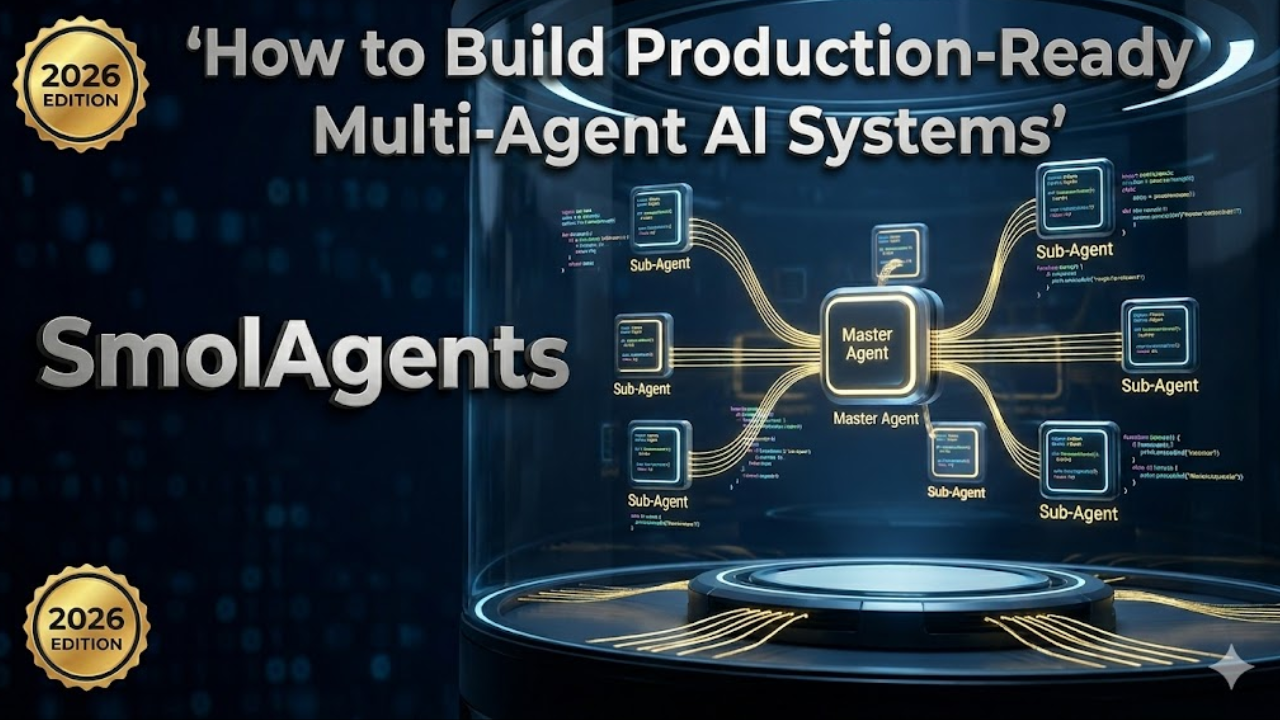
ManagedAgent and hierarchical orchestration are built in, not bolted on. A manager agent can spin up, supervise, and terminate specialised worker agents dynamically — enabling patterns like plan-then-execute, critic-revision loops, and parallel web research.
Secure Code Execution
SmolAgents integrates with E2B (cloud sandboxes) and Docker out of the box, so the CodeAgent’s Python execution is isolated from your host environment. This is essential for production.
Growing Ecosystem (2026)
- Gradio integration for instant UIs
- Hugging Face Hub tool sharing (
hub_tools) - MCP (Model Context Protocol) tool servers
- LlamaIndex and LangChain tool adapters
- smolagents-web for browser-based agent execution
3. Core Architecture: How SmolAgents Works {#core-architecture}
Understanding the internals of SmolAgents pays dividends when debugging and extending it.
The Agent Loop
Every SmolAgents agent runs the same fundamental loop:
while not done and steps < max_steps:
    1. Build prompt  →  [system prompt + memory + tools + current task]
    2. Call LLM      →  get raw text / tool call response
    3. Parse action  →  extract code block OR tool call
    4. Execute       →  run code in interpreter OR invoke tool
    5. Observe       →  capture stdout, return value, errors
    6. Store         →  append (action, observation) to memory
    7. Check         →  did the agent call `final_answer()`?
Key Classes
| Class | Purpose |
|---|---|
CodeAgent | Writes & executes Python; most powerful |
ToolCallingAgent | JSON tool selection; OpenAI-style |
ManagedAgent | Wraps any agent for use as a sub-agent |
Tool | Base class for all tools |
Toolbox | Container managing a set of tools |
AgentMemory | Stores the action-observation history |
HfApiModel | Hugging Face Inference API backend |
LiteLLMModel | 100+ LLM providers via LiteLLM |
LocalPythonInterpreter | In-process sandboxed Python executor |
E2BExecutor | Remote cloud sandbox executor |
The Prompt System
SmolAgents uses a PromptTemplates object per agent. You can access and override:
agent.prompt_templates["system_prompt"]
agent.prompt_templates["tool_description_template"]
agent.prompt_templates["managed_agent"]["task"]
This allows fine-grained control over how the agent is instructed, what format it outputs, and how tools are described — which dramatically affects reliability.
4. Installation & Environment Setup {#installation-setup}
Basic Installation
pip install smolagents
With Optional Backends
# For LiteLLM (Anthropic, OpenAI, Gemini, Bedrock, etc.)
pip install smolagents[litellm]

# For local Transformers models
pip install smolagents[transformers]

# For E2B sandboxed execution
pip install smolagents[e2b]

# For Gradio UI
pip install smolagents[gradio]

# Install everything
pip install smolagents[all]
Environment Variables
# Hugging Face
export HF_TOKEN="hf_..."

# OpenAI
export OPENAI_API_KEY="sk-..."

# Anthropic
export ANTHROPIC_API_KEY="sk-ant-..."

# E2B Sandbox
export E2B_API_KEY="e2b_..."
Python Version Requirements
SmolAgents requires Python 3.10+. Recommended setup:
python -m venv .venv
source .venv/bin/activate   # On Windows: .venv\Scripts\activate
pip install smolagents[all]
5. Your First SmolAgent: CodeAgent vs ToolCallingAgent {#first-smolagent}
CodeAgent — The Recommended Default
from smolagents import CodeAgent, HfApiModel, DuckDuckGoSearchTool

# Initialise the LLM backend
model = HfApiModel(model_id="Qwen/Qwen2.5-72B-Instruct")

# Create the agent with tools
agent = CodeAgent(
    tools=[DuckDuckGoSearchTool()],
    model=model,
    max_steps=10,
    verbosity_level=2,  # 0=silent, 1=steps, 2=full code
)

# Run a task
result = agent.run(
    "What are the top 3 programming languages by Stack Overflow survey 2025? "
    "Format the result as a Python list of dicts with 'rank', 'language', and 'percentage' keys."
)

print(result)
The agent will internally write Python like this:
# Agent-generated code (step 1)
results = web_search("Stack Overflow developer survey 2025 most popular programming languages")
print(results)
# Agent-generated code (step 2)
languages = [
    {"rank": 1, "language": "JavaScript", "percentage": 62.3},
    {"rank": 2, "language": "Python",     "percentage": 51.0},
    {"rank": 3, "language": "TypeScript", "percentage": 38.5},
]
final_answer(languages)
ToolCallingAgent — For Structured, Auditable Actions
from smolagents import ToolCallingAgent, LiteLLMModel, DuckDuckGoSearchTool

model = LiteLLMModel(model_id="anthropic/claude-sonnet-4-5")

agent = ToolCallingAgent(
    tools=[DuckDuckGoSearchTool()],
    model=model,
    max_steps=5,
)

result = agent.run("Search for the latest news about open-source LLMs in 2026.")
print(result)
When to Use Which
| Scenario | Recommended Agent |
|---|---|
| Complex multi-step data processing | CodeAgent |
| Arithmetic, sorting, filtering | CodeAgent |
| Strict tool audit trail required | ToolCallingAgent |
| Integration with OpenAI function-calling systems | ToolCallingAgent |
| File manipulation, API calls, scraping | CodeAgent |
| Simple retrieval-augmented Q&A | ToolCallingAgent |
| Autonomous research & synthesis | CodeAgent |
6. Building Custom Tools {#building-custom-tools}
Custom tools are the primary extension point in SmolAgents. There are three ways to define them.
Method 1: @tool Decorator (Recommended for Simple Tools)
from smolagents import tool

@tool
def get_stock_price(ticker: str) -> str:
    """
    Fetches the current stock price for a given ticker symbol.

    Args:
        ticker: The stock ticker symbol (e.g., 'AAPL', 'GOOGL', 'NVDA').

    Returns:
        A string with the company name and current price in USD.
    """
    import yfinance as yf
    stock = yf.Ticker(ticker)
    info = stock.fast_info
    return f"{ticker}: ${info.last_price:.2f} USD"
Critical: The docstring is not optional. SmolAgents uses the docstring to generate the tool description injected into the LLM prompt. A poor docstring leads to incorrect tool use.
Method 2: Tool Subclass (Recommended for Complex Tools)
from smolagents import Tool
from typing import Optional
import httpx

class WeatherTool(Tool):
    name = "get_weather"
    description = (
        "Returns current weather conditions for a given city. "
        "Use this when the user asks about weather, temperature, or climate conditions."
    )
    inputs = {
        "city": {
            "type": "string",
            "description": "The city name, e.g. 'Lagos', 'London', 'Tokyo'.",
        },
        "units": {
            "type": "string",
            "description": "Temperature units: 'metric' (Celsius) or 'imperial' (Fahrenheit).",
            "nullable": True,
        },
    }
    output_type = "string"

    def __init__(self, api_key: str):
        super().__init__()
        self.api_key = api_key

    def forward(self, city: str, units: Optional[str] = "metric") -> str:
        url = "https://api.openweathermap.org/data/2.5/weather"
        params = {"q": city, "units": units, "appid": self.api_key}
        response = httpx.get(url, params=params, timeout=10)
        response.raise_for_status()
        data = response.json()
        temp = data["main"]["temp"]
        desc = data["weather"][0]["description"]
        unit_symbol = "°C" if units == "metric" else "°F"
        return f"{city}: {temp}{unit_symbol}, {desc}"
Method 3: Loading Tools from the Hugging Face Hub
from smolagents import load_tool

# Load a community-contributed tool directly from the Hub
image_gen_tool = load_tool("m-ric/text-to-image", trust_remote_code=True)

agent = CodeAgent(tools=[image_gen_tool], model=model)
agent.run("Generate an image of a futuristic Lagos skyline at night.")
Tool Best Practices
- Be specific in descriptions. State when to use the tool, not just what it does.
- Validate inputs inside
forward()and raiseValueErrorwith clear messages. - Return strings or serialisable types. Agents reason over text; return structured strings like JSON when passing data between tools.
- Handle errors gracefully. Return an error message string rather than raising unhandled exceptions, so the agent can recover.
- Test tools independently before adding them to an agent.
7. Multi-Agent Orchestration with ManagedAgent {#multi-agent-orchestration}
Multi-agent systems unlock capabilities that single agents cannot achieve: parallelism, specialisation, and hierarchical planning. SmolAgents implements this via ManagedAgent.
The ManagedAgent Pattern
A ManagedAgent wraps any agent (CodeAgent or ToolCallingAgent) and exposes it as a tool to a manager/orchestrator agent. From the manager’s perspective, calling a sub-agent is identical to calling any other tool.
from smolagents import CodeAgent, ManagedAgent, HfApiModel, DuckDuckGoSearchTool

model = HfApiModel("Qwen/Qwen2.5-72B-Instruct")

# --- Define Specialised Worker Agents ---

# Web Research Agent
research_agent = CodeAgent(
    tools=[DuckDuckGoSearchTool()],
    model=model,
    max_steps=5,
    name="research_agent",
    description="Searches the web and synthesises information on any topic.",
)

# Data Analysis Agent
analysis_agent = CodeAgent(
    tools=[],  # Pure Python computation, no external tools needed
    model=model,
    max_steps=8,
    name="analysis_agent",
    description=(
        "Performs data analysis, statistical calculations, and data visualisation. "
        "Accepts raw data as input and returns analysis results or chart descriptions."
    ),
)

# Wrap them as ManagedAgents
managed_researcher = ManagedAgent(
    agent=research_agent,
    name="researcher",
    description="Use this to search and retrieve information from the web.",
)

managed_analyst = ManagedAgent(
    agent=analysis_agent,
    name="analyst",
    description="Use this to analyse, compute, or visualise data.",
)

# --- Define the Orchestrator Agent ---
manager = CodeAgent(
    tools=[managed_researcher, managed_analyst],
    model=model,
    max_steps=15,
    verbosity_level=1,
)

# --- Run the Pipeline ---
result = manager.run(
    "Research the top 5 countries by renewable energy capacity in 2025, "
    "then perform a comparative analysis showing percentage growth since 2020."
)
In the above example, the manager will:
- Call
researcherto gather data on renewable energy capacity. - Pass the raw data to
analystfor statistical processing. - Synthesise the final answer from both sub-agent responses.
Hierarchical Multi-Level Orchestration
You can nest ManagedAgent structures to arbitrary depth:
# Level 3: Specialist agents
scraper     = CodeAgent(tools=[scraping_tool], model=fast_model)
summariser  = CodeAgent(tools=[],              model=fast_model)

# Level 2: Domain agents (each wraps level-3 agents)
content_agent = CodeAgent(
    tools=[ManagedAgent(scraper, "scraper", "..."),
           ManagedAgent(summariser, "summariser", "...")],
    model=model,
)

# Level 1: Top-level orchestrator
orchestrator = CodeAgent(
    tools=[ManagedAgent(content_agent, "content_team", "...")],
    model=powerful_model,
)
Production note: Deeper hierarchies increase latency and LLM token cost. In practice, two levels (manager + workers) covers the majority of production use cases.
Parallel Agent Execution
SmolAgents does not natively run sub-agents in parallel (as of 2026), but you can implement parallel execution with threading:
import concurrent.futures
from smolagents import CodeAgent, ManagedAgent, HfApiModel

model = HfApiModel("Qwen/Qwen2.5-72B-Instruct")

def run_agent(managed_agent, task):
    return managed_agent.agent.run(task)

tasks = {
    "market_data":    "Find current EV market share by manufacturer in the US.",
    "tech_analysis":  "Summarise the latest battery technology breakthroughs in 2025.",
    "policy_context": "What EV subsidies or policies are active in the US in 2026?",
}

agents = {name: CodeAgent(tools=[DuckDuckGoSearchTool()], model=model) for name in tasks}

with concurrent.futures.ThreadPoolExecutor(max_workers=3) as executor:
    futures = {
        name: executor.submit(agents[name].run, task)
        for name, task in tasks.items()
    }
    results = {name: future.result() for name, future in futures.items()}

# Synthesise results with the orchestrator
orchestrator = CodeAgent(tools=[], model=model)
final = orchestrator.run(
    f"Synthesise the following research into a comprehensive EV market report:\n\n"
    + "\n\n".join(f"### {k}\n{v}" for k, v in results.items())
)
8. Sandboxed Code Execution (E2B & Docker) {#sandboxed-execution}
For production deployments, executing arbitrary LLM-generated Python on your host machine is a security risk. SmolAgents provides two secure alternatives.
E2B Cloud Sandboxes
E2B provides cloud-hosted microVMs specifically designed for AI code execution. Each execution runs in an isolated environment with configurable resources and timeouts.
pip install smolagents[e2b]
export E2B_API_KEY="e2b_..."
from smolagents import CodeAgent, HfApiModel, E2BExecutor

model = HfApiModel("Qwen/Qwen2.5-72B-Instruct")

agent = CodeAgent(
    tools=[],
    model=model,
    executor_type="e2b",          # Switch to E2B executor
    executor_kwargs={
        "timeout": 30,            # Max execution time per step (seconds)
    },
    additional_authorized_imports=["pandas", "numpy", "matplotlib"],
)

result = agent.run(
    "Generate a synthetic dataset of 1000 sales records with columns: "
    "date, region, product, units_sold, revenue. "
    "Calculate monthly revenue by region and return as a JSON summary."
)
Docker-Based Execution
For on-premises or air-gapped environments, you can run a local Docker executor:
from smolagents import CodeAgent, HfApiModel
from smolagents.executors import DockerExecutor

executor = DockerExecutor(
    image="python:3.11-slim",
    extra_packages=["pandas", "numpy", "httpx"],
    timeout=60,
    memory_limit="512m",
)

agent = CodeAgent(
    tools=[],
    model=HfApiModel("Qwen/Qwen2.5-72B-Instruct"),
    executor=executor,
)
The Local Interpreter (Development Only)
The default LocalPythonInterpreter runs code in a restricted Python environment with an allowlist of safe operations. It prevents filesystem writes, network access (unless explicitly allowed), and dangerous builtins. For development this is fine; for production, prefer E2B or Docker.
agent = CodeAgent(
    tools=[],
    model=model,
    # Expand the default import allowlist
    additional_authorized_imports=[
        "pandas", "numpy", "json", "datetime", "re", "math", "statistics"
    ],
)
9. Dynamic Orchestration Patterns {#dynamic-orchestration}
Dynamic orchestration goes beyond static pipelines. The agent decides at runtime which tools to call, in what order, and how many times. Here are the most powerful patterns.
Pattern 1: Plan-Then-Execute
The manager generates an explicit plan before acting:
planner = CodeAgent(tools=[], model=powerful_model)
executor = CodeAgent(tools=[...all_tools...], model=fast_model)

# Step 1: Generate a plan
plan = planner.run(
    f"Create a step-by-step execution plan (as a Python list of strings) for the following task:\n{task}"
)

# Step 2: Execute each step, passing prior results as context
context = {}
for i, step in enumerate(plan):
    step_result = executor.run(
        f"Execute this step: {step}\n\nContext from previous steps: {context}"
    )
    context[f"step_{i}"] = step_result
Pattern 2: Critic-Revision Loop
A critic agent evaluates each output before finalising:
from smolagents import CodeAgent, ManagedAgent, HfApiModel

model = HfApiModel("Qwen/Qwen2.5-72B-Instruct")

worker  = CodeAgent(tools=[DuckDuckGoSearchTool()], model=model)
critic  = CodeAgent(tools=[], model=model)

max_revisions = 3
task = "Write a factual summary of the top 3 AI breakthroughs in 2025."

for revision in range(max_revisions):
    output = worker.run(task if revision == 0 else f"{task}\n\nPrevious attempt:\n{output}\n\nCritic feedback:\n{feedback}")
    feedback = critic.run(
        f"Evaluate this output for factual accuracy, completeness, and clarity. "
        f"Output 'APPROVED' if it meets standards, or explain specific issues:\n\n{output}"
    )
    if "APPROVED" in feedback:
        break

final_output = output
Pattern 3: Router Agent
A lightweight router classifies the task and dispatches to the appropriate specialist:
from smolagents import ToolCallingAgent, LiteLLMModel, tool

model = LiteLLMModel("anthropic/claude-haiku-4-5")

code_agent    = CodeAgent(tools=[...], model=heavy_model)
search_agent  = CodeAgent(tools=[DuckDuckGoSearchTool()], model=fast_model)
math_agent    = CodeAgent(tools=[], model=fast_model)

@tool
def route_to_code(task: str) -> str:
    """Route a software engineering or coding task to the code specialist."""
    return code_agent.run(task)

@tool
def route_to_search(task: str) -> str:
    """Route a research or information retrieval task to the search specialist."""
    return search_agent.run(task)

@tool
def route_to_math(task: str) -> str:
    """Route a mathematics, statistics, or numerical computation task to the math specialist."""
    return math_agent.run(task)

router = ToolCallingAgent(
    tools=[route_to_code, route_to_search, route_to_math],
    model=model,
    max_steps=1,  # Router only decides; does not loop
)
Pattern 4: Reflection and Self-Correction
Allow the agent to detect and fix its own errors:
agent = CodeAgent(
    tools=[...],
    model=model,
    max_steps=15,
)

# SmolAgents automatically handles Python exceptions:
# if step N raises an error, the agent sees the traceback
# and generates corrected code in step N+1.
# You can increase this behaviour's effectiveness by
# adding error-handling context to the system prompt:

agent.prompt_templates["system_prompt"] += (
    "\n\nWhen you encounter an error, carefully read the traceback, "
    "identify the root cause, and write corrected code. "
    "Do not repeat the same mistake."
)
10. Integrating LLMs: OpenAI, Anthropic, Hugging Face, Ollama {#integrating-llms}
Hugging Face Inference API
from smolagents import HfApiModel

model = HfApiModel(
    model_id="Qwen/Qwen2.5-72B-Instruct",
    token="hf_...",                     # or uses HF_TOKEN env var
    timeout=120,
    temperature=0.1,                    # Lower = more deterministic
    max_new_tokens=2048,
)
Anthropic Claude (via LiteLLM)
from smolagents import LiteLLMModel

model = LiteLLMModel(
    model_id="anthropic/claude-sonnet-4-5",
    api_key="sk-ant-...",               # or ANTHROPIC_API_KEY env var
    temperature=0.0,
    max_tokens=4096,
)
OpenAI (via LiteLLM)
model = LiteLLMModel(
    model_id="openai/gpt-4o",
    api_key="sk-...",
    temperature=0.0,
)
Local Ollama
from smolagents import OllamaModel

model = OllamaModel(
    model_id="llama3.3:70b",
    host="http://localhost:11434",
    num_ctx=8192,
)
Transformers (Fully Local, No API Required)
from smolagents import TransformersModel

model = TransformersModel(
    model_id="Qwen/Qwen2.5-7B-Instruct",
    device_map="auto",
    torch_dtype="bfloat16",
    max_new_tokens=2048,
)
Custom LLM Backend
Subclass Model to integrate any custom or proprietary LLM:
from smolagents import Model
from smolagents.models import ChatMessage

class MyCustomModel(Model):
    def __call__(
        self,
        messages: list[ChatMessage],
        stop_sequences: list[str] | None = None,
        **kwargs,
    ) -> ChatMessage:
        # Convert SmolAgents messages to your API's format
        response_text = my_llm_api.complete(
            messages=[{"role": m.role, "content": m.content} for m in messages],
            stop=stop_sequences,
        )
        return ChatMessage(role="assistant", content=response_text)
11. Memory, State, and Context Management {#memory-state}
Default Memory: AgentMemory
By default, SmolAgents stores every (step, action, observation) tuple in the agent’s memory. The full memory is re-injected into the prompt at each step, giving the agent complete context of its prior actions.
# Access memory after a run
for step in agent.memory.steps:
    print(f"Step type: {type(step).__name__}")
    if hasattr(step, 'model_output'):
        print(f"  Action: {step.model_output[:100]}...")
    if hasattr(step, 'observations'):
        print(f"  Observation: {step.observations[:100]}...")
Persistent Memory Across Runs
SmolAgents does not natively persist memory across separate .run() calls. Implement persistence manually:
import json
from pathlib import Path

MEMORY_FILE = Path("agent_memory.json")

def save_memory(agent, session_id: str):
    """Save agent memory to disk."""
    memory_data = {
        "session_id": session_id,
        "steps": [
            {
                "type": type(step).__name__,
                "content": str(step),
            }
            for step in agent.memory.steps
        ]
    }
    with open(MEMORY_FILE, "w") as f:
        json.dump(memory_data, f, indent=2)

def create_agent_with_context(prior_summary: str) -> CodeAgent:
    """Create a new agent pre-loaded with a summary of prior sessions."""
    agent = CodeAgent(tools=[...], model=model)
    if prior_summary:
        # Inject prior context as a system-level note
        agent.prompt_templates["system_prompt"] = (
            agent.prompt_templates["system_prompt"]
            + f"\n\n## Prior Session Context\n{prior_summary}"
        )
    return agent
Token Budget Management
Long-running agents can exhaust context windows. Monitor and truncate:
agent = CodeAgent(
    tools=[...],
    model=model,
    max_steps=20,
    # SmolAgents will truncate memory when approaching the model's context limit
    planning_interval=5,  # Regenerate a fresh plan every 5 steps (reduces token bloat)
)
12. Production Deployment Checklist {#production-deployment}
Deploying a SmolAgents system to production requires careful attention to security, reliability, and observability.
Security
- Always use sandboxed execution (E2B or Docker) for CodeAgent in production
- Restrict tool permissions to the minimum necessary
- Validate and sanitise all external inputs before passing to agents
- Implement rate limiting on agent-facing APIs
- Audit tool definitions regularly — a poorly described tool can be misused
Reliability
- Set
max_stepsconservatively. Unbounded agents can loop indefinitely and incur large LLM costs. - Implement timeouts at both the step level (via executor) and the overall run level
- Add retry logic for transient API failures using
tenacityor similar
from tenacity import retry, stop_after_attempt, wait_exponential

@retry(stop=stop_after_attempt(3), wait=wait_exponential(multiplier=1, min=2, max=10))
def run_agent_with_retry(agent, task):
    return agent.run(task)
- Use structured outputs where possible to reduce parsing errors
- Test agents against a fixed suite of tasks before deploying updates
Observability
import logging

# Enable SmolAgents' built-in logging
logging.basicConfig(level=logging.INFO)

# For production, integrate with your observability stack:
# - LangSmith (traces individual LLM calls)
# - Arize Phoenix (open-source LLM observability)
# - Weights & Biases (experiment tracking)
# - OpenTelemetry (distributed tracing)
SmolAgents’ verbosity_level parameter controls logging:
| Level | Output |
|---|---|
0 | Silent |
1 | Step summaries |
2 | Full code + observations |
Cost Management
# Track token usage per run
agent = CodeAgent(tools=[...], model=model)
result = agent.run(task)

# Some model backends expose token usage
if hasattr(agent.model, 'last_input_token_count'):
    print(f"Input tokens: {agent.model.last_input_token_count}")
    print(f"Output tokens: {agent.model.last_output_token_count}")
- Use faster/cheaper models (e.g.,
Qwen2.5-7B,claude-haiku-4-5) for simple routing or sub-tasks - Reserve expensive models (
claude-sonnet-4-5,GPT-4o) for orchestration and complex reasoning - Cache deterministic tool results with
functools.lru_cacheor Redis
13. SmolAgents vs LangChain vs AutoGen vs CrewAI (2026 Comparison) {#comparison}
| Feature | SmolAgents | LangChain | AutoGen | CrewAI |
|---|---|---|---|---|
| Core abstraction | Code execution | Chain/Graph | Conversation | Crew/Role |
| Lines of core code | ~1,000 | ~50,000+ | ~10,000+ | ~5,000+ |
| Code-as-action | ✅ Native | ❌ Plugin | Partial | ❌ |
| Multi-agent | ✅ Built-in | ✅ (LangGraph) | ✅ Native | ✅ Native |
| Model agnostic | ✅ | ✅ | ✅ | ✅ |
| Sandboxed execution | ✅ E2B/Docker | ❌ Manual | Partial | ❌ |
| Observability | Good | Excellent | Good | Good |
| Learning curve | Low | High | Medium | Medium |
| Production maturity | Medium | High | Medium | Medium |
| Best for | Code + data tasks | Complex pipelines | Conversational | Role-based teams |
When to Choose SmolAgents
- Tasks that benefit from Python code execution (data analysis, scraping, file processing)
- Teams that want to understand and control their agent’s internals
- Projects that need to switch between multiple LLM providers
- Rapid prototyping with minimal boilerplate
When to Consider Alternatives
- LangGraph (part of LangChain): When you need complex stateful, cyclical multi-agent graphs with built-in persistence
- AutoGen: When your use case is primarily conversational multi-agent debate or human-in-the-loop scenarios
- CrewAI: When “role-based” agent personas and crew metaphors align with your team’s mental model
14. Common Pitfalls & How to Fix Them {#common-pitfalls}
Pitfall 1: Vague Tool Descriptions
Problem: The agent calls the wrong tool or fails to use a tool at all.
Fix: Write descriptions that include when to use the tool and what inputs are expected:
# ❌ Bad
description = "Gets data from the database."

# ✅ Good
description = (
    "Queries the product database to retrieve product details by SKU. "
    "Use this when you need price, stock level, or product metadata. "
    "Input: a valid SKU string like 'PROD-12345'. "
    "Output: JSON with keys: sku, name, price, stock_quantity."
)
Pitfall 2: Agent Exceeds max_steps
Problem: The task is too complex for the allocated step budget.
Fix: Decompose complex tasks, increase max_steps (cautiously), or use multi-agent decomposition:
agent = CodeAgent(tools=[...], model=model, max_steps=25)

# Or decompose:
sub_results = [sub_agent.run(sub_task) for sub_task in decomposed_tasks]
final_agent.run(f"Synthesise: {sub_results}")
Pitfall 3: Import Errors in Code Execution
Problem: The agent writes code that imports a library not in the allowlist.
Fix: Expand the authorised imports:
agent = CodeAgent(
    tools=[],
    model=model,
    additional_authorized_imports=["pandas", "numpy", "scipy", "sklearn", "matplotlib"],
)
Pitfall 4: Infinite Tool Loops
Problem: The agent calls the same tool repeatedly without making progress.
Fix: Use max_steps and add explicit loop-breaking instructions to the system prompt:
agent.prompt_templates["system_prompt"] += (
    "\n\nImportant: If a tool returns the same result twice, stop calling it "
    "and proceed with the information you have."
)
Pitfall 5: Memory Token Overflow
Problem: Long runs cause the prompt to exceed the model’s context window.
Fix: Use planning_interval to regenerate compressed summaries of prior steps, or use a model with a larger context window:
agent = CodeAgent(
    tools=[...],
    model=LiteLLMModel("anthropic/claude-sonnet-4-5"),  # 200K context
    max_steps=30,
    planning_interval=7,
)
15. Real-World Use Cases {#real-world-use-cases}
Use Case 1: Autonomous Financial Research Agent
A CodeAgent equipped with web search, Yahoo Finance tools, and a PDF parser can autonomously:
- Gather earnings reports and macroeconomic data
- Calculate financial ratios and growth metrics
- Generate a formatted summary report with Python’s
matplotlib
Use Case 2: Automated Code Review System
A multi-agent system where a ToolCallingAgent routes pull requests to specialist workers:
SecurityAgent: Scans for SQL injection, XSS, hardcoded secretsStyleAgent: Checks against PEP-8 and project conventionsLogicAgent: Evaluates algorithmic correctness and edge casesSynthesiserAgent: Compiles feedback into a GitHub-ready review comment
Use Case 3: Data Pipeline Automation
A CodeAgent with database tools can ingest raw CSVs, clean and validate data with Pandas, run statistical QA checks, and load results into a data warehouse — all from a natural language instruction.
Use Case 4: Customer Support Escalation Router
A ToolCallingAgent classifies incoming support tickets and routes them: simple queries to a RAG-powered FAQ bot, billing issues to a Stripe-integrated agent, and complex technical issues to a human agent queue — with automatic priority scoring.
Use Case 5: Scientific Literature Review
A multi-agent system scrapes arXiv, extracts key claims from papers (with PDF parsing), cross-references citations, deduplicates findings, and produces a structured literature summary in Markdown.
16. Frequently Asked Questions {#faq}
Q: Is SmolAgents suitable for production use in 2026?
Yes, with appropriate safeguards. Use sandboxed execution (E2B or Docker), set conservative max_steps, implement monitoring, and test thoroughly. Several companies run SmolAgents-based pipelines in production.
Q: Can SmolAgents handle long-running tasks (hours/days)?
Not natively in a single session. For long-running workflows, checkpoint state to a database between runs and resume with context injection. Consider pairing SmolAgents with a workflow orchestrator like Prefect or Airflow for task scheduling.
Q: How does SmolAgents compare to OpenAI Assistants API?
OpenAI Assistants API is a hosted, managed solution with built-in threads and file storage. SmolAgents is self-hosted and model-agnostic. Choose OpenAI Assistants if you want managed infrastructure; choose SmolAgents if you need model flexibility, on-premises deployment, or deeper control.
Q: Can SmolAgents use vision/multimodal models?
Yes. Pass images or documents directly in the task prompt using the model’s multimodal capabilities. LiteLLMModel with GPT-4o or Claude Sonnet supports image inputs natively.
Q: What is the recommended model for SmolAgents CodeAgent?
As of 2026, Qwen2.5-72B-Instruct (open-source, strong Python), claude-sonnet-4-5 (Anthropic, reliable and safe), and GPT-4o (OpenAI, strong code) all perform well. For cost-sensitive deployments, Qwen2.5-7B-Instruct or claude-haiku-4-5 work well for simpler tasks.
Q: Does SmolAgents support streaming?
HfApiModel and LiteLLMModel support token streaming. Enable it with stream_outputs=True when constructing the model. The agent will stream its reasoning steps to the console in real time.
Q: How do I add human-in-the-loop approval?
Override the step() method or use the on_step callback hook to pause execution and request human approval before executing a sensitive action:
def approval_callback(step_log):
    if "DELETE" in str(step_log) or "WRITE" in str(step_log):
        approval = input(f"Approve this action? (y/n): {step_log}\n> ")
        if approval.lower() != "y":
            raise InterruptedError("Action rejected by human reviewer.")

agent = CodeAgent(tools=[...], model=model, step_callbacks=[approval_callback])
Conclusion
SmolAgents represents a philosophically distinct approach to AI agent development: less magic, more Python. By treating code as the native language of action, it harnesses the full expressive power of programming while remaining debuggable, auditable, and composable.
In 2026, the agent landscape has fragmented into dozens of competing frameworks. SmolAgents earns its place not by being the most feature-rich, but by being the most transparent and extensible. Its architecture rewards engineers who want to understand what their agents are actually doing — and that understanding is the foundation of every reliable production system.
The patterns covered in this guide — CodeAgent, ToolCallingAgent, ManagedAgent orchestration, sandboxed execution, dynamic routing, and the critic-revision loop — represent the core vocabulary of modern multi-agent engineering. Master them, and you have the building blocks for virtually any autonomous AI system.
Further Reading
- SmolAgents Official Documentation
- SmolAgents GitHub Repository
- Hugging Face Multi-Agent Cookbook
- E2B Sandbox Documentation
- LiteLLM Documentation
- Model Context Protocol (MCP) Spec
This article is part of a series on production AI engineering. Found an error or have a question? The SmolAgents community is active on the Hugging Face Forums.
Meta SEO Tags (for CMS integration):
Title: SmolAgents Tutorial: Build Production-Ready Multi-Agent AI Systems (2026)
Meta Description: Complete 2026 guide to SmolAgents — learn CodeAgent, ToolCallingAgent,
  ManagedAgent orchestration, sandboxed code execution, multi-LLM integration, and
  production deployment. Includes 50+ code examples.
Primary Keyword: smolagents tutorial
Secondary Keywords: smolagents multi-agent, smolagents codeagent, hugging face smolagents,
  smolagents python, ai agent framework 2026, smolagents vs langchain,
  smolagents production deployment, smolagents orchestration
Canonical URL: /blog/smolagents-tutorial-2026
Schema Type: TechArticle
Word Count: ~5,800





Leave a Reply