

Imagine having an AI assistant that does more than answer your questions.
You tell it, “Prepare my morning briefing.”
Instead of simply writing a response, it could check your calendar, review selected news sources, analyze your tasks, summarize important information, update a workspace, and return a prioritized briefing.
That is the difference between using AI as a chatbot and building a personal AI agent.
An AI agent can pursue a defined goal, decide which steps are needed, use external tools, and take actions with limited human intervention. OpenAI describes an agent around three core elements: a model, tools, and instructions.
The good news is that you do not need to build a sophisticated AI system from scratch.
In 2026, you can create a useful personal AI agent with no-code automation platforms, agent frameworks, APIs, or a combination of these approaches.
Create a personal AI agent that turns your morning briefing into an audio podcast Here
This guide explains exactly how.
Key Takeaways
• A personal AI agent is an AI system designed to accomplish recurring tasks on your behalf.
• A useful agent needs more than a language model. It needs clear instructions, tools, context, and appropriate guardrails.
• Memory allows an agent to retain useful information across interactions, although not every agent needs long-term memory.
• You can build a personal AI agent with no-code tools or create one programmatically using frameworks such as the OpenAI Agents SDK.
• Model Context Protocol, or MCP, provides a standardized way for AI applications to connect with external tools and data.
• Start with one narrow, repetitive workflow before attempting to build an all-purpose personal AI assistant.
What Is a Personal AI Agent?
A personal AI agent is an AI-powered system designed to accomplish specific tasks for you with some degree of autonomy.
A traditional chatbot generally follows this pattern:
You ask → AI responds → You act.
An AI agent can follow a longer loop:
You give it a goal → It plans → It uses tools → It takes actions → It checks the result → It reports back.
IBM defines AI agents as systems that can autonomously perform tasks by designing workflows and using available tools.
For example, suppose you tell your personal agent:
“Find the most important AI developments from this week and prepare a briefing for me.”
A simple chatbot might give you a summary based on information available to it.
An agent could potentially:
- Search approved sources.
- Collect relevant information.
- Remove duplicate stories.
- Classify the information.
- Summarize important developments.
- Compare findings against your interests.
- Format the briefing.
- Save the report to your preferred workspace.
- Notify you when it is ready.
The important distinction is that the agent can interact with tools and systems instead of stopping at text generation.
Personal AI Agent vs AI Assistant vs Chatbot
These terms often get mixed together.
A chatbot primarily responds to prompts.
An AI assistant can help you complete tasks but may require frequent direction.
An AI agent can operate through a goal-oriented workflow, deciding when to use available tools and actions.
The boundaries are not absolute. Products increasingly combine all three patterns.
The practical question is therefore not:
“Is this technically an agent?”
A better question is:
“Can this system reliably complete a multi-step task with less intervention from me?”
If the answer is yes, you are moving into agentic territory.
How Does a Personal AI Agent Work?
A personal AI agent typically combines several components.
Think of it as a small digital worker.
Model
The model provides the reasoning and language capabilities.
It interprets your request, evaluates information, decides what to do next, and generates outputs.
OpenAI’s current agent guidance describes the model as one of three fundamental components of an agent, alongside tools and instructions.
Instructions
Instructions define the agent’s job.
They can specify:
• What the agent should do.
• How it should behave.
• What information it should prioritize.
• What format it should use.
• What actions it is allowed to take.
• What it must never do.
Weak instruction:
“You are my assistant.”
Better instruction:
“You are my research assistant. Find information from approved sources, prioritize primary sources, distinguish facts from opinions, cite important claims, and ask for confirmation before taking external actions.”
Tools
Tools allow the agent to interact with the outside world.
Depending on your setup, tools can include:
• Web search
• Calendar
• Google Drive
• Notion
• Slack
• Databases
• APIs
• Spreadsheets
• CRM systems
• Code execution
• File systems
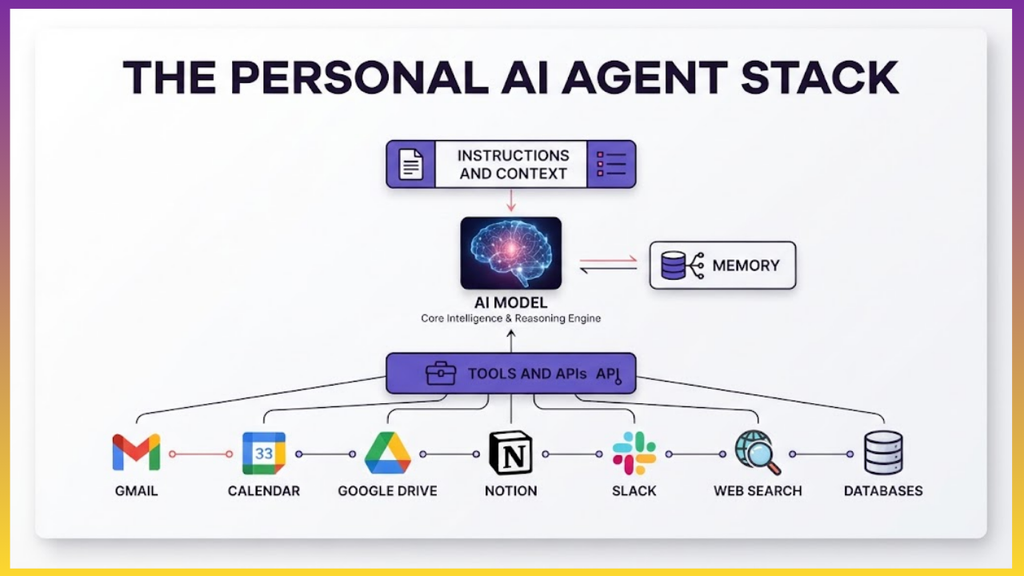
Without tools, an agent is heavily limited to the information and capabilities available inside its model and current context.
OpenAI’s agent documentation describes tools as external functions or APIs that an agent can use to take action.
Create a personal AI agent that turns your morning briefing into an audio podcast Here
Memory
Memory allows an agent to retain useful information beyond the immediate interaction.
For example, your agent could remember:
• Your preferred writing style.
• Your recurring work schedule.
• Your project names.
• Your preferred sources.
• Your frequently used workflows.
• Important project context.
AI agent memory can be implemented through external storage and retrieval systems. IBM notes that memory can help agents retain context and use information from previous interactions.
But memory should not mean “store everything.”
Good memory stores information that improves future performance.
Bad memory creates unnecessary privacy and security risks.
Guardrails
Guardrails define what your agent can and cannot do.
For example:
• It can read your calendar.
• It can draft emails.
• It cannot send an email without approval.
• It can analyze financial information.
• It cannot make financial transactions.
• It can prepare a social media post.
• It cannot publish without confirmation.
This distinction becomes increasingly important as agents gain access to real-world systems.
The Basic Architecture
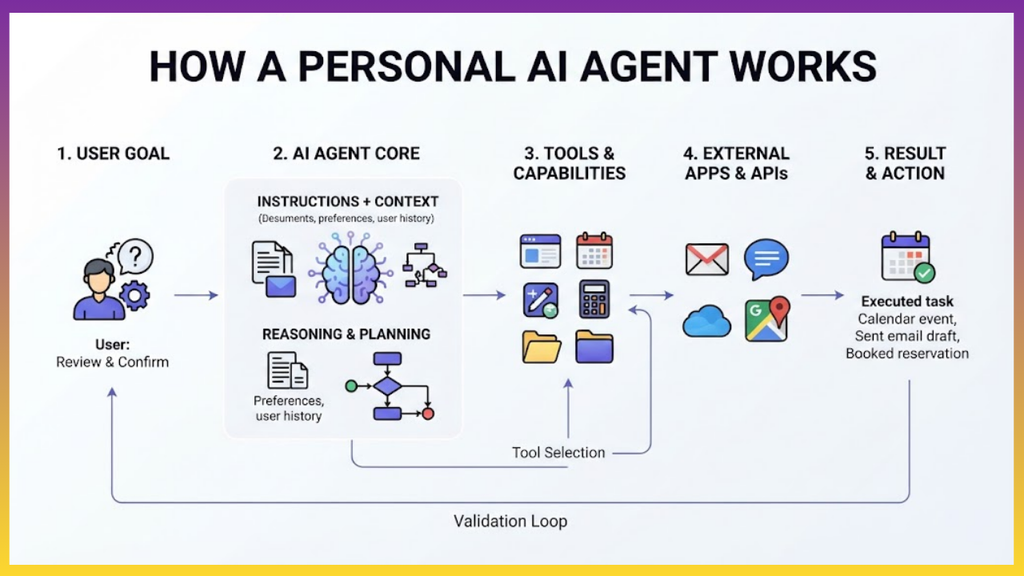
A simple personal AI agent can be represented like this:
User goal
↓
AI model
↓
Instructions + context
↓
Reasoning and planning
↓
Tool selection
↓
External tools
↓
Result
↓
Validation
↓
Final action or response
This architecture can be extremely simple or become much more sophisticated as you add memory, multiple agents, databases, scheduled execution, authentication, monitoring, and other capabilities.
How to Create a Personal AI Agent
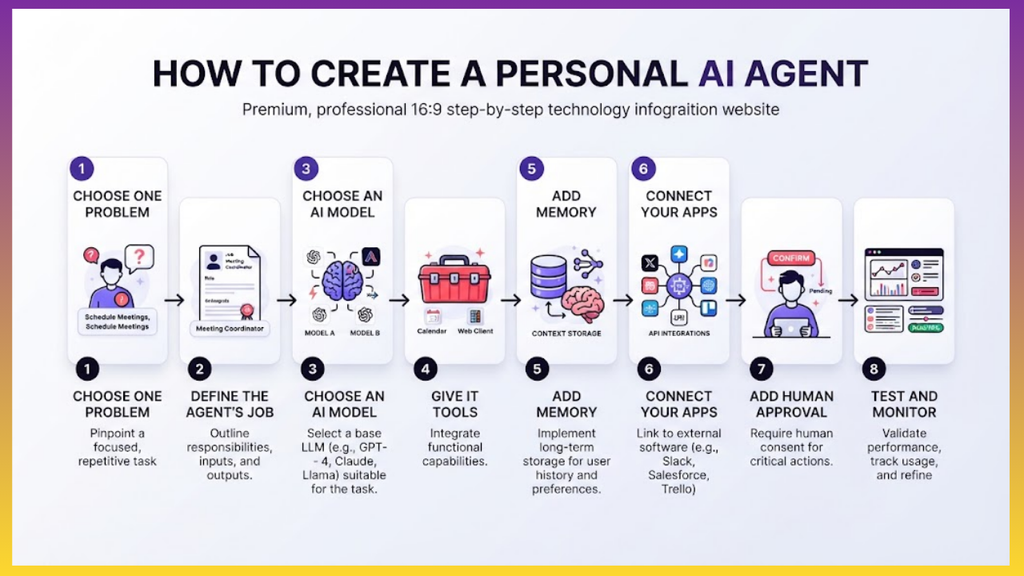
Step 1: Choose One Problem
Do not start by trying to build “an AI that manages my entire life.”
That is too broad.
Start with one recurring problem.
Good examples include:
• Morning research briefing.
• Email triage.
• Meeting preparation.
• Content research.
• LinkedIn content assistant.
• Personal knowledge assistant.
• Job opportunity tracker.
• Weekly business report.
• Expense categorization.
• Customer support triage.
• Project status reporting.
The best first use case usually has three characteristics:
It happens repeatedly.
It follows a recognizable process.
It produces a clear output.
For example:
Every weekday at 8 AM, collect important AI developments from selected sources and create a five-minute briefing.
That is a much better starting point than:
“Manage my business.”
“Want your AI agent to speak?” Then Try ElevenLabs.
Step 2: Define the Agent’s Job
Write down exactly what the agent is responsible for.
Use this structure:
Role:
You are my personal research assistant.
Goal:
Create a concise daily briefing.
Inputs:
Approved websites, RSS feeds, saved documents, and my notes.
Process:
Find relevant information, remove duplicates, verify important claims, summarize findings, and rank them by relevance to my work.
Output:
A structured briefing containing five important developments, why each matters, and links to sources.
Rules:
Do not invent facts. Clearly distinguish confirmed information from analysis. Ask for approval before taking external actions.
This gives the model a much clearer operating environment.
Step 3: Choose Your AI Model
You have several options.
Cloud AI models are usually the simplest starting point.
Depending on your requirements, you can use models from providers such as OpenAI, Anthropic, or Google.
Your decision should depend on:
• Reasoning capability.
• Tool-use capability.
• Context capacity.
• Speed.
• Cost.
• Privacy requirements.
• Available integrations.
You do not necessarily need the most powerful model for every task.
A lightweight model may handle classification, formatting, or simple extraction.
A more capable model may be appropriate for complex research, planning, coding, or reasoning.
Read Also: How to Create Simple AI Agents for Your Business – Save Time and Money
Step 4: Give Your Agent Tools
This is where your chatbot starts becoming useful as an agent.
Imagine a personal research agent with these tools:
search_web()
read_page()
search_drive()
read_document()
create_document()
send_email()
Now give it a goal:
“Prepare my weekly business briefing.”
The agent can determine which tools it needs during the workflow.
Modern agent frameworks support this type of tool calling. OpenAI’s agent documentation describes tools as external functions or APIs that agents can call to perform actions.
Step 5: Add Memory
Your agent becomes more useful when it understands persistent context.
For example:
Your agent knows that you work in product management.
It knows which industries you follow.
It knows your preferred writing style.
It knows that you prefer concise reports.
It knows which websites you trust.
It knows the projects you are currently working on.
When designing memory, separate temporary context from persistent information.
Short-term memory can contain the current conversation or task.
Long-term memory can contain information that should remain useful across future sessions.
You can implement long-term memory using databases, structured files, knowledge bases, vector databases, or memory services, depending on the architecture.
Google’s Agent Development Kit, for example, includes memory-oriented tooling for retrieving relevant information from previous sessions.
Step 6: Connect Your Agent to Your Apps
This is where a personal AI agent can become significantly more useful.
Imagine connecting it to:
Gmail + Calendar + Google Drive + Notion + Slack + your task manager.
Now you can create workflows such as:
“Prepare me for tomorrow’s meetings.”
The agent could potentially:
- Read your calendar.
- Identify the meetings.
- Retrieve relevant documents.
- Summarize previous notes.
- Identify outstanding tasks.
- Prepare questions.
- Create a meeting briefing.
The agent does not need every possible integration.
Give it only the tools it needs.
Too many tools can make an agent harder to control, test, and secure.
Step 7: Consider MCP
Model Context Protocol, commonly called MCP, is an open standard designed to connect AI applications with external tools and data.
OpenAI describes its Apps SDK as being built on MCP, allowing developers to build applications that connect ChatGPT to external tools and data.
The MCP ecosystem has also continued evolving. The July 28, 2026 MCP specification introduced changes including a stateless protocol core, updated authorization behavior, caching capabilities, and other protocol improvements.
For a personal AI agent, MCP can be useful when you want a standardized way to expose capabilities such as:
• Files.
• Databases.
• Search.
• Business applications.
• APIs.
• Internal tools.
Instead of creating a completely different integration for every AI application, MCP provides a common protocol for connecting models and applications with external capabilities.
Step 8: Choose Your Build Method
There are three practical ways to build a personal AI agent.
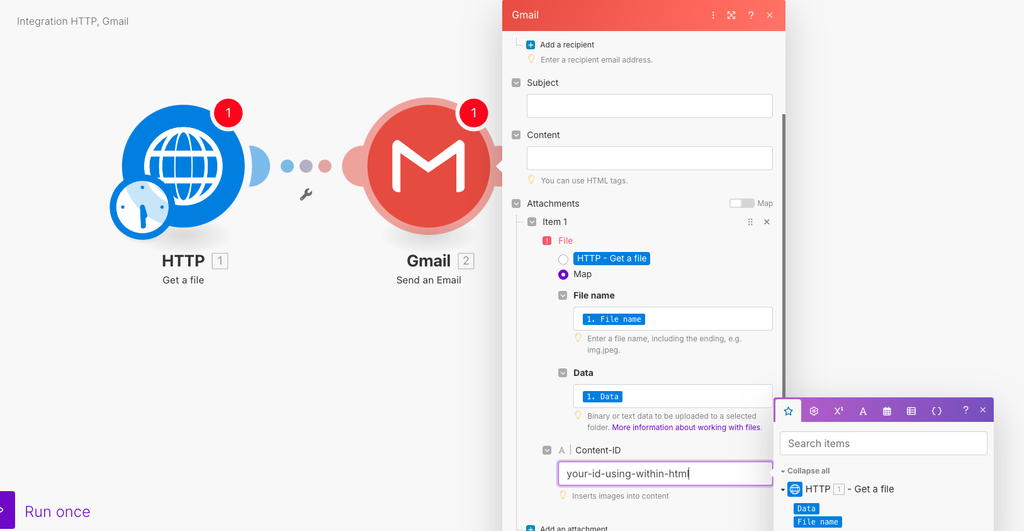
Option 1: No-Code
This is the easiest path for beginners.
You can combine an AI model with an automation platform and connect services through visual workflows.
A basic workflow could look like:
Trigger
↓
AI model
↓
Search
↓
Analyze
↓
Format
↓
Save
↓
Notify
This approach is useful if you want to automate business or personal workflows without writing much code.
Build your first AI agent with Make
Option 2: Low-Code
Low-code gives you more control.
You can combine automation tools, APIs, webhooks, databases, and custom code where necessary.
This approach works well when you understand workflows but do not want to build an entire software system from scratch.
Option 3: Code
If you need deeper customization, build the agent programmatically.
OpenAI provides an Agents SDK for building agent systems around models, instructions, and tools. Its current developer platform also includes an Agents API designed for cloud agents and long-running tasks.
A simplified architecture might look like:
Python application
↓
Agent
↓
Model
↓
Tools
↓
APIs
↓
Database
↓
Memory
The code-first approach gives you greater control over authentication, logging, testing, tool permissions, memory, and deployment.
Step 9: Build a Simple Personal Research Agent
Let’s make the idea concrete.
Suppose you want an agent that sends you an AI industry briefing every morning.
Your workflow could be:
Trigger:
8:00 AM every weekday.
Goal:
Create a five-minute AI briefing.
Tools:
Web search, webpage reader, database or document storage.
Process:
- Search approved sources.
- Collect recent developments.
- Remove duplicate stories.
- Identify significant developments.
- Verify important claims.
- Summarize each development.
- Explain why it matters.
- Save the report.
- Send the final briefing.
Output format:
AI DAILY BRIEFING
Top developments
- Headline
What happened:
Why it matters:
Source: - Headline
What happened:
Why it matters:
Source:
Today’s opportunity
One practical opportunity based on today’s developments.
Today’s action
One thing I should do today.
This is already a useful personal AI agent.
You can also Build AI Video Research Agent, For example:
Research → Script → AI avatar → Video → Save draft
Step 10: Add Human Approval
Do not give an agent unlimited authority simply because it can perform an action.
Separate actions into three categories.
Low risk:
• Summarize a document.
• Categorize notes.
• Draft an email.
• Create a report.
Medium risk:
• Update a CRM.
• Modify a project.
• Create calendar events.
• Edit files.
High risk:
• Send sensitive emails.
• Delete data.
• Make financial transactions.
• Publish content publicly.
• Change production systems.
For higher-risk actions, require human approval.
A useful pattern is:
Agent prepares → Human reviews → Agent executes.
This keeps the agent useful without giving it unnecessary control.
Step 11: Test Your Agent
Do not judge an agent using one successful example.
Create a test set.
For example, give your research agent:
• A normal request.
• An ambiguous request.
• A request containing incorrect information.
• A request requiring multiple tools.
• A request where a tool fails.
• A request outside its scope.
• A request involving sensitive information.
Then measure:
• Accuracy.
• Completion rate.
• Tool selection.
• Error handling.
• Response quality.
• Cost.
• Latency.
• Safety.
Agent evaluation matters because an agent can produce a plausible response while still making incorrect decisions or using tools incorrectly. IBM recommends evaluating how agents perform tasks, make decisions, and interact with users or environments.
Step 12: Add Monitoring
Once your agent performs real tasks, monitor it.
Track:
• Which tools it uses.
• How often tasks fail.
• How much each task costs.
• How long tasks take.
• Which instructions cause errors.
• Which actions require human intervention.
• Whether outputs meet your quality criteria.
This becomes especially important for agents that run automatically.
OpenAI’s recent agent infrastructure work emphasizes controlled environments, tool use, files, code execution, and long-running tasks.
A Personal AI Agent Example
Here is a practical example for a busy professional.
Agent name:
Personal Chief of Staff
Primary goal:
Help manage research, planning, documents, and recurring administrative work.
Tools:
• Calendar
• Email
• Cloud storage
• Web search
• Notes
• Task manager
• Spreadsheet
Memory:
• Personal preferences
• Active projects
• Important contacts
• Recurring meetings
• Writing preferences
• Frequently used sources
Daily workflow:
7:30 AM
Review calendar and tasks.
8:00 AM
Prepare morning briefing.
12:00 PM
Check outstanding tasks.
4:00 PM
Summarize important updates.
6:00 PM
Prepare tomorrow’s priority list.
Weekly workflow:
Friday afternoon
Review completed work, unfinished tasks, upcoming meetings, and important information.
The result is not a single chatbot.
It is a personal AI workflow system.
What Can You Automate With a Personal AI Agent?
Once the basic architecture works, you can expand it.
Research
• Monitor websites.
• Track competitors.
• Summarize research papers.
• Monitor industry news.
• Build recurring reports.
Content
• Research topics.
• Generate content briefs.
• Repurpose long-form content.
• Create social media drafts.
• Maintain an editorial calendar.
Business
• Prepare sales reports.
• Analyze customer feedback.
• Update CRM records.
• Generate proposals.
• Monitor key metrics.
Productivity
• Prepare meeting briefs.
• Organize notes.
• Track tasks.
• Summarize emails.
• Prepare daily plans.
Career
• Monitor job listings.
• Match opportunities to your skills.
• Customize application materials.
• Track applications.
• Prepare interview questions.
Read Also: How to Turn Claude Into Your Spreadsheet Machine
Personal knowledge
• Organize documents.
• Search your notes.
• Summarize books and research.
• Create a searchable knowledge base.
• Connect information across projects.
Common Mistakes When Building a Personal AI Agent
Mistake 1: Starting Too Broad
“Build me an AI that manages my life” is not a good first specification.
Start with one workflow.
Mistake 2: Giving the Agent Too Many Tools
More tools do not automatically make an agent better.
Every additional tool introduces another possible failure point.
Give the agent the smallest toolset required to complete its job.
Mistake 3: Writing Vague Instructions
“Be helpful” is not enough.
Define the goal, process, output, constraints, and escalation rules.
Mistake 4: Ignoring Human Approval
An agent that can act should not automatically be allowed to perform every action.
Use approval gates for sensitive operations.
Mistake 5: Building Memory Without a Purpose
Do not store everything.
Store information that improves future tasks.
Mistake 6: Skipping Evaluation
A successful demo does not prove reliability.
Test the agent against realistic situations before trusting it with important work.
Mistake 7: Automating a Broken Workflow
AI will not automatically fix a poorly designed process.
First simplify the workflow.
Then automate it.
Mistake 8: Ignoring Cost
Every model call, tool call, search, retrieval operation, and workflow execution can contribute to cost.
Track usage from the beginning.
A Simple Personal AI Agent Blueprint
Use this blueprint for your first build:
- Choose one recurring task.
- Define the desired outcome.
- Select the AI model.
- Write detailed instructions.
- Add only the required tools.
- Decide what information the agent needs as context.
- Add memory if the workflow benefits from it.
- Add approval checkpoints.
- Test normal and failure scenarios.
- Monitor performance.
- Improve the instructions.
- Add additional capabilities only after the first workflow is reliable.
The goal is not to build the most complicated agent.
The goal is to build an agent that reliably saves you time.
Do You Need Coding Skills?
Not necessarily.
If your goal is a simple personal workflow, you can start with no-code or low-code tools.
If you want custom integrations, complex memory, advanced orchestration, custom interfaces, or production-grade deployment, programming becomes increasingly useful.
The important skill is not simply knowing how to call an AI API.
It is understanding how to design reliable workflows around AI.
That includes:
• Task decomposition.
• Tool design.
• Prompt and instruction design.
• Data management.
• Authentication.
• Error handling.
• Evaluation.
• Monitoring.
• Security.
• Human oversight.
This is why modern agent development is closer to system design than simply writing prompts.
A Useful Mental Model
Think of your personal AI agent as a junior digital employee.
You provide:
A job description.
A set of tools.
Access to relevant information.
Rules.
Examples.
A way to ask for help.
A way to review its work.
The AI provides reasoning and execution.
But just as you would not give a new employee unrestricted access to every company system on their first day, you should not give an AI agent unrestricted access to your digital life.
Start small.
Measure performance.
Increase permissions gradually.
Your First Personal AI Agent Can Be Simple
You do not need a complicated multi-agent architecture.
You do not need dozens of integrations.
You do not need a custom application.
Start with:
One goal.
One model.
Three to five useful tools.
Clear instructions.
A small amount of relevant memory.
A human approval step where necessary.
Then test it.
If it reliably completes the task, expand it.
That is how you move from “using AI” to building a system that actually works for you.
Read Also: 10 Practical Ways Founders and Business Owners Can Use GPT-6 Astra
Frequently Asked Questions
What is a personal AI agent?
A personal AI agent is an AI-powered system designed to accomplish tasks on your behalf using instructions, models, tools, context, and sometimes persistent memory.
What is the difference between ChatGPT and a personal AI agent?
ChatGPT can answer questions and assist with many tasks. A personal AI agent is designed around a specific workflow and can use connected tools to perform actions with greater autonomy.
Do I need coding skills to create a personal AI agent?
No. No-code and low-code platforms can handle many personal workflows. Coding becomes more useful when you need custom tools, advanced integrations, specialized memory, or greater control.
Can a personal AI agent remember me?
Yes, if you design it with a memory system. Memory can store selected information and retrieve it when relevant. The exact implementation depends on the platform and architecture.
Can an AI agent access my email and calendar?
It can if you connect appropriate tools and permissions. Access should be limited to what the agent needs, and sensitive actions should require approval.
Is MCP required to build a personal AI agent?
No. MCP is one way to standardize connections between AI applications and external tools or data. You can build agents without MCP.
Can I build a personal AI agent for free?
You can prototype some agents using free software, local models, free tiers, or existing AI products. Costs can appear when you use paid models, APIs, hosted databases, automation platforms, or external services.
What is the best personal AI agent to build first?
Start with a task you perform repeatedly and manually. Examples include research briefings, meeting preparation, email triage, content research, and document organization. The right first agent depends on your workflow.
Can an AI agent work without human supervision?
Some agents can perform workflows with limited intervention, but the appropriate level of autonomy depends on the task. Sensitive actions should generally include human approval and appropriate safeguards.
Final Thoughts
The most useful personal AI agent is not necessarily the most advanced one.
It is the one that solves a real problem repeatedly.
Start with a task you perform every week.
Define exactly what “done” means.
Give your agent the tools it needs.
Add useful memory.
Set clear boundaries.
Test it with real scenarios.
Then automate.
Modern AI agent platforms are making this increasingly accessible. OpenAI’s current agent tooling supports models, instructions, tools, reusable agents, and more advanced long-running agent workflows, while MCP is developing into a common protocol for connecting AI systems with external capabilities.
The shift is important.
Instead of asking AI to help you with every individual task, you can begin designing systems that help you complete entire workflows.
Your first agent does not need to run your life.
It just needs to give you back a few hours every week.





Leave a Reply