
Imagine opening one website, entering what you want to create, and having an AI-powered workflow designed to help you produce up to 100 videos in a day.
That is the idea behind a new video-generation feature appearing on There’s An AI For That, the popular AI tools discovery platform.
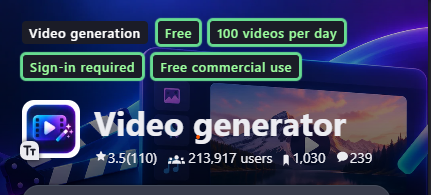
The platform has recently expanded beyond simply helping users discover AI tools. Its video area now includes a “Generate Videos” option, with a workflow labeled “Create 100 videos per day.”
For creators, marketers, businesses, educators and faceless YouTube channel owners, this could dramatically change how they approach video production.
There’s an important distinction, though.
“Create 100 videos per day” does not mean you should blindly publish 100 low-quality videos every day. The real advantage is the ability to scale your content production workflow and test more ideas without manually creating every video from scratch.
Read Also: WHAT IS GEO? A PRACTICAL GUIDE TO GENERATIVE ENGINE OPTIMIZATION
In this guide, I’ll show you how to find the feature, how the workflow works, and how to use it effectively.
What Is There’s An AI For That?
There’s An AI For That, commonly called TAAFT, is an AI tools discovery platform that helps users find software for specific tasks.
Instead of searching for a particular AI brand, you can search for the task you want to accomplish.
The platform has grown into a large directory covering thousands of AI tools and hundreds of tasks. Its video category includes tools for different parts of the video-production process.
The important change is that TAAFT is increasingly moving from simply helping people discover AI tools toward providing more direct AI-powered creation workflows.
That is where the new video-generation option becomes interesting.
What Is the “Generate Videos” Feature?
The new workflow adds a “Generate Videos” option to the platform.
When you select it, you are taken to a dedicated video-generation page where you can access the “Create 100 videos per day” workflow.
The concept is simple.
Instead of manually creating one video, exporting it, starting another project and repeating the process, the workflow is designed around high-volume video production.
This makes it particularly interesting for:
• YouTube Shorts creators
• TikTok creators
• Instagram Reels creators
• Faceless YouTube channels
• Digital marketers
• Affiliate marketers
• Small businesses
• Social media managers
• Educators
• Content agencies
• News and information publishers
How to Generate 100 Videos Per Day
Here is the process.
Step 1: Open There’s An AI For That
Start by visiting There’s An AI For That.
The platform’s core purpose is to help users discover AI tools based on the task they want to complete.
You can access the platform here:
Step 2: Look for “Generate Videos”
Once you are on the platform, look for the new “Generate Videos” option.
The exact location and interface may change as TAAFT continues rolling out the feature, so don’t be surprised if the layout looks slightly different from screenshots or tutorials published later.
The important option to find is:
Generate Videos
Step 3: Open the Video Generation Page
After selecting “Generate Videos,” the platform takes you to the video-generation interface.
This is different from simply searching the TAAFT directory for existing video tools.
You are entering a workflow designed specifically around generating video content.
Look for the option:
“Create 100 videos per day”
Select it to continue.
Step 4: Define What You Want to Create
This is where your strategy becomes important.
Do not start by thinking:
“I need 100 random videos.”
Instead, choose one content format and build a repeatable system around it.
For example:
“Create short educational videos explaining interesting AI tools.”
Or:
“Create 30-second motivational videos for entrepreneurs.”
Or:
“Create short Bible stories with cinematic visuals.”
Or:
“Create short videos explaining interesting facts about Nigeria.”
A specific content direction makes it much easier to maintain consistency.
Step 5: Create a Repeatable Video Concept
The biggest mistake would be using the 100-video capacity to generate 100 completely unrelated pieces of content.
Instead, create a repeatable format.
For example:
Hook → Explanation → Example → Takeaway → Call to action
You can then produce dozens of videos using the same underlying structure while changing the topic.
For an AI tools channel, your content database could look like this:
Video 1: Best AI tool for writing emails
Video 2: Best AI tool for creating presentations
Video 3: Best AI tool for making videos
Video 4: Best AI tool for creating logos
Video 5: Best AI tool for research
Video 6: Best AI tool for students
Video 7: Best AI tool for marketers
The format remains consistent while the subject changes.
Step 6: Generate the Videos
Once your topic, format and instructions are configured, initiate the generation process.
The system is designed around high-volume production, with the headline capability being up to 100 videos per day.
That is the part that makes this workflow different from traditional AI video creation.
Instead of treating AI video as a one-video-at-a-time process, the workflow is designed around production at scale.
Step 7: Review the Output
Do not immediately publish everything the AI generates.
This is one of the most important steps.
AI video generation can save enormous amounts of production time, but speed does not automatically equal quality.
Check each video for:
• Incorrect facts
• Strange visuals
• Pronunciation problems
• Repetitive scripts
• Poor hooks
• Incorrect captions
• Awkward transitions
• Inconsistent characters
• Copyright problems
• Misleading claims
• Unnatural voiceovers
If you are creating educational, financial, medical, historical or religious content, fact-checking becomes even more important.
Step 8: Select the Best Videos
You do not have to publish everything you generate.
Think of the 100-video capability as a testing engine.
Generate many ideas.
Identify the strongest ones.
Publish the videos that actually meet your quality standard.
This approach gives you something more valuable than simply producing a large quantity of content.
You get more opportunities to discover what your audience responds to.
Step 9: Repurpose Your Winners
Suppose you create 100 short videos and discover that five topics perform significantly better than the rest.
Do not stop there.
Turn those winners into content series.
For example:
“5 AI Tools That Save You Hours”
could become:
“5 AI Tools for Students”
“5 AI Tools for Entrepreneurs”
“5 AI Tools for Job Seekers”
“5 AI Tools for Marketers”
“5 AI Tools for Small Businesses”
You can then turn the strongest Shorts into longer YouTube videos, blog posts, LinkedIn posts and newsletters.
The real opportunity is not 100 videos.
It is the content system that 100 videos can feed.
How I Would Use the 100 Videos Per Day Workflow
If I were building a faceless content operation with this tool, I would not create 100 unrelated videos.
I would use a five-stage system.
Research
Find 100 relevant topics.
Script
Create a repeatable script structure.
Generate
Produce the videos using the AI workflow.
Review
Remove weak or inaccurate videos.
Distribute
Publish the strongest content across the platforms where the audience already spends time.
This creates a content production pipeline rather than a random video factory.
For example, an AI tools creator could build:
100 video ideas
↓
100 generated videos
↓
30 quality-approved videos
↓
10 strongest performers
↓
3 recurring content series
↓
Long-form YouTube videos
↓
Blog posts
↓
LinkedIn content
↓
Newsletter topics
That is where the feature becomes strategically useful.
Can You Really Make 100 Videos Every Day?
The platform’s new workflow is presented around the ability to create 100 videos per day.
However, creators should understand the difference between generation capacity and guaranteed publishing capacity.
Generating 100 videos does not mean that 100 videos will automatically become successful pieces of content.
There are several variables.
Generation limits can change.
Processing times can vary.
Output quality can vary.
Some features may require an account or specific access.
Some video-generation models may have their own limits or costs.
The interface may also change as the feature develops.
So treat “100 videos per day” as a production capability rather than a promise that every user will receive 100 publication-ready videos every day.
Why This Matters for Content Creators
Video production has traditionally contained several bottlenecks.
Research takes time.
Writing takes time.
Recording takes time.
Editing takes time.
Captions take time.
Finding visuals takes time.
Repurposing takes time.
AI is attacking each of those bottlenecks.
The result is a shift from:
“I need more time to create content.”
to:
“I need better ideas, better quality control and better distribution.”
That is a significant change.
The technology is making production cheaper and faster. The scarce resources increasingly become attention, trust, creativity and audience understanding.
AI Video Production Is Moving Toward Volume
The broader AI video ecosystem is already moving toward high-volume production.
Recent AI video workflows combine scripts, images, animation, voices and editing into increasingly automated pipelines. Research into AI-assisted short-form video creation also shows why structured workflows matter, particularly around hooks, storytelling and audience engagement.
But there is a major danger.
AI makes it extremely easy to create more content than people actually want to watch.
That means creators who simply maximize volume may produce hundreds of videos without building an audience.
The better strategy is:
More experiments.
Better selection.
Higher-quality winners.
More distribution.
Use 100 Videos as a Testing Engine
This is probably the smartest way to think about the feature.
Instead of asking:
“How can I publish 100 videos every day?”
Ask:
“How can I test 100 content ideas and identify the 5 that deserve more attention?”
That changes everything.
Imagine testing:
20 hooks
20 topics
20 storytelling formats
20 visual styles
20 calls to action
You now have data.
You can identify patterns.
Maybe educational videos outperform entertainment.
Maybe videos beginning with a question outperform videos beginning with a statement.
Maybe 20-second videos outperform 45-second videos.
Maybe certain subjects consistently attract comments.
That information is far more valuable than simply having a folder containing 100 AI videos.
Best Use Cases for the New AI Video Workflow
- YouTube Shorts
Create large batches of short-form videos around a focused niche.
- TikTok
Test multiple hooks and formats quickly.
- Instagram Reels
Create recurring educational, entertainment or promotional content.
- Affiliate Marketing
Create product-focused videos around specific problems and use cases.
- Business Marketing
Generate multiple creative concepts for products, services and campaigns.
- Education
Turn lessons, concepts and facts into short videos.
- Personal Branding
Turn your expertise into a consistent stream of short-form content.
- Content Repurposing
Convert existing articles, newsletters and research into video concepts.
- A/B Testing
Test different hooks, structures and creative approaches.
- Content Agencies
Use AI to increase production capacity while keeping human review in the workflow.
What You Should Not Do
Do not create 100 videos simply because you can.
Do not copy other creators.
Do not publish unverified AI-generated information.
Do not create misleading deepfakes.
Do not mass-produce near-identical videos.
Do not assume AI-generated content automatically qualifies for monetization.
Do not sacrifice quality for volume.
The goal should be to use AI to increase your creative capacity, not to flood platforms with content nobody wants.
Final Thoughts
There’s An AI For That’s new “Generate Videos” workflow is worth watching because it represents a larger shift in how content gets produced.
The interesting part isn’t simply the claim of creating 100 videos per day.
The bigger development is the move toward automated, high-volume content production.
Creators who understand this early can use the technology to test more ideas, find winning formats and build repeatable content systems.
But the winners probably won’t be the people who generate the most videos.
They will be the people who know what to create, who to create it for, how to make it useful and how to distribute the best ideas.
If you have access to the new feature, start with 10 videos.
Learn what works.
Then scale.
Frequently Asked Questions
Can There’s An AI For That create 100 videos per day?
The new “Generate Videos” workflow is presented around the ability to create up to 100 videos per day. Actual availability, limits and requirements may vary by account, rollout and the underlying generation system.
Is There’s An AI For That free?
There’s An AI For That is primarily an AI discovery platform, and its directory can be used to find AI tools. Individual tools listed on the platform can have their own pricing and usage limits.
Is the 100-video feature completely free?
Do not assume that every generation is permanently free. Check the current interface, account requirements and any usage or credit information shown before generating at scale.
Can I use the generated videos on YouTube?
That depends on the terms of the underlying generation service and the content you create. Always review the applicable usage rights and YouTube’s current monetization policies before building a business around AI-generated videos.
Is generating 100 videos better than making one high-quality video?
Not necessarily.
For most creators, the better approach is to use high-volume generation for experimentation and then invest more attention in the strongest ideas.
The advantage is not simply more videos.
The advantage is more opportunities to find what works.





Leave a Reply