
OpenAI is moving AI assistants beyond simple conversations.
On September 29, 2026, OpenAI introduced Dots, a new type of always-on AI agent designed to take responsibility for ongoing work instead of waiting for you to give it a prompt every time.
A Dot can research information, work with connected apps, create content, analyze data, build software, and continue working toward a goal while you are away.
Read Also: OpenAI Releases 722 Math Manuscripts From an Unreleased AI Model: What What It Means for Mathematics
Unlike a normal ChatGPT conversation, you can give a Dot an objective and let it figure out the steps required to make progress.
So, what exactly is OpenAI Dot, how does it work, who can use it, how much does it cost, and what can you actually do with one?
Here is everything you need to know.

What Is Dot by OpenAI?
Dot is an always-on AI agent built into ChatGPT.
Instead of simply answering questions, a Dot can take an ongoing responsibility, work through multiple steps, use connected tools, and return to you when it needs your input or has something important to report.
OpenAI describes Dots as agents that can work toward your goals 24/7. They are powered by GPT-6 Astra and have their own cloud computer and browser.
Think of the difference this way:
ChatGPT answers a request.
A Dot can take ownership of a project.
For example, instead of asking ChatGPT:
“Research 10 competitors and create a report.”
You could give your Dot a broader responsibility:
“Monitor these competitors, track important changes, summarize what matters, and tell me when something requires my attention.”
The Dot can continue working between conversations.
That shift from answering prompts to managing ongoing work is one of the most important things about Dots.
Read Also: 50 Powerful AI Websites You Should Bookmark in 2026
How Does OpenAI Dot Work?
A Dot combines several capabilities that previously required multiple AI tools.
First, it has access to a cloud computer.
The computer gives the Dot an environment where it can browse, work with files, use software, and perform tasks without depending entirely on your personal computer. OpenAI says the Dot’s cloud work can continue even when your own devices are turned off.
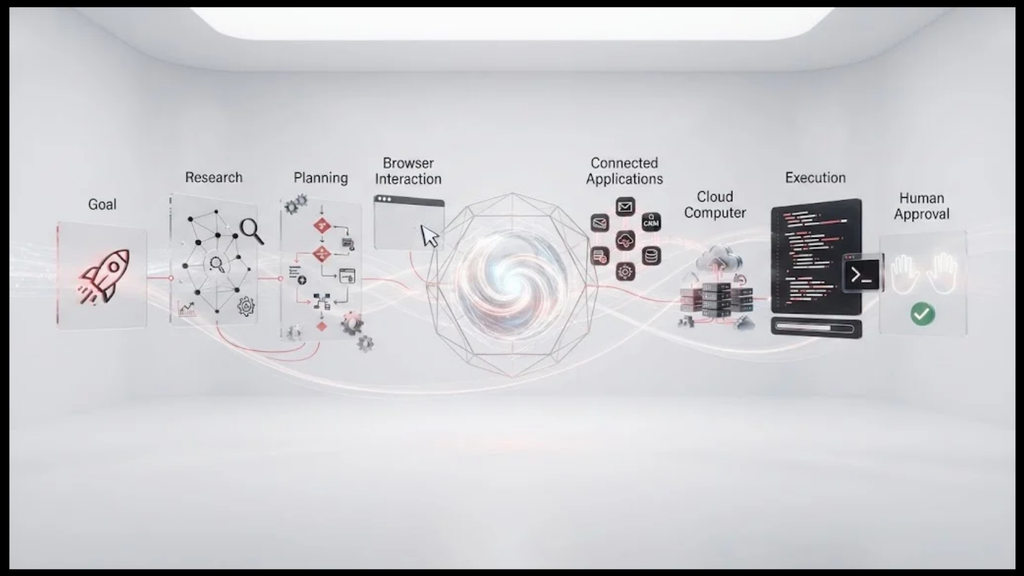
Second, it can connect to apps.
OpenAI says Dots can connect to more than 4,000 apps through its plugin ecosystem.
Third, it can maintain context.
Your Dot can use relevant ChatGPT memory, conversation context, and its own saved notes about your preferences, decisions, and ongoing work.
Fourth, it can work proactively.
Instead of waiting for another prompt, a Dot can continue working, track progress, research connected information, and determine when it needs to ask you a question or request a decision.
This is what makes Dots different from traditional chatbots.
What Can OpenAI Dot Do?
Dots are designed for a wide range of professional and personal tasks.
Here are some practical examples.
- Research
You can ask a Dot to investigate a topic, compare information, monitor developments, and summarize the findings.
For example:
“Track the latest developments in AI agents and send me a weekly summary of the five changes that could affect my business.”
The Dot can continue working toward that goal instead of requiring you to restart the research every week.
- Create Content
A Dot can help turn raw information into finished content.
OpenAI gives content creation as one example. A Dot could take an interview transcript, create show notes, produce social media posts, and carry your edits across the drafts.
For a content creator, that could mean:
Research topic
Create outline
Analyze source material
Draft article
Create social posts
Revise based on feedback
Prepare final assets
- Build and Improve Software
Dots can also work on software projects.
OpenAI says a Dot can scope a software change, write code, test the changes, and return working changes for you to review.
OpenAI has also described Dots working on customer feedback, identifying recurring bugs or requests, implementing smaller fixes, testing them, and bringing completed pull requests back for developer review.
This could make Dots particularly interesting for developers and small software teams.
- Analyze Data
You can give a Dot access to relevant information and ask it to analyze the data.
For example:
“Review this month’s sales data, identify unusual changes, compare performance with last month, and prepare a summary for my team.”
The important difference is that the Dot can continue working through the project instead of stopping after one response.
- Prepare Presentations
Dots can help create presentations by researching information, analyzing data, organizing material, and preparing documents.
OpenAI’s documentation gives presentation preparation as an example of a project a Dot can handle.
- Manage Projects
A Dot can help keep a project moving.
You could give it a goal, provide relevant context, connect the required applications, and allow it to track progress.
It can then return with updates, questions, or decisions that require your attention.
- Work With Slack and Microsoft Teams
Dots are designed to operate across the places where people already work.
OpenAI says you can interact with your Dot through ChatGPT, Slack, and Microsoft Teams.
This means you can start a project in ChatGPT and continue interacting with the same Dot through your workplace communication tools.
- Voice Conversations
You can also talk to your Dot.
OpenAI says users can call their Dot through ChatGPT, discuss work, change priorities, and continue working after the call ends.
How Is Dot Different From ChatGPT?
This is one of the most important questions.
ChatGPT is primarily a conversational AI assistant.
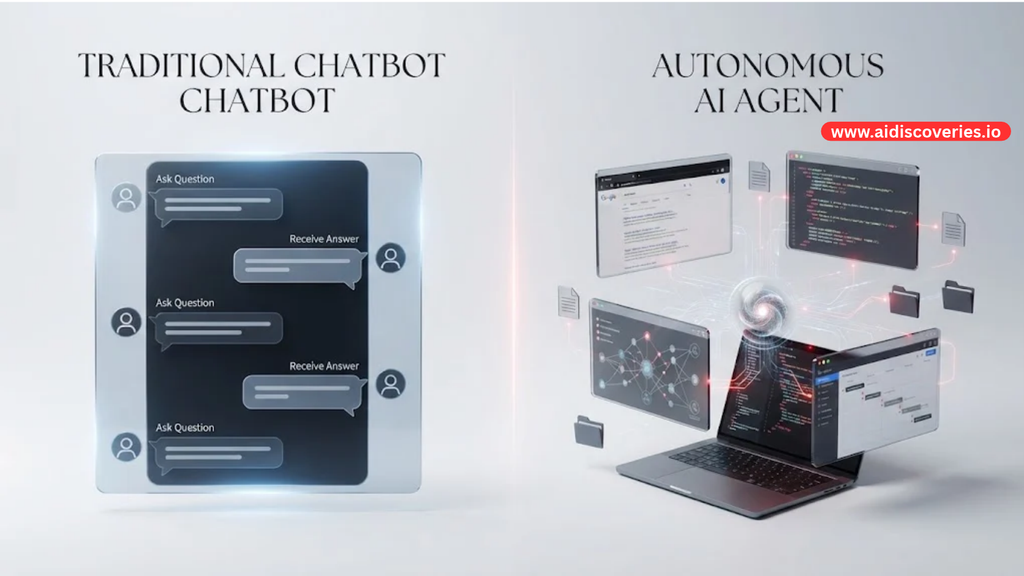
You ask it something.
It responds.
You give it another instruction.
It responds again.
A Dot is designed around ongoing responsibility.
You give it a goal.
It works on the goal.
It tracks progress.
It can continue between conversations.
It asks for your judgment when necessary.
It returns with results.
Read Also: Lagos Life Game: How to Play the Viral Nigerian Game Everyone Is Talking About
OpenAI describes this as the difference between a regular ChatGPT conversation and an always-on agent that can keep making progress between conversations.
A simple comparison looks like this:
ChatGPT:
You give it instructions → It responds → You give another instruction.
Dot:
You give it a goal → It plans and works → It monitors progress → It asks when necessary → It returns results.
That makes Dots closer to digital workers than traditional chatbots.
What Model Powers OpenAI Dot?
Dots are powered by GPT-6 Astra.
OpenAI says GPT-6 Astra provides the underlying intelligence while the Dot adds an agentic environment, cloud computer, connected applications, memory, permissions, and ongoing task management.
This distinction matters.
The model is the intelligence.
The Dot is the agent that uses that intelligence to pursue an ongoing goal.
Does Dot Have Its Own Computer?
Yes.
One of the most important technical differences between Dots and ordinary ChatGPT conversations is that each Dot has its own cloud computer and browser.
That computer allows the Dot to perform work in a controlled environment.
You can also inspect what your Dot is doing and take control when necessary.
OpenAI says users can open the Dot’s computer, inspect its work, and take over when they need to perform a step themselves.
Can Dot Use Your Computer?
Yes, with permission.
Your Dot has its own cloud computer, but OpenAI also allows users to connect their computer so the Dot can access local files, code, and applications where permission has been granted.
This could make Dots significantly more useful for people whose work depends on desktop software and local files.
How Does Dot Memory Work?
Dots are designed to remember relevant information about how you work.
OpenAI says a Dot can use relevant ChatGPT memory as well as its own saved notes about your preferences, decisions, and ongoing projects.
For example, if you repeatedly tell your Dot that you prefer:
Short reports
Simple language
Specific data sources
A particular presentation format
A particular approval process
It can use that context in future work.
The goal is to reduce the amount of repetitive instruction you have to provide.
Can Dot Work While You Are Offline?
Yes.
A Dot’s cloud computer allows it to continue working while your own computer is turned off.
This is one of the biggest differences between an always-on agent and a conventional AI chatbot.
You can assign work and return later to see what happened.
How Much Does OpenAI Dot Cost?
Your first Dot is included at no additional cost for eligible Pro and Business Premium users.
OpenAI’s current Pro plans are:
Pro 100: $100 per month
Pro 200: $200 per month
Pro 500: $500 per month
The Pro 500 plan includes Astra Ultrafast.
For businesses, ChatGPT Business Premium seats currently cost $100 per user per month when billed annually, or $125 per user per month when billed monthly.
Enterprise customers can access Dots through a beta when their workspace administrator enables the feature.
OpenAI says it plans to eventually allow users to add more Dots and scale the amount of work they perform.
Who Can Use OpenAI Dot?
Dots are currently rolling out gradually.
According to OpenAI, Dots are available to eligible Pro and Business Premium users in supported markets.
Enterprise users, including Edu and Healthcare workspaces, can access the beta when their administrator enables it.
At launch, Pro access excludes the European Economic Area, Switzerland, and the United Kingdom.
OpenAI says availability is expanding gradually, so access may take time to reach eligible accounts.
How Do You Create a Dot?
You create your Dot from ChatGPT on desktop.
OpenAI currently supports creating a Dot through the ChatGPT desktop app or desktop web.
The basic process is:
Open ChatGPT on desktop.
Choose the option to create a Dot.
Give your Dot a name.
Connect the apps it needs.
Define what you want it to handle.
Set permissions and boundaries.
Give it your first project.
Review its work and provide feedback.
After setup, you can interact with your Dot through supported channels, including ChatGPT and workplace communication platforms such as Slack and Teams.
What Are Some Useful Dot Examples?
The real value of Dots becomes clearer when you think about specific workflows.
For a founder:
“Monitor my competitors, identify important product changes, summarize them every Friday, and highlight anything that requires my attention.”
For a marketer:
“Research topics in my industry, identify content opportunities, draft articles, and prepare social posts using my preferred style.”
For a developer:
“Monitor customer feedback, identify recurring bugs, implement smaller fixes, test them, and prepare pull requests for review.”
For a project manager:
“Track this project, review updates from the connected tools, identify blockers, and tell me when a decision is required.”
For a sales professional:
“Research target accounts, identify relevant company changes, prepare account briefs, and flag new opportunities.”
For a creator:
“Research weekly AI developments, identify the most useful stories for my audience, prepare content ideas, and create drafts for review.”
The common theme is simple.
You are giving the AI responsibility, not just instructions.
What Are the Benefits of OpenAI Dot?
The biggest benefits include:
Less repetitive prompting.
Ongoing work between conversations.
Access to connected applications.
A dedicated cloud computer.
Persistent context and notes.
Proactive research.
Support for complex multi-step projects.
Human approval for important decisions.
Cross-platform access.
The biggest potential benefit is time.
Instead of spending an hour coordinating several small tasks, you can potentially give one agent a larger objective and review the work when it is ready.
What Are the Risks and Limitations?
Dots are powerful, but they should not be treated as autonomous employees that can be trusted with everything.
OpenAI has built permissions and safety controls into Dots.
Users can choose which apps a Dot can access and define what it can do independently. Custom rules can allow actions, require approval, or block specific actions.
OpenAI also says proactive research uses read-only tools when the Dot is working in the background, limiting its ability to make changes without the appropriate permissions.
There are still practical reasons to review important work.
AI agents can make mistakes.
They can misunderstand instructions.
They can select the wrong information.
They can make incorrect assumptions.
They can produce an output that looks complete but still needs human judgment.
For financial, legal, security, hiring, or other high-impact decisions, human review remains important.
Dot vs Meta Muse
OpenAI introduced Dots during a period of intense competition in the AI agent market.
Meta’s Muse is one of the products driving this shift toward more proactive AI assistants. OpenAI’s Dots are positioned as a competing approach, with a strong focus on professional work, connected applications, cloud computing, and ongoing projects.
The broader competition is important because it shows where AI assistants are heading.
The question is becoming less:
“What can AI answer?”
And more:
“What can AI take responsibility for?”
That is a much bigger market.
Are Dots the Future of AI Assistants?
Dots represent an important shift in how people interact with AI.
The first generation of popular AI tools focused heavily on conversation.
The next generation is increasingly focused on action.
Instead of asking an AI to explain how to complete a task, you give it the task and allow it to perform multiple steps.
That could change how people work.
A marketer might have an AI agent monitoring campaigns.
A developer might have an agent handling routine bugs.
A founder might have an agent monitoring competitors.
A researcher might have an agent tracking new papers.
A content creator might have an agent managing part of the content pipeline.
The long-term idea is even bigger.
OpenAI says it eventually envisions teams of Dots working together.
That means a future workflow could involve multiple specialized agents handling different responsibilities.
One Dot could research.
Another could analyze.
Another could create.
Another could test.
Another could monitor results.
Humans would remain responsible for goals, judgment, priorities, and important decisions.
What Does OpenAI Dot Mean for Businesses?
For businesses, Dots could become more interesting than ordinary AI chatbots because they are designed around workflows.
A company does not necessarily need AI that can write another paragraph.
It needs AI that can help move work forward.
For example, an operations team could use an agent to monitor systems and identify issues.
A marketing team could use an agent to research competitors and prepare content.
A product team could use an agent to analyze feedback and prepare product improvements.
A software team could use an agent to investigate bugs and prepare code changes.
This could reduce the amount of repetitive coordination humans perform every day.
The real business opportunity may therefore be less about replacing employees and more about giving employees AI agents that handle routine work.
Final Verdict: Is OpenAI Dot Worth Paying Attention To?
Yes.
Dots are one of OpenAI’s clearest moves from conversational AI toward autonomous, ongoing AI work.
The most important feature is not simply that Dots can answer questions.
It is that they can take a goal, use connected tools, work on the task over time, remember relevant context, and return to you when they need your judgment.
Powered by GPT-6 Astra and equipped with their own cloud computers, Dots are designed to behave more like ongoing digital assistants than traditional chatbots.
The technology is still new, and access is limited to eligible plans and markets.
But the direction is clear.
AI is moving from:
Prompt → Answer
toward:
Goal → Plan → Action → Progress → Human review.
That change could have a much bigger impact on work than another improvement in chatbot quality.
Frequently Asked Questions About OpenAI Dot
What is OpenAI Dot?
OpenAI Dot is an always-on AI agent inside ChatGPT that can work on ongoing projects, use connected applications, access a cloud computer, maintain relevant context, and continue working between conversations.
Is Dot the same as ChatGPT?
No. ChatGPT is primarily a conversational AI assistant, while Dot is designed to take ongoing responsibility for tasks and projects.
What model powers Dot?
OpenAI Dots are powered by GPT-6 Astra.
How much does OpenAI Dot cost?
Your first Dot is included with eligible ChatGPT Pro and Business Premium plans at no additional cost. Pro plans currently start at $100 per month, while Business Premium costs $100 per user per month when billed annually or $125 monthly.
Can Dot work while my computer is off?
Yes. Dots have their own cloud computers, allowing them to continue cloud-based work while your personal computer is turned off.
Can Dot use other apps?
Yes. OpenAI says Dots can connect to more than 4,000 apps through its plugin ecosystem.
Can I talk to my Dot?
Yes. You can message or call your Dot through supported ChatGPT experiences. Dots can also be accessed through Slack and Microsoft Teams.
Can Dot write code?
Yes. OpenAI says Dots can scope software changes, write code, test changes, and prepare working changes for review.
Can I create multiple Dots?
Currently, users start with one primary Dot. OpenAI says it plans to support additional Dots and eventually teams of Dots.
When will OpenAI Dot be available to everyone?
OpenAI has not announced universal availability. Dots are rolling out gradually to eligible users and organizations in supported markets.





Leave a Reply